Note
Access to this page requires authorization. You can try signing in or changing directories.
Access to this page requires authorization. You can try changing directories.
Question
Thursday, November 29, 2018 4:08 AM
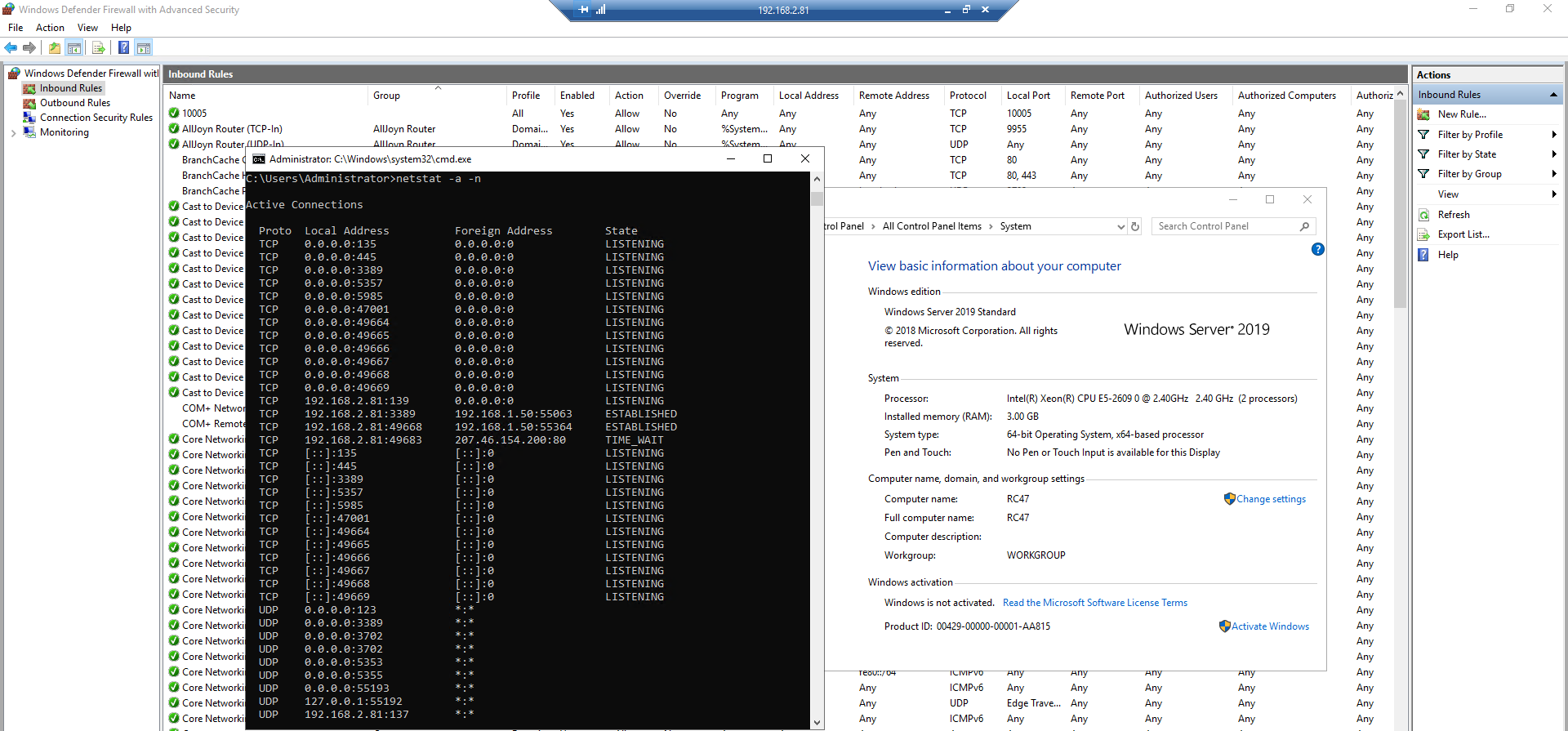
On Windows Server 2016 and 2019, I go to Firewall and open port 10005 or other ports such as 10002 - 100020, 5000... then I use:
- Netstat -a -n to check open port list but I cannot found these ports.
- Telnet to the server via these ports but failed. But I can successfully telnet to the server via default port that Windows 2019 already opened such as 49669, 49668, 5985... (listening ports)
- I can telnet via 3389 port.
- Note that the service that use the port that I open already run/ configured.
Any one can help me?
All replies (7)
Thursday, November 29, 2018 4:16 AM
Netstat -a -n to check open port list but I cannot found these ports.
this simply means there is no process currently listening on the ports.
Regards, Dave Patrick ....
Microsoft Certified Professional
Microsoft MVP [Windows Server] Datacenter Management
Disclaimer: This posting is provided "AS IS" with no warranties or guarantees, and confers no rights.
Thursday, November 29, 2018 4:20 AM
Can you help me to open port that I need?
Thursday, November 29, 2018 4:23 AM
It sounds like you may have already done that. If netstat run on the pc with the services does not show the ports listening then there is some other issue or problem. You could also try locally;
netstat -aonb
and look for the specific process by name. You can also test with firewall off on both ends to rule out firewall issues.
Regards, Dave Patrick ....
Microsoft Certified Professional
Microsoft MVP [Windows Server] Datacenter Management
Disclaimer: This posting is provided "AS IS" with no warranties or guarantees, and confers no rights.
Thursday, November 29, 2018 4:32 AM
I agree with Dave Patrick, use netstat -anob and look for the process that use the port you are looking for. If you cannot see the port, it's probably because the process is not running.
This posting is provided AS IS without warranty of any kind
Friday, November 30, 2018 2:58 AM
Hello All,
I resolved my issued that comes from my network.
Friday, November 30, 2018 3:04 AM
Good news.
(please don't forget to mark helpful replies as answer)
Regards, Dave Patrick ....
Microsoft Certified Professional
Microsoft MVP [Windows Server] Datacenter Management
Disclaimer: This posting is provided "AS IS" with no warranties or guarantees, and confers no rights.
Sunday, January 13, 2019 8:38 AM
There is a difference between having a process listening on the port and having the port allowed on the firewall.
To check on the firewall settings which are effective, you can go under Monitoring on Windows Defender Firewall with Advanced Security. If you run netstat then it will list the ports which are listing and the processes which are using them.
In your case, your issue seems to be related to the fact that no processes are listing on the mentioned port rather than the firewalls blocking them. In all cases, and in case your suspect the firewall to be dropping traffic, you can enable logging and check on the logs for the drops.
This posting is provided AS IS with no warranties or guarantees , and confers no rights.
Ahmed MALEK