Note
Access to this page requires authorization. You can try signing in or changing directories.
Access to this page requires authorization. You can try changing directories.
Question
Wednesday, May 29, 2019 6:37 PM
i have a form that includes two buttons, one for uploading a file to SQL- server and the other for downloading that file from SQL-server i am using win forms framework with c#, i don`t want to view that file inside my application i just want to store it and download it, so i didn't find any code that helps me to perform these functions, i tried to use open-file dialog and save-file dialog but i didn't find the proper code.
All replies (5)
Wednesday, May 29, 2019 10:32 PM
Hello,
EDIT: The code listing below does not exists as Microsoft retired the site. For current repository of code see https://github.com/karenpayneoregon/SqlServerInsertFiles
Check out my MSDN Code sample, SQL-Server insert binary files. Look at DataOperations.cs which has code to insert and extract files.
The script for the sample database is here if you want to run the code
https://1drv.ms/u/s!AtGAgKKpqdWjjTKecmCgkCL2nk6Z
Please remember to mark the replies as answers if they help and unmarked them if they provide no help, this will help others who are looking for solutions to the same or similar problem. Contact via my Twitter (Karen Payne) or Facebook (Karen Payne) via my MSDN profile but will not answer coding question on either.
NuGet BaseConnectionLibrary for database connections.
StackOverFlow
Thursday, May 30, 2019 7:03 AM
Hi yaman,
Thank you for posting here.
Based on your description, you want to store and download the file from sql server.
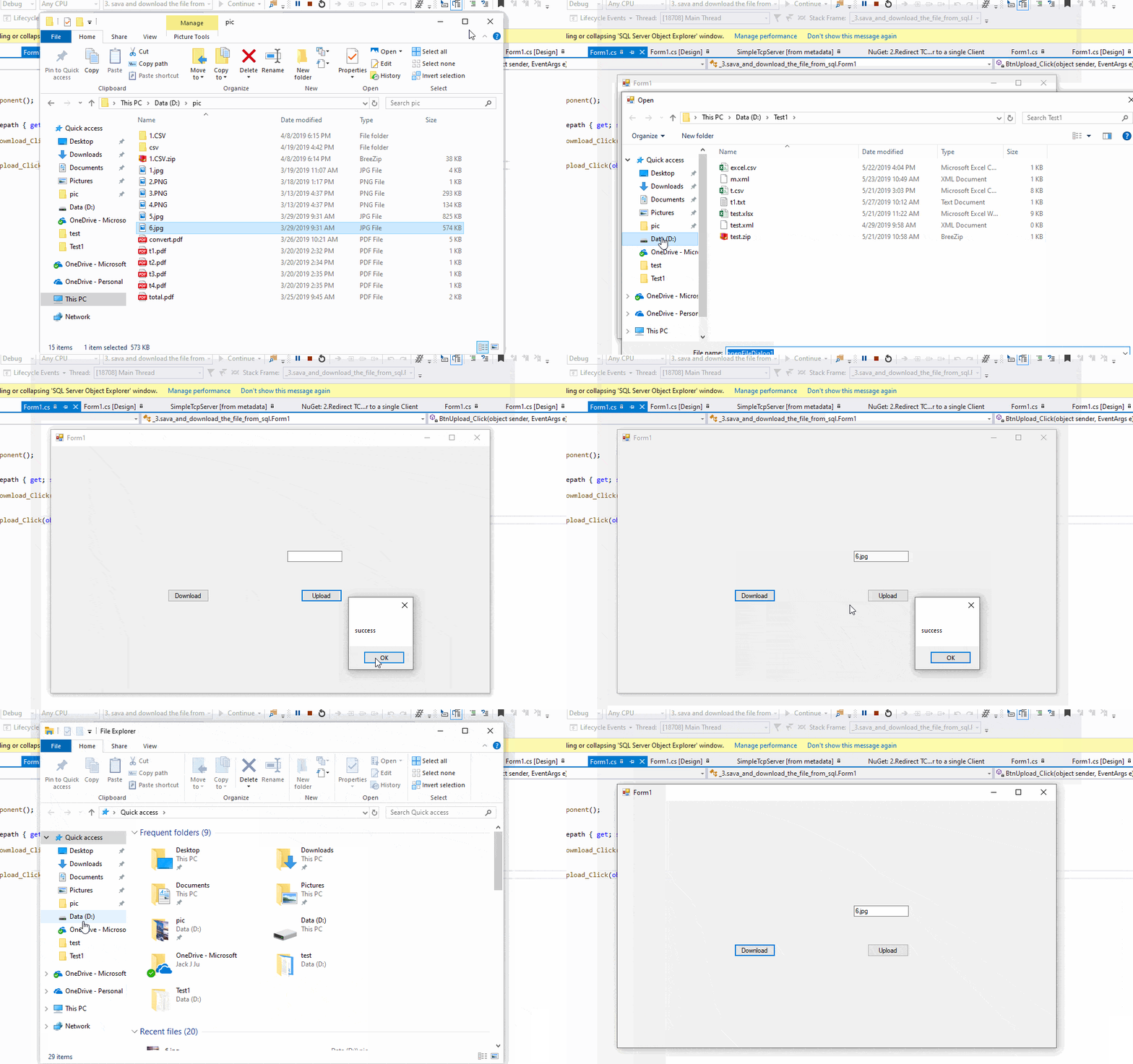
I make a simple code, you could have a look.
 public string filepath { get; set; }
        private void BtnDowmload_Click(object sender, EventArgs e)
        {
                string con = @"Data Source=(localdb)\ProjectsV13;Initial Catalog=mlhelper;Integrated Security=True;Connect Timeout=30;Encrypt=False;TrustServerCertificate=False;ApplicationIntent=ReadWrite;MultiSubnetFailover=False";
                SqlConnection connection = new SqlConnection(con);
                connection.Open();
                string sql = "select * from StoredFile where FileName=" +"'"+textBox1.Text+"'";
                SqlCommand cmd = new SqlCommand(sql,connection);
                SqlDataReader dr = cmd.ExecuteReader();
                byte[] data = null;
                while (dr.Read())
                {
                data = (byte[])dr[1];

                }
                using (var fs = new FileStream(Path.Combine("D:\\",textBox1.Text), FileMode.Create, FileAccess.Write))
                {
                    fs.Write(data, 0, data.Length);
                }

                MessageBox.Show("success");

        }

        private void BtnUpload_Click(object sender, EventArgs e)
        {
            if (openFileDialog1.ShowDialog() == DialogResult.OK)
            {
                filepath =openFileDialog1.FileName;
            }
            byte[] filebyte = File.ReadAllBytes(filepath);
            string con = @"Data Source=(localdb)\ProjectsV13;Initial Catalog=mlhelper;Integrated Security=True;Connect Timeout=30;Encrypt=False;TrustServerCertificate=False;ApplicationIntent=ReadWrite;MultiSubnetFailover=False";
            SqlConnection connection = new SqlConnection(con);
            connection.Open();
            string sql = "insert into StoredFile(FileName,Data)values(@FileName,@Data)";
            SqlCommand cmd = new SqlCommand(sql, connection);
            SqlParameter parameter1 = cmd.Parameters.AddWithValue("@FileName", Path.GetFileName(filepath));
            parameter1.DbType = DbType.String;
            SqlParameter parameter2 = cmd.Parameters.AddWithValue("@Data", filebyte);
            parameter2.DbType = DbType.Binary;

            cmd.ExecuteNonQuery();
            connection.Close();
            MessageBox.Show("success");
        }
Result:
Best Regards,
Jack
MSDN Community Support
Please remember to click "Mark as Answer" the responses that resolved your issue, and to click "Unmark as Answer" if not. This can be beneficial to other community members reading this thread. If you have any compliments or complaints to MSDN Support, feel free to contact [email protected].
Thursday, May 30, 2019 6:10 PM
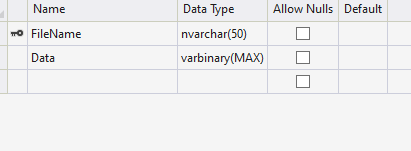
please what is the datatype you have used to store the file inside database
Thursday, May 30, 2019 6:23 PM
Not sure who you are asking but here is what I use, varbinary.
CREATE TABLE [dbo].[EventAttachments](
    [id] [int] IDENTITY(1,1) NOT NULL,
    [EventId] [int] NULL,
    [FileContent] [varbinary](max) NULL,
    [FileExtention] [nchar](10) NULL,
    [FileBaseName] [nvarchar](max) NULL,
 CONSTRAINT [PK_EventAttachments] PRIMARY KEY CLUSTERED
(
    [id] ASC
)WITH (PAD_INDEX = OFF, STATISTICS_NORECOMPUTE = OFF, IGNORE_DUP_KEY = OFF, ALLOW_ROW_LOCKS = ON, ALLOW_PAGE_LOCKS = ON) ON [PRIMARY]
) ON [PRIMARY] TEXTIMAGE_ON [PRIMARY]
Please remember to mark the replies as answers if they help and unmarked them if they provide no help, this will help others who are looking for solutions to the same or similar problem. Contact via my Twitter (Karen Payne) or Facebook (Karen Payne) via my MSDN profile but will not answer coding question on either.
NuGet BaseConnectionLibrary for database connections.
StackOverFlow
Friday, May 31, 2019 1:20 AM
Hi yanman hos,
Thanks for the feedback.
The following picture is the database design for my code.
Best Regards,
Jack
MSDN Community Support
Please remember to click "Mark as Answer" the responses that resolved your issue, and to click "Unmark as Answer" if not. This can be beneficial to other community members reading this thread. If you have any compliments or complaints to MSDN Support, feel free to contact [email protected].