Note
Access to this page requires authorization. You can try signing in or changing directories.
Access to this page requires authorization. You can try changing directories.
Question
Monday, February 11, 2013 10:24 PM
Ok, so I have this below code..
$results += New-Object psObject -Property @{
    'Server' = $server;
    'Status' = $Status;
    'FileStatus' = $FileStatus;
    'File1' = $File0;
    'File2' = $File1
    }$results | Export-Csv C:\test.csv -NoTypeInformation
and I'd like the output to look like this:
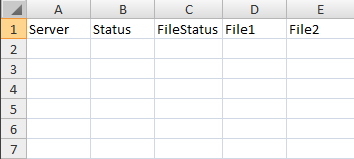
but in my case, the output is coming out as below format:
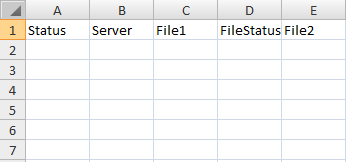
any idea why? what should I do to correct this?
Please advise!
Thank you!
All replies (2)
Monday, February 11, 2013 10:35 PM ✅Answered
That's common when crating objects from hash tables, and easy to fix. Just select the properties in the order you want them before you export:
$results += New-Object psObject -Property @{
    'Server' = $server;
    'Status' = $Status;
    'FileStatus' = $FileStatus;
    'File1' = $File0;
    'File2' = $File1
    }
$results |
 Select Server,Status,FileStatus,File1,File2 |
  Export-Csv C:\test.csv -NoTypeInformation
[string](0..33|%{[char][int](46+("686552495351636652556262185355647068516270555358646562655775 0645570").substring(($_*2),2))})-replace " "
Monday, February 11, 2013 11:15 PM
Thank you very much! That did it! :)