Note
Access to this page requires authorization. You can try signing in or changing directories.
Access to this page requires authorization. You can try changing directories.
Question
Wednesday, June 10, 2015 9:00 PM
I'm getting the following errors on a 20TB REFS volume. Please advise.
Event ID 133
The file system detected a checksum error and was not able to correct it. The name of the file or folder is "<unable to determine file name>".
Event ID 134
The file system was unable to write metadata to the media backing volume E:. A write failed with status "The volume repair was not successful." ReFS will take the volume offline. It may be mounted again automatically.
All replies (9)
Thursday, June 11, 2015 9:28 AM
Hi,
>>The file system detected a checksum error and was not able to correct it. The name of the file or folder is "<unable to determine file name>".
For this event, we can refer to the suggestions provided by Kevin Ni in the following thread for troubleshooting.
ReFS Corruption When Filled To Capacity?
Best regards,
Frank Shen
Please remember to mark the replies as answers if they help and unmark them if they provide no help. If you have feedback for TechNet Subscriber Support, contact [email protected].
Thursday, June 11, 2015 5:10 PM
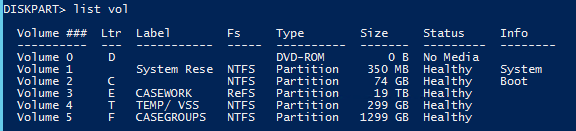
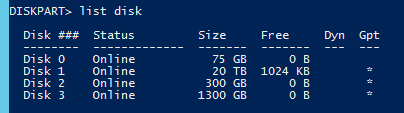
Here are the results from running that command listed. It indicates that there is only 1024KB of free space. However other volumes show 0 free space so this must be indicating something other that what it appears to mean. It also shows the status of the volume as healthy?
Please advise.

Thursday, June 11, 2015 5:10 PM

Tuesday, June 16, 2015 2:26 PM
Frank, can you please advise on what I should do next?
Wednesday, June 17, 2015 8:52 PM
I still need a response as to how to proceed. Is there any way to correct this problem? Is the solution to just reformat the volume?
Additionally, I looked back in the event logs to try to determine the cause of this failure. The server running this ReFS volume is a VM running on vmware vsphere 6 and the corruption this occurred just after taking a snapshot of the VM. It's possible this is what caused the corruption in the first place.
Thursday, June 18, 2015 2:34 AM
Hi,
Before going further, sorry for the delayed response.
>>It indicates that there is only 1024KB of free space. However other volumes show 0 free space so this must be indicating something other that what it appears to mean.
Here, 1024KB and 0B should not mean the free spaces of the logical volumes but it should mean the total unpartitioned spaces on the physical disks. In our case, the free space on the ReFS volume should be 3627GB which is displayed as Volume Free Space.
>>The server running this ReFS volume is a VM running on vmware vsphere 6 and the corruption this occurred just after taking a snapshot of the VM. It's possible this is what caused the corruption in the first place.
I did a test to take a snapshot for a VM with ReFS volume which is hosted by Hype-V and it could be done successfully. Here, it's recommended that we can try to contact vendor support to see if they have some suggestions.
Best regards,
Frank Shen
Please remember to mark the replies as answers if they help and unmark them if they provide no help. If you have feedback for TechNet Subscriber Support, contact [email protected].
Thursday, June 18, 2015 8:51 PM
I'm not trying to determine the root cause at this point. I'm trying fix the problem at hand. What should I do to fix the problem at hand? Is there anyway I can repair this ReFS volume?
Monday, June 22, 2015 5:08 AM
Hi,
>>I'm not trying to determine the root cause at this point. I'm trying fix the problem at hand.
My intention is that we can contact vendor to consult if this is related to the product and if they have good troubleshooting suggestions regarding the issue.
>>What should I do to fix the problem at hand? Is there anyway I can repair this ReFS volume?
Unfortunately, as far as I know, ReFS is designed to automatically correct corruption or recover from System error. In this case, if necessary, we may consider backing up the files on the ReFS volume, reformat the volume, and then copy the data back.
Regarding ReFS and recovery of ReFS drive, the following article and thread can be referred to for more information.
Resilient file system
https://msdn.microsoft.com/en-us/library/windows/desktop/hh848060(v=vs.85).aspx
Recovery of corrupt ReFS drives
Hope it helps.
Best regards,
Frank Shen
Please remember to mark the replies as answers if they help and unmark them if they provide no help. If you have feedback for TechNet Subscriber Support, contact [email protected].
Tuesday, June 23, 2015 12:20 AM
Let me ask you this. What is the best method to determine the current health of a ReFS volume? The commands given above show the volume as healthy when it's not. What's up with that?