Note
Access to this page requires authorization. You can try signing in or changing directories.
Access to this page requires authorization. You can try changing directories.
Question
Thursday, January 30, 2020 6:29 PM
Hello SharePoint Gurus - When we create a team in Microsoft Teams, it created public group site in SharePoint. My question is could i use the same site for landing page of our intranet portal attached to the Hub Site? Also, if i give visitor permission to the site, would they also be able to access team? I don't want visitor to see the conversations or any access to teams but can access the outcome (like articles sections, news sections or document libraries) from the team meetings to be published to the visitors.
Best Regards,
Khushi
All replies (5)
Monday, February 3, 2020 10:32 AM ✅Answered | 1 vote
Hi,
First of all, SharePoint is a collaboration platform primarily for document storage while MS Teams is a chat-based communication tool.
If you create a new team by “Build a team from scratch” in Microsoft Teams, a new team site will automatically be created in SharePoint Online and be removed along if you delete the team from MS Teams.
If you create a site from SharePoint Online, it will not create a new team in MS Teams and the site is able to work without connecting to Office 365 groups. However, if you create a new team by "Create from an existing Office 365 group or team" in MS Teams, the site will be bond to the team and cannot be disconnected.
That is to say, if you decide to collaborate a SharePoint Online team site with MS Teams, it will be impossible to work separately from MS Teams.
I suggest you manage your SharePoint Online environment separately from MS Teams. Do not connect existing sites to MS Teams but create new ones from MS Teams since the action will be irrevocable.
You can refer to the links below for detailed information about SharePoint working with MS Teams.
Microsoft Teams vs. SharePoint.
SharePoint and Teams: Better Together.
Please note: Microsoft provides third-party contact information to help you find technical support. This contact information may change without notice. Microsoft does not guarantee the accuracy of this third-party contact information.
Best regards,
Chelsea Wu
Please remember to mark the replies as answers if they helped. If you have feedback for TechNet Subscriber Support, contact [email protected].
SharePoint Server 2019 has been released, you can click here to download it.
Click here to learn new features. Visit the dedicated forum to share, explore and talk to experts about SharePoint Server 2019.
Friday, January 31, 2020 6:42 AM
Hi,
For your first question:
You can use the same site for landing page of your intranet portal attached to the Hub Site.
A site created from MS Teams is a normal modern Team site which is connected to Office 365 group, just the same as the ones directly created from SharePoint Online.
All sites created from MS Teams can be managed in SharePoint admin center.
For your second question:
All users in your organization will have access to the team site created in SharePoint Online, and automatically be added to the Team Member group of this site with Edit permission.
Users will be able to join the team via “Join or create a team” option without making a request since it is a public group, no matter if they have been given Visitor permission to the site.
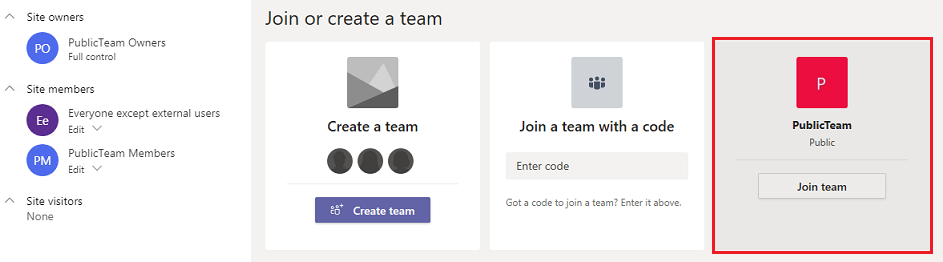
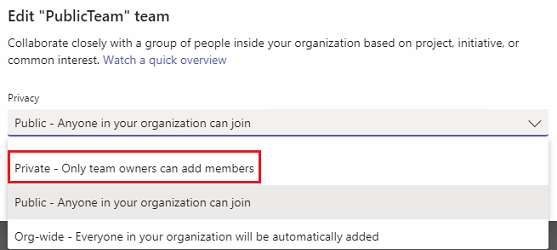
If you don’t want the users to have access to the team, you can edit the team privacy via MS Teams > Teams > Edit team and change it to “Private”. The existing Visitor permissions will not be modified.
Best regards,
Chelsea Wu
Please remember to mark the replies as answers if they helped. If you have feedback for TechNet Subscriber Support, contact [email protected].
SharePoint Server 2019 has been released, you can click here to download it.
Click here to learn new features. Visit the dedicated forum to share, explore and talk to experts about SharePoint Server 2019.
Friday, January 31, 2020 3:55 PM
Thank you Chelsea for such a detailed response. I understand now that we can do the way you mentioned. What does Best Practices says? Should we make Teams site and SharePoint Sites separately or do these tweaks? I am trying to understand there has to be reason to create two separate - Is it Security? That's where I am confuse and need to understand architecture basics.
Any thoughts?
Khushi
Thursday, February 6, 2020 6:11 AM
Hi,
Please remember to update this thread if you have any progress.
Thank you for your understanding.
Best regards,
Chelsea Wu
Please remember to mark the replies as answers if they helped. If you have feedback for TechNet Subscriber Support, contact [email protected].
SharePoint Server 2019 has been released, you can click here to download it.
Click here to learn new features. Visit the dedicated forum to share, explore and talk to experts about SharePoint Server 2019.
Thursday, February 6, 2020 5:50 PM
Thank you Chelsea for such a detailed response. Your response really helped me!
Best Regards,
Khushi