Note
Access to this page requires authorization. You can try signing in or changing directories.
Access to this page requires authorization. You can try changing directories.
Question
Thursday, April 6, 2017 2:08 PM
Hello,
I need to give some users rights to connect directly to a hyper-v vm console in a member domain Hyper-V 2016 server.
I don't want to give the users Local Administrator rights of the server an if is possible I don't want to give them Hyper-V admin rights.
I tried these but without any result:
I installed in every user desktop Hyper-v Manager administration tool and I added them to Hyper-V Administrators local group of Hyper-V server. This didn't work.
I also gave permisssions to connectt with cmd-let Grant-VMConnectAccess, but didtn't work.
When I try to connect I appears a message "You do not have the required permission to complete this task. Contact the administrator of the authorization policy for the computer.
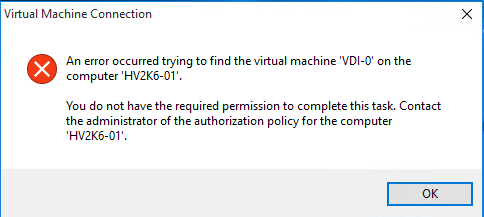
If I try the same but adding them in Local Administrator group works perfect, but I don't need that.
Can someone help me, please?
Kind regards
All replies (2)
Friday, April 7, 2017 7:52 AM ✅Answered | 4 votes
Hi Sir,
>>I installed in every user desktop Hyper-v Manager administration tool and I added them to Hyper-V Administrators local group of Hyper-V server. This didn't work.
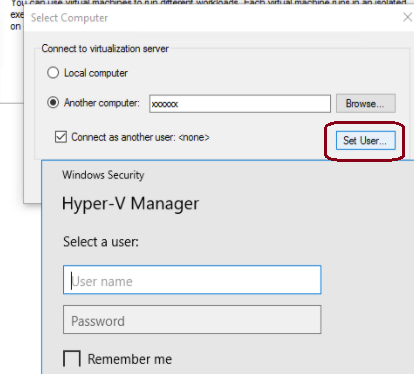
I tested it in my lab (windows 10 connect to server 2016 hyper-v server , they are in same domain) .
I added that user account into local group "Hyper-v Administrator" and "Remote Management Users" of hyper-v server , then it works .

Best Regards,
Elton
Please remember to mark the replies as answers if they help.
If you have feedback for TechNet Subscriber Support, contact [email protected].
Wednesday, May 17, 2017 12:26 PM
This is deprecated from Windows Server 2012 R2