Note
Access to this page requires authorization. You can try signing in or changing directories.
Access to this page requires authorization. You can try changing directories.
Question
Wednesday, December 31, 2014 5:50 AM
Hi Friends,
I have created a list form which has two text columns Text1 and Text2 getting information from another list. Using a data connection, I'm auto populating the values in Text1 and Text2 which is working correctly
Next, I created 2 peplepicker columns in list form, on which I have set the rules
Condition: None - Rule run when field is changes
Set a fields value AccountID=Text1
This will take the text from Text1 and convert into a username in the peoplepicker fields
But for some reason these rules are not working and I'm getting this error
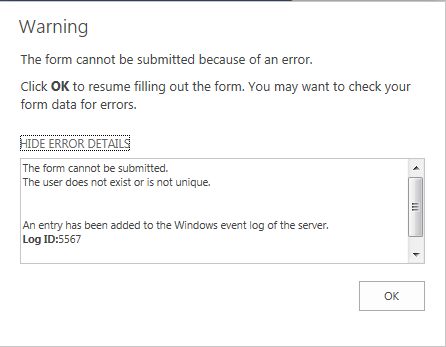
Any ideas on how to resolve this issue and convert the text values to user names?
All replies (5)
Wednesday, December 31, 2014 6:35 AM ✅Answered
Hi Chandra,
Its pretty simple. Please check below
http://sharepoint2013admin.wordpress.com/2013/12/20/user-doesnot-exist-or-is-not-unique-error/
Firstly, make sure that this list was not set to read-only. You need to check the InfoPath form as Page Design->Properties, and check the list settings->Advanced Settings->Item-level Permissions.
If possible , please ask for a site administrator to remove these users and add them again using OOB.
Please remember to click 'Mark as Answer' on the answer if it helps you
Wednesday, December 31, 2014 2:37 PM ✅Answered
Chandra,
Make sure your form ppl picker control data type is UserType.
Is it possible recreate this from using "Customise in infopath" using list tab from ribbon.
Please 'propose as answer' if it helped you, also 'vote helpful' if you like this reply.
Thursday, September 21, 2017 7:54 AM | 1 vote
Hello
In my case what solve the issue :
- was opening the list in sharepoint designer
- edit list items
- double click on the field that was causing this, in my case it was a dropdown
- select All users, not just Sharepoint group
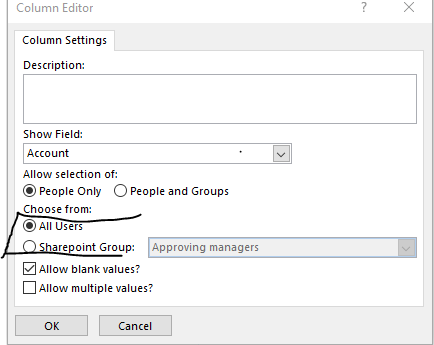
Friday, January 4, 2019 9:50 AM
I realise this is an old post but for anybody looking for a solution - try this:
I just had this problem and by design had limited the person/group picker field in InfoPath to allow only members of a particular SharePoint group under [Properties]-[General]-[Choose from]...
Unfortunately I had selected a different group in the corresponding list column properties in SharePoint, so InfoPath was allowing me to select users who were not members of the SharePoint group specified in the column settings.
For me setting them to the same group fixed the issue.
Friday, June 26, 2020 5:43 AM
I'm getting the same problem with Group name that i have create in outlook - is there a solution for that ?
Thanks
Almog