Note
Access to this page requires authorization. You can try signing in or changing directories.
Access to this page requires authorization. You can try changing directories.
Question
Sunday, February 1, 2015 9:55 PM
hi friends
when i run this command in script block mode, it works fine:
Get-service | where { $_.Name -like 'win*' -and $_.Status -eq 'running' }
but if i run the the same code in the comparison statement form, it fails
Get-service | where Name -like 'win*' -and Status -eq 'running'
Where-Object : Parameter set cannot be resolved using the specified named parameters.
At line:1 char:14
- cls; gsv | ? Name -like 'win*' -and Status -eq 'running'
- ~~~~~~~~~~~~~~~~~~~~~~~~~~~~~~~~~~~~~~~~~~~~~~
+ CategoryInfo : InvalidArgument: (:) [Where-Object], ParameterBindingException
+ FullyQualifiedErrorId : AmbiguousParameterSet,Microsoft.PowerShell.Commands.WhereObjectCommand
is it a general rule that when we want to specify more than one condition in where -obect clause, we have to use script block form & we can't use comparison statement?
thanks
All replies (9)
Sunday, February 1, 2015 10:45 PM ✅Answered
That is correct. Why are you asking?
Thissi not a comparison object it is just a shorthand that we can use at a prompt. It is a limminted use convenience and what has been referred to by the PosH team as "syntactical candy".
¯\(ツ)_/¯
Monday, February 2, 2015 11:14 AM ✅Answered
But Sam... V3 and later allow this:
Get-service | where Name -like 'win*'
Which is what is at issue here. ( no curly bits )
¯\(ツ)_/¯
Well, I didn't know that.
What I've used in the past is curly brackets when I wanted to be PS2 compatible like:
Get-service | where { $_.Name -like 'win*' }
and the .where method when I wanted to run faster (and be PS4 compatible) like:
(Get-service).where( { $_.Name -like 'win*' } )
Both formats allow for testing multiple conditions.
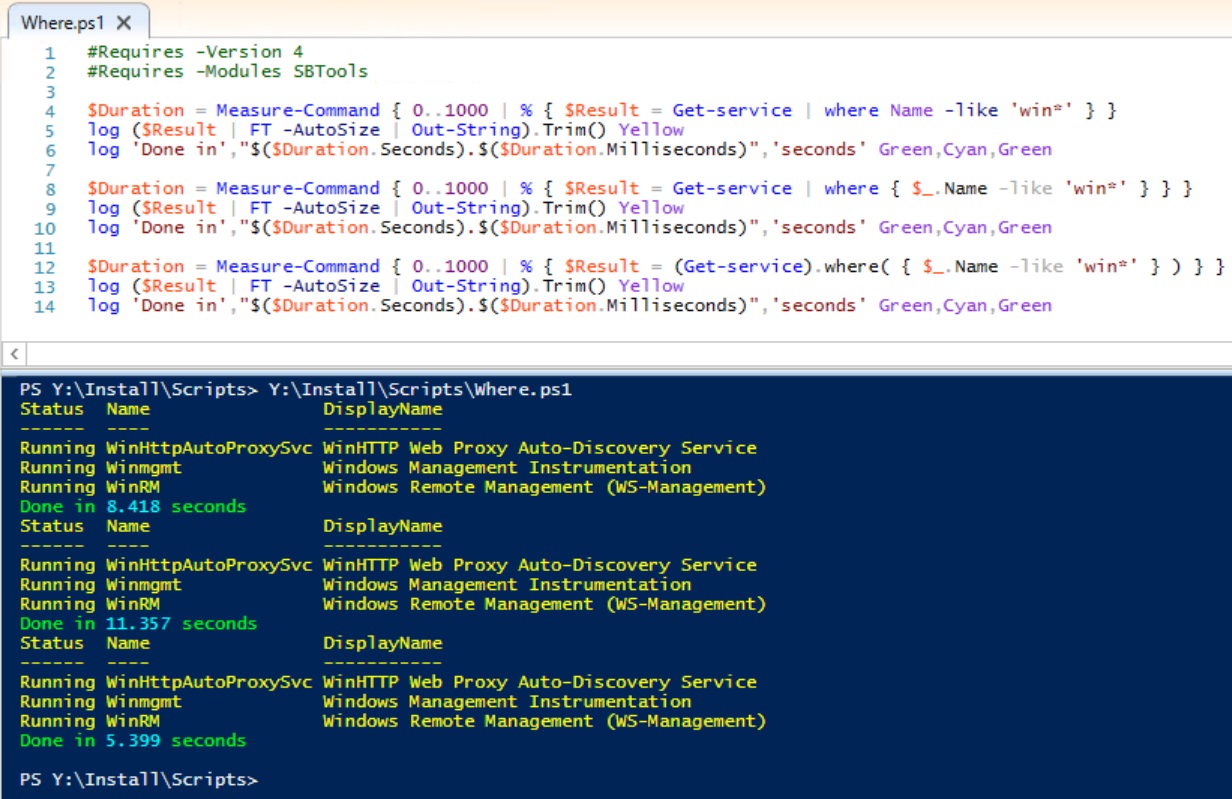
Performance:
#Requires -Version 4
#Requires -Modules SBTools

$Duration = Measure-Command { 0..1000 | % { $Result = Get-service | where Name -like 'win*' } }
log ($Result | FT -AutoSize | Out-String).Trim() Yellow
log 'Done in',"$($Duration.Seconds).$($Duration.Milliseconds)",'seconds' Green,Cyan,Green

$Duration = Measure-Command { 0..1000 | % { $Result = Get-service | where { $_.Name -like 'win*' } } }
log ($Result | FT -AutoSize | Out-String).Trim() Yellow
log 'Done in',"$($Duration.Seconds).$($Duration.Milliseconds)",'seconds' Green,Cyan,Green

$Duration = Measure-Command { 0..1000 | % { $Result = (Get-service).where( { $_.Name -like 'win*' } ) } }
log ($Result | FT -AutoSize | Out-String).Trim() Yellow
log 'Done in',"$($Duration.Seconds).$($Duration.Milliseconds)",'seconds' Green,Cyan,Green
Sam Boutros, Senior Consultant, Software Logic, KOP, PA http://superwidgets.wordpress.com (Please take a moment to Vote as Helpful and/or Mark as Answer, where applicable) _________________________________________________________________________________ Powershell: Learn it before it's an emergency http://technet.microsoft.com/en-us/scriptcenter/powershell.aspx http://technet.microsoft.com/en-us/scriptcenter/dd793612.aspx
Monday, February 2, 2015 2:51 AM
Yes, basic syntax of Where-object is to use curly brackets after it enclosing the filtering condition. See this page for more details. It has nothing to do with how many conditions you're testing for.
Sam Boutros, Senior Consultant, Software Logic, KOP, PA http://superwidgets.wordpress.com (Please take a moment to Vote as Helpful and/or Mark as Answer, where applicable) _________________________________________________________________________________ Powershell: Learn it before it's an emergency http://technet.microsoft.com/en-us/scriptcenter/powershell.aspx http://technet.microsoft.com/en-us/scriptcenter/dd793612.aspx
Monday, February 2, 2015 3:10 AM
But Sam... V3 and later allow this:
Get-service | where Name -like 'win*'
Which is what is at issue here. ( no curly bits )
¯\(ツ)_/¯
Monday, February 2, 2015 12:25 PM
Sam - It's just more candy. Don't worry about it. It's a shortcut method to reduce typing.
¯\(ツ)_/¯
Monday, February 2, 2015 12:40 PM
That is correct. Why are you asking?
T
hissi not a comparison object it is just a shorthand that we can use at a prompt. It is a limminted use convenience and what has been referred to by the PosH team as "syntactical candy".
¯\(ツ)_/¯
hissi not a comparison object
i didn't say this is a comparision object. i told " comparison statement"
PS where-object help:
Beginning in Windows PowerShell 3.0, there are two different ways to construct a Where-Object command.
Script block. You can use a script block to specify the property name, a comparison operator, and a property value. Where-Object returns all objects for which the script block statement is true.
For example, the following command gets processes in the Normal priority class, that is, processes where the value of the PriorityClass property equals "Normal".
Get-Process | Where-Object {$_.PriorityClass -eq "Normal"}
Comparison statement. You can also write a comparison statement, which is much more like natural language. Comparison statements were introduced in Windows PowerShell 3.0.
For example, the following commands also get processes that have a priority class of "Normal". These commands are equivalent and can be used interchangeably.
Get-Process | Where-Object -Property PriorityClass -eq -Value "Normal"
Monday, February 2, 2015 12:49 PM
That is correct. Why are you asking?
Thissi not a comparison object it is just a shorthand that we can use at a prompt. It is a limminted use convenience and what has been referred to by the PosH team as "syntactical candy".
¯\(ツ)_/¯
because i searched a lot but didn't find anything about it. so i wanted to ask from others because maybe there be a solution for that , which i don't know
Monday, February 2, 2015 1:27 PM
That is correct. Why are you asking?
Thissi not a comparison object it is just a shorthand that we can use at a prompt. It is a limminted use convenience and what has been referred to by the PosH team as "syntactical candy".
¯\(ツ)_/¯
because i searched a lot but didn't find anything about it. so i wanted to ask from others because maybe there be a solution for that , which i don't know
From the perspective of the formality the "comparison statement" (not object) is limited to a single comparison as noted in the docs.
The comparison is only an extension of the Where-Object CmdLet to add a number of property sets selected by the existence of a single "comparison" operator. It is not a separate CmdLet or syntax. It is a simple extension of the parametersets defined for the Where-Object CmdLet.
To extend in this way for multiple comparisons is possible but would be very cumbersome.
¯\(ツ)_/¯
Monday, February 2, 2015 1:37 PM
That is correct. Why are you asking?
Thissi not a comparison object it is just a shorthand that we can use at a prompt. It is a limminted use convenience and what has been referred to by the PosH team as "syntactical candy".
¯\(ツ)_/¯
because i searched a lot but didn't find anything about it. so i wanted to ask from others because maybe there be a solution for that , which i don't know
Instead of searching a lot start by reading the help. How this is defined is very clearly docummented in the help. Take a look to see what I mmean.
¯\(ツ)_/¯