Note
Access to this page requires authorization. You can try signing in or changing directories.
Access to this page requires authorization. You can try changing directories.
Question
Monday, September 19, 2016 1:19 PM | 1 vote
Hi,
I'm using Visual Studio 2015 for an Umbraco CMS website.
I have a very simple public ViewModel class.
I have created a class diagram file in the same folder of the project, but when I drag my VM class on it, an error message box says "one or more of the selected items cannot be added to the class diagram".
It's really strange, it's a local file, in the same folder, it's public, etc.
Can anyone please tell me what am I doing wrong?
Thanks,
Sia
All replies (2)
Tuesday, September 20, 2016 3:17 AM ✅Answered
Hi maroonedsia2,
In my side, I could drag all classes to the class diagram without any problems from class view. Please refer to the following screenshot.
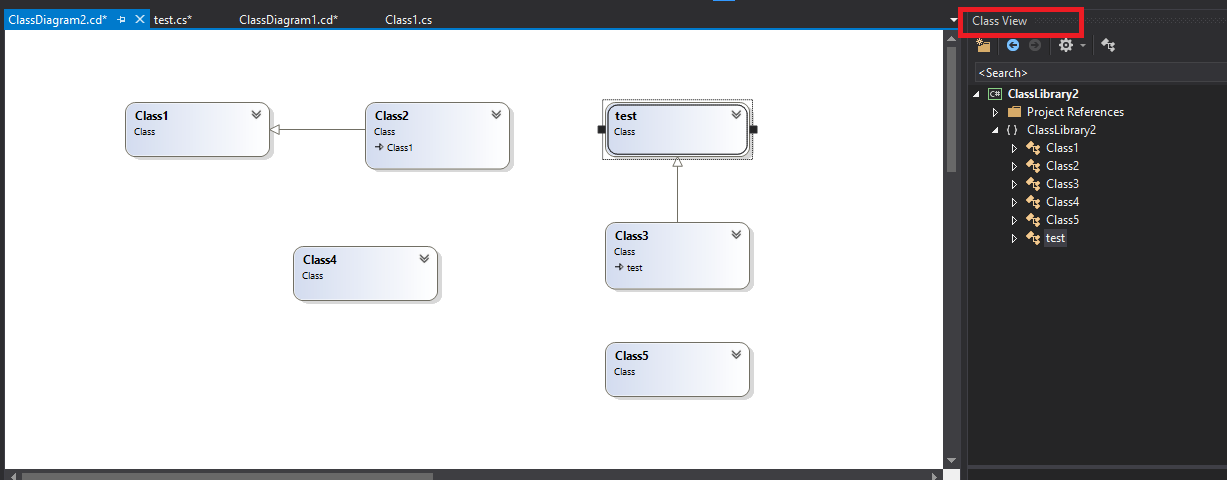
According to your description, does the VM class call other references? Please refer to the following steps to troubleshot this issue:
1). Please create a new project, and add a class diagram and some classes to it. To observe whether has the same issue, this method could help us exclude the reasons caused by Visual Studio.
2). Please create a new simple class to your project, and drag it to class diagram to observe whether has the same issue. Which could help us to judge whether this issue caused by VM class.
3). Please make sure all required assemblies from VM class are referenced.
Sincerely,
Oscar
We are trying to better understand customer views on social support experience, so your participation in this interview project would be greatly appreciated if you have time. Thanks for helping make community forums a great place. Click HERE to participate the survey.
Thursday, December 19, 2019 6:16 PM
Hello!
I just found I had the exact same problem in an existing VB.NET project, and I discovered that classes that had a
Namespace Global.HM.Events
Public Class Event_mytest
' Class features here.
End Class
End Namespace
would not display in the Class Diagram and would issue the above message ("One or more of the selected items cannot be added to the class diagram.") when I try to drag the class into the diagram. This was true even though the project builds without any errors.
However, if I changed the Namespace to something without the "Global." in it, e.g.
Namespace aaa
then it CAN be dragged and displayed in the class diagram.
And to be clear, THIS IS THE PROJECT that defines the class -- the source code is in this project.
The error persisted even when I went to Project > Properties > References and included HM.Events in the Imported Namespaces.
My company uses several Global.HM.xxxxx name spaces in our software. However, we are not making separate DLLs with them, or having those namespaces defined in a separate project, but including families of classes that work together in projects that all share such namespaces. Other classes that use features in such class families simply do this:
Imports HM.Events
So I have 3 questions:
1. Is there a way to display classes defined in the local project that are within Global.HM.Events?
2. Is there something wrong with using "Global.xxx.xxx" in defining company-wide namespaces for families of classes that work together?
3. Or is this a bug in the Class Diagram that simply won't let you ADD a class that is in the "Global.subspace" namespace?
IMPORTANT NOTE: If I change my test class namespaces to not have "Global." in them and THEN add them to the class diagram, and then put the "Global." back into the class, they remain correctly displayed in the diagram! (It almost looks like this is a bug in the ADD A CLASS step in the Class Diagram tool... Please correct me if I am wrong.)
Kind regards,
Vic
P.S. I am using Visual Studio 2017 Community Edition, and just updated it, and just installed the Class Diagram component.