Note
Access to this page requires authorization. You can try signing in or changing directories.
Access to this page requires authorization. You can try changing directories.
Question
Wednesday, April 11, 2012 9:45 PM
I have a poser here. I have been stuck on this for the past 4 days. Here is the backstory:
2 Servers: DC Server-2008R2, APPS Server-2008R2.
18 Workstations: 4-WIN7, 14-XP PRO SP3
All wired LAN, although wireless is avail.
Been running flawlessly for 2 years in this config.
All connections seem fine.
I can ping 127.0.0.1, my mail server, local host, default gateway, remote host, Host name of remote host, etc.
All our clients use outlook on SMTP set deliberately to port 24. All works fine.
We are also using a program to manage our customers orders. It has an email function, which opens an HTML-based message editing window, "Send" button establishes a connection with the mail server using a TCP port 24 (which i have set). We usually attach a pdf file to the email for cust.
Here is the mystery, the email text AND attachments are sent properly using the WIN7 clients, but the XP client's emails arrive without the attachment, with error:
Error 10054
Connection reset by peer.
The company who makes the program is stumped. They have run their software on XP SP2 without issue. I have troubleshot with their support team for 3 days. My network is clearly the issue.
No AUTH necessary, no SSL.
No group policies are set.
Disabled AV and firewalls on servers and clients.
Permissions given to all.
It happens from each XP workstation, not WIN7.
Somewhere a connection is being closed on this lil packet.
MS GIVES THIS:
********************************************
WSAECONNRESET (10054)
Translation: Connection reset by peer.
Description: An existing connection was forcibly closed by the remote host. This error typically occurs if the peer program on the remote host is suddenly stopped, the host is restarted, or the remote host uses a hard close. See setsockopt (Wsapiref_94aa.asp) for more information about the SO_LINGER option on the remote socket. This error may also result if a connection was broken because of keep-alive activity that detects a failure while one or more operations are in progress. Operations that were in progress fail with WSAENETRESET. Subsequent operations fail with WSAECONNRESET.
A wireshark capture isolated this:
********************************************
220 mail.mydomain.com ESMTP Postfix (Ubuntu)
EHLO WS16
250-mail.mydomain.com
250-PIPELINING
250-SIZE 30960000
250-VRFY
250-ETRN
250-STARTTLS
250-AUTH CRAM-MD5 PLAIN LOGIN
250-AUTH=CRAM-MD5 PLAIN LOGIN
250-ENHANCEDSTATUSCODES
250-8BITMIME
250 DSN
RSET
250 2.0.0 Ok
MAIL FROM:
250 2.1.0 Ok
RCPT TO:
250 2.1.5 Ok
DATA
354 End data with .
From: "Corporation"
To: [email protected]
Content-Type: multipart/mixed; boundary="=_NextPart_2rfkindysadvnqw3nerasdf"
MIME-Version: 1.0
Reply-To: [email protected]
Date: Mon, 9 Apr 2012 15:59:50 -0700
X-Priority: 3
X-Library: Indy 9.00.10
This is a multi-part message in MIME format
--=_NextPart_2rfkindysadvnqw3nerasdf
Content-Type: multipart/alternative;
boundary="=_NextPart_2altrfkindysadvnqw3nerasdf"
--=_NextPart_2altrfkindysadvnqw3nerasdf
Content-Type: text/plain
Content-Transfer-Encoding: quoted-printable
Please find a document attached for your attention.=20
Please feel free to contact me if you require further information.
--=_NextPart_2altrfkindysadvnqw3nerasdf
Content-Type: text/html
Content-Transfer-Encoding: quoted-printable
Please find a document attached for your attention.=20
Please feel free to contact me if you require further information=
.
--=_NextPart_2altrfkindysadvnqw3nerasdf--
--=_NextPart_2rfkindysadvnqw3nerasdf
Content-Type: application/octet-stream;
name="OrderAckSO10037.PDF"
Content-Transfer-Encoding: base64
Content-Disposition: attachment;
filename="OrderAckSO10037.PDF"
ZW5kb2JqDQo1IDAgb2JqDQo8PCAvVHlwZSAvUGFnZSANCi9QYXJlbnQgNCAwIFIgDQovTWVkaWFC
b3ggWzAgMCA2MTIgNzkyXSANCi9SZXNvdXJjZXMgOSAwIFINCi9Db250ZW50cyA2IDAgUiA+PiAN
CmVuZG9iag0KMTMgMCBvYmoNCjw8IC9UeXBlIC9YT2JqZWN0IC9TdWJ0eXBlIC9JbWFnZQ0KL05h
bWUgL0ltMTMNCi9XaWR0aCA3MCAvSGVpZ2h0IDg5DQovQml0c1BlckNvbXBvbmVudCA4DQovQ29s
b3JTcGFjZSAvRGV2aWNlUkdCDQovRmlsdGVyIFsgL0FTQ0lJODVEZWNvZGUgL0ZsYXRlRGVjb2Rl
IF0NCi9MZW5ndGggMTQgMCBSID4+IA0Kc3RyZWFtDQpHaFVESSRXJ21TKDAzOTZSW2NuXidmJGw/
LUM/O0UsVmM4c2dAV2E+cChTTVRXQFRoXypAJk8jRjo7b1FsKCdJUUhKND9qYis8LSkmYF0rQA0K
PWY8JmIsXWo+NSJZRlJoK2FNbilzLSVTbEhfNUA9bkdjVStSLF5DLW0nRyU7cDApaDFwIjckJUZg
aVpFQzFxOW9DYiw9MjJqZ2ZEVmYoPiUNCiUyXmRsOlMwaHVkRXRmZzs6MCUpLSdxa0dlPVs3I0dy
PW1LUSlGXGZKXml1aXFONWJUYGFCPiEqWTVDVSM3Y11LTG9AR1giZWxKSTNsSyJWDQo5cTQxX20r
QVIlI0FEPkswZk0kKWJPUzNVWlZoLVIpay5pJW5DK21CI2dmQT1QSyFodUg+XGpfXGBLLU42XGJe
S0glYSZzYydxJ1FGYCRHQA0KaEk9PDYtWVc1LEI6aW0rRG5sN1pBIlFaJVlISkpJWyVrcU83NyRZ
QGM5KEorJlw5Xy9cXXNXcFhdb19ZclYhJV8sYCdMPjs1OFU/ckhENWwNCi5FLDNCOVc0MVs0X0Vg
PzI+VkNCS0E1XTVMdSpSUz5sXDp0Li0wT1FbYElJWz9bb2IhYSxYZ0E+ZHV1ZmAiUFRCNjBCWFM7
USlaVV00UFNhDQo/c1MqZVRoZSZuU2suW0FEblRgIloicV1BMUddXHUlbVR1cjd1bl0+bSwjRmZV
bmhQQU5aREpWckFFPUw0RiRAUjA+OFA2NiJPVj01UTpGJg0KUlw+LSJqQE1IW1cuIlI6bkltOUZT
RGAwRDRhUWFpRG5hJyI9OnA3QEtwQHBnZ1U6dFJaPU9EWWZbPy1BNTxTTTZpbzRGU3I6QTYhOzkl
Y0kNClsoLGhyZmxSI15sKm9NcS5yUl4mLjRNY2UqXitpJlo9UEZMOG9cLkVDL25fUGlwLCdwZDs2
PjxoXVg4TlREaXM0bVUoYU1AJyopbWduIlZkSUNUMm1uQ1tPW0YyKG9CdXA2M1w9LTVRZGhJJy9t
KikuTC1KKkNjRUdKJzlPamMNClJsPjckIzIoQ10mW0opaEtOV2cmblY9UmA0P0dbYmYrL29iVyld
PzQvaTVoUWtdU2pyKGxcWzVoTXVdSzIrNzpGS25ZNT44OHRpZHFNazAsDQpga1ltcT5DcEo4RDdB
PUpUXDlyO2k9O29AUkRGTi1SWW0sY1FIPUAjaFVMM0ttY2AmbmZ0TGguSV1RXFlCJElEW1pQRyxy
PCNacWorWkJ0bw0Ka05DVC9kamVWMixdR3VqYU4zazNMXWZIPS8jPlRsQWY2RDZAcS9HOTthOjlW
ajVcMUBIWyc6Y0F0KyFASmNVJGxlOVcmSHFlKnAtKStOY20NCiJVLD1fZzxqcjU7SjRAYEMiIXA2
ZFhIYWRYXTsnTD9baGY+RG0rJmlZLCVqXV1GVyZGW2khRk0mPFpqcTBTUVs+aWVtKmhDcmFWSUlv
MyNRDQpQRllacFNKMz1UQmdlN0w0U2ZnKlY1MG9bRTksKiZTPUgqMm4lO1IxJCxHV19qQm1FOFtD
JDtvNik6VyM2XC8wQVVWUnNwZ2dOITBFXThDPA0KZG5gNChQV0ZWZzEhJWVrO0o7SGhjVGUmMyNW
QE1VQz8qPG4+JzNCJWEzZV4ySTghPW5AQiVEaGA1TyM8aD1nNmoyJj9bNTlxPT88XGBdUSoNClJv
MD4jKUxMWktYQWRkST1yUEdAKXM/PmpmcyopPyk9MVgjUnMqU1NjcUZbQUFMJVtkMGMmYDZGIm42
QnFVL2plPl5IQ21iL3RRYihLImAuDQpVckU4bD8kRyxkbTdoNy8hT2w/KCwzXGVeN1pFP2RaU3Mp
OzMkRy5mQyg7PUw0RUJMUkAyPEpNcXNWOmRycS1DcDxFMWQtSyxMb1AzOC9WQQ0KNF9EdDY3STJB
bC9hbEVcNVchY1dBM100YGkmWXVEJi8uNCZEbmw2T3FNL0xJU3Q3UTEqVD1MPyY+OzdpcjV0JD80
Ni4mYUxWJ0QxJTdFY1oNCjhVY1VvQG4xZTplUTlOX21RNStiK21lJHNbZkdCNXBDQmIqaUg8P048
MDVjIi1yOy42S1pgJmIsSF10NENQYjFnV190P3BkRS5FIiJbQk5MDQonYGVyQkB0KUlON21RLUpK
J2pccioyLU9PbyFxbSMrOyxXTWxKZ0swVEBGXjIrJTJqOnI8RmhXJU5IbHBfNjo9S2BrNFRnMEhu
PCtlbi1LOw0KT2o+Lig0K0hrSDJkPG9mKj1ZLCRrKSgyNlgmbEpfNnIiXjYzRWk0PmMsV2ViKlR0
aGVmJkdXXEVtcShNU1k1UyJvQihgNk9jQFE6NlUxQSgNCiInSWc6N1pQPUU6W2g3U0Qkc0xpMFEn
JDNoI05WaFM4YXJ0OkQ6JVMpXVxMYzFXRiRIXkUzLXRIcSVZJFxxbWY8L0RxKyFnUVkybldXYA0K
NUFwRzg+KEVSUCw3ayUyKGd0cFgsdGhWUWBsNXBdbj9xRStvXWFoNU1fOD5LR2ozWVE6YEAwQ244
PiIoaydeMyk0QEk0M2khW1poOTE2V0ENCitAOU1bUTdaSG1xNSYoay9zclNGUmxnMDlRLlhfa2Bk
I0lVJy05bDwzOllZK0BvL1hzOCU/RFlmYjVSWD8kVU8tNFBJRGswLlUyUEtIMVYlDQpgOD4zYSku
250 2.0.0 Ok: queued as B83F31CC28F
502 5.5.2 Error: command not recognized
500 5.5.2 Error: bad syntax
500 5.5.2 Error: bad syntax
502 5.5.2 Error: command not recognized
500 5.5.2 Error: bad syntax
502 5.5.2 Error: command not recognized
221 2.7.0 Error: I can break rules, too. Goodbye.
bEYxZWYwV11pU1IoYUtDTCE3N0otQkZqI2clMTgnZFtfQC1VclxZSSNBaEtBaV1iKnJnZjVoYjN0
Tz5AWHUrfj4NCmVuZHN0cmVhbQ0KZW5kb2JqDQoxNCAwIG9iag0KNDk5NA0KZW5kb2JqDQoxNSAw
IG9iag0KPDwgL1R5cGUgL1hPYmplY3QgL1N1YnR5cGUgL0ltYWdlDQovTmFtZSAvSW0xNQ0KL1dp
ZHRoIDE2OCAvSGVpZ2h0IDMzDQovQml0c1BlckNvbXBvbmVudCA4DQovQ29sb3JTcGFjZSAvRGV2
aWNlUkdCDQovRmlsdGVyIFsgL0FTQ0lJODVEZWNvZGUgL0ZsYXRlRGVjb2RlIF0NCi9MZW5ndGgg
MTYgMCBSID4+IA0Kc3RyZWFtDQpHaFZQU0gxNzBMZ1cvXlleK1tVXGBmYjE4UDpeIU0pOy0+TSti
TTFyOUx0KHMnSWpfLVo2W1JuT2ZfKjJBNHFrNCN0WXNxK29BdTpZUEdpbg0KcFJedWdeXCE7Ikoq
PyxXSikjKnBtZWBNcT9pME4xYzhoTF1zL2BZOUosVCYkNVE6L0RTKThfcVNYWjcjcVQxLCJyViMh
bDVRQXNQTyRFV2INCmVbUDhNamQwPmVjY3VMYyhBPnFETG87I0dfRjFDMyJcNnE9SV9FbWFOLFxh
U0xFRlpvbCU/dWMxUStnJFhrKUo7QzEkND4hIjRdTUZEXE4pDQo0Kkt1SEdNYlEycSFgYjJxWHM3
MVtvXWI+aDdAYXBoN0ltJzUoMHMoOF86K05xOlZoIipkUWgvPVNTVmNvSiQxMFwpNyQ8SlsqYCI2
If I missed anything obvious, be gentle ;),
Thanks for your help.
-Jason
All replies (8)
Monday, April 16, 2012 6:20 PM ✅Answered
SOLUTION:
This answer is not cut and dried, its more speculation.
Evidently, the program I was working in had a little bug with parsing attachments thru xp only.
I decided to try a few "grasping at straws" ideas before I attepted to rebuild what i thought was a corrupted firebird database.
I am glad I didnt, that would have set me back months.
All I did was go into the email utility in the program, make a change to the "default email text" field, and save it.
This must have "reset" a buggy config file somewhere because it has worked ever since.
NOTE: Now I can't rule out the possibility of this fix actually being a delayed reaction of some server changes I attempted last week:
* Adding a bunch of permissions to the outgoing firewall policy, and disabling it.
* Changing the KEEPALIVE setting in the registry to optimal.
* Removing AVs in order to test.
Obscure symptoms like this one require an obscure remedy, i guess.
Smeetech on Technet
Wednesday, April 11, 2012 11:26 PM
What type of mail server is it? Is it Exchange, or something else? If Exchange, why are the clients using POP/SMTP?
.
From the WSAECONNRESET (10054)
Translation: Connection reset by peer.[...] This error typically occurs if the peer program on the remote host is suddenly stopped, the host is restarted, or the remote host uses a hard close. [...]
.
The above is evident of the hard close where it shows:
221 2.7.0 Error: I can break rules, too. Goodbye.
.
So something is blocking the SMTP connection on the Windows XP boxes. Maybe whatever it is doesn;t like the non-default TCP 24 port. You've mentioned that antivirus was disabled. There are many AVs when "disabled" will have DLLs and SYS drivers that are still running in the background, and in some AV or security software, like the old Zone Alarm, even after being uninstalled, will leave SYS files that are still running causing necessary traffic to not communicate. I would test it by uninstalling the AV, and check with the AV vendor or comnmunity to see if anything's left behind after uninstalling it.
.
If you manually did a telnet session not using ESMTP, rather SMTP, does it work? If not sure, here's how (type in what's in bold):
- Turn on wireshark to capture the traffic
- Start/Run, **CMD **
- type in Telnet
- type in **open mailserver.yourdomain.com 24 ** (this opens an SMTP session. We usually specify 25, but you're using 24)
- type in **helo yourdomain.com **
- type in **mail from:[email protected] ** (you can use any email address here)
- you should get a Sender Ok message
- type in recpt to:[email protected] (use an actual valid user account)
- type in **Subject: This is a test **
- type in Hello World, this is just a test
- Then hit the button
- Then type in a period
- Then hit the button again. (Hitting twice, once in step 11, and this step, will send it.)
.
Then check the valid recipient's inbox. If it didn't come through, check Wireshark's capture. If it did go through, then it's not handling ESMTP. SMTP has a single component, rather ESMTP has two components that some antivirus or security software may think it's a spoof attempt. Matter of fact due to this, with a Cisco ASA, I have to run a fixup protocol 25 to allow ESMTP to allow my Exchange servers to use ESMTP.
.
Or one other thing, since it's showing a STARTTLS, that means it must be enabled to use TLS. Then that would require the certificate on the mailserver to be current, name matching, etc. What;s the status of the certificate in the mail server?
.
Ace Fekay
MVP, MCT, MCITP Enterprise Administrator, MCTS Windows 2008 & Exchange 2007 & Exchange 2010, Exchange 2010 Enterprise Administrator, MCSE & MCSA 2003/2000, MCSA Messaging 2003
Microsoft Certified Trainer
Microsoft MVP - Directory Services
Complete List of Technical Blogs: http://www.delawarecountycomputerconsulting.com/technicalblogs.php
This posting is provided AS-IS with no warranties or guarantees and confers no rights.
Wednesday, April 11, 2012 11:37 PM
Jason,
One more thing - if it's been working flawlessly for two years, and all of a suddent it's not, the very first thing I ask myself in such scenarios, is what was changed? It could be:
- A Windows update - what was the last update? Although this is highly unlikey, but I always ask.
- Antivirus update, not necessarily a DAT update, rather an engine update. I've seen this before with CA AV. They sent an update then all of a sudden 2500 users can no longer save a PowerPoint file that has an image in it. Took us a whole month to figure that one out.
- A setting got changed on the XP box
- Something got installed on the XP box that affected current installed apps
- Something got uninstalled that removed something necessary
- Maybe a MIME configuration got changed. Since the attachment is MIME based, that may cause it.
- Or it could simply be due to an authentication issue (SMTP auth password got changed?) with SMTP
.
What's worse, the following doesn't indicate exactly what the error is, which in this case, it's best to enable logging on SMTP to see exactly what's up:
250 2.0.0 Ok: queued as B83F31CC28F
502 5.5.2 Error: command not recognized
.
If this was all going through Exchange and the clients were Outlook clients using Exchange (non POP or IMAP), then we would have been able to eliminate any client configuration, and easily looked at verbose logging on the Exchange side.
When I've seen this type of error once before, it was a MIME issue with an Exchange server communicating with a POSTGRE mail server.
.
Ace Fekay
MVP, MCT, MCITP Enterprise Administrator, MCTS Windows 2008 & Exchange 2007 & Exchange 2010, Exchange 2010 Enterprise Administrator, MCSE & MCSA 2003/2000, MCSA Messaging 2003
Microsoft Certified Trainer
Microsoft MVP - Directory Services
Complete List of Technical Blogs: http://www.delawarecountycomputerconsulting.com/technicalblogs.php
This posting is provided AS-IS with no warranties or guarantees and confers no rights.
Thursday, April 12, 2012 6:40 PM
if it's been working flawlessly for two years, and all of a suddent it's not
I need to be more clear about this. OUr network, outlook, mailserver, etc has been working flawlessly for years, and STILL IS.
We are not having problems with our outlook clients, or sending attachments, or anything.
We are having a problem with this one program that uses an email client. It will sent an email, but errors only with with an attachment.
10054 "Connection Reset By Peer"
What type of mail server is it? Is it Exchange, or something else?
We use Tierranet, we dont use Exchange or anything on our network.
[There are many AVs when "disabled" will have DLLs and SYS drivers that are still running in the background, and in some AV or security software, like the old Zone Alarm, even after being uninstalled, will leave SYS files that are still running causing necessary traffic to not communicate.]
"Uninstalling" the AV on the server will be a last last resort. The Panda AV software is painstaking.
If the WIN7 boxes are working, I don't see how the AV could be the culprit.
If you manually did a telnet session not using ESMTP, rather SMTP, does it work?
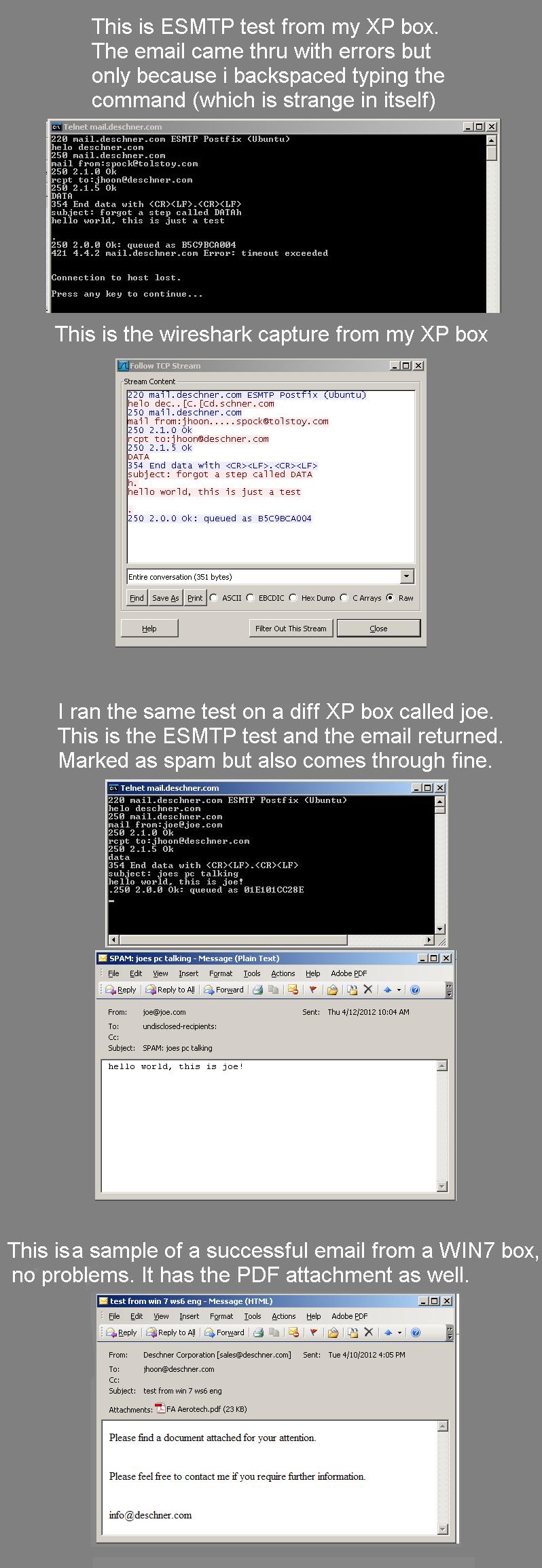
I followed your instructions to the letter, I think i found a few syntax errors in the steps:
8. SHOULD BE- type in RCPT to:[email protected] - not "recpt" right?
And then missing step 8A:
type DATA (without this, i got a 'goodbye' error.)
wireshark captured the following:
220 mail.deschner.com ESMTP Postfix (Ubuntu)
helo dec[C[Cdschner.com
250 mail.deschner.com
mail from:[email protected]
250 2.1.0 Ok
rcpt to:[email protected]
250 2.1.5 Ok
DATA
354 End data with .
subject: forgot a step called DATA
h
hello world, this is just a test
.
250 2.0.0 Ok: queued as B5C9BCA004
When I checked my mailbox in outlook, the message came thru, but with errors.
Evidently, the error boxes are where I backspaced during the command (interesting).
But it works.
So now how do I test sending an attach a file manually?
[What;s the status of the certificate in the mail server]
I assume its current, since WIN7 is working. To check this or the MIME avenue, I'll need instructions.
Smeetech on Technet
Thursday, April 12, 2012 9:37 PM
I posted that from memory. Notice my typos? :-) I revised it for anyone else that wants to try it:
SMTP Telnet Test:
- If you like, you can start a packet capture using Netmon or Wireshark.
- Start/Run, CMD
- Type in Telnet
- Type in open mailserver.yourdomain.com 24 (this opens an SMTP session. We usually specify 25, but you're using 24)
- Type in helo yourdomain.com
- Type in mail from:[email protected] (you can use any email address here)
- You should get a 250 2.1.5 Ok message meaning Sender Address is Ok
- Type in rcpt to:[email protected] (use an actual valid user account)
- You should get a 250 2.1.5 Ok message meaning the Recipient Address is Ok
- Type in data
- You should get a message saying "End data with ., which just means to end your input by hitting then a period, then again.
- Type in Subject: This is a test
- Type in Hello World, this is just a test
- Then hit the button
- Then type in a period
- Then hit the button again. (Hitting twice, based on the message in step 11, will send it.)
.
As far as sending an attachment, that's a bit more complicated since you have to convert the attachment using MIME within the DATA section.
.
Ace Fekay
MVP, MCT, MCITP Enterprise Administrator, MCTS Windows 2008 & Exchange 2007 & Exchange 2010, Exchange 2010 Enterprise Administrator, MCSE & MCSA 2003/2000, MCSA Messaging 2003
Microsoft Certified Trainer
Microsoft MVP - Directory Services
Complete List of Technical Blogs: http://www.delawarecountycomputerconsulting.com/technicalblogs.php
This posting is provided AS-IS with no warranties or guarantees and confers no rights.
Friday, April 13, 2012 4:09 PM
Thanks Ace for showing me these tips on testing the smtp. Very helpful.
What I really need help with is determining why my attachments (pdf, txt, etc) do not go out.
The software works properly. A plain smtp msg works when no attachment is present.
Somthing is preventing an attachment from going out on XP, but WIN7 works fine.
Is there someone who can show me how to set up and test this using mime ?
Smeetech on Technet
Friday, April 13, 2012 6:13 PM
Like I said, it's a bit complex. You can encode the attachment using UUENCODE, or to use MIME, you can refer to the following site to show you how to encode the attachment using MIME:
http://moze.koze.net/?p=113
And the following site indicates that you have to use a PERL script to encode it using MIME:
http://www.ranzs.com/?p=203
Or easier, try using the ActivXperts SMTP script to do it for you
http://www.activexperts.com/activemail/telnet/
.
However, just to point out, I've never had to do it this way to test SMTP. If something is blocking an attachment, then I would look at the client side app, if just on the Windows XP boxes, to see if there are any attachment restrictions, or the firewall or antivirus is blocking it. And yes, it could have been an antivirus update that could be causing it.
.
Ace Fekay
MVP, MCT, MCITP Enterprise Administrator, MCTS Windows 2008 & Exchange 2007 & Exchange 2010, Exchange 2010 Enterprise Administrator, MCSE & MCSA 2003/2000, MCSA Messaging 2003
Microsoft Certified Trainer
Microsoft MVP - Directory Services
Complete List of Technical Blogs: http://www.delawarecountycomputerconsulting.com/technicalblogs.php
This posting is provided AS-IS with no warranties or guarantees and confers no rights.
Monday, April 16, 2012 10:55 PM
In some cases with 3rd party apps, yes, obscurity applies! I'm glad to hear you've found a resolution!
. Cheers!
Ace Fekay
MVP, MCT, MCITP Enterprise Administrator, MCTS Windows 2008 & Exchange 2007 & Exchange 2010, Exchange 2010 Enterprise Administrator, MCSE & MCSA 2003/2000, MCSA Messaging 2003
Microsoft Certified Trainer
Microsoft MVP - Directory Services
Complete List of Technical Blogs: http://www.delawarecountycomputerconsulting.com/technicalblogs.php
This posting is provided AS-IS with no warranties or guarantees and confers no rights.