Note
Access to this page requires authorization. You can try signing in or changing directories.
Access to this page requires authorization. You can try changing directories.
Question
Tuesday, January 8, 2013 4:03 PM
Hi,
If I have a date field called CLOSE_DATE, how do I create a view that dynamically displays records from 3 months ago to present using the CLOSE_DATE field?
I had this view set up from SharePoint 2.0 that I had to manually update to display past 3 months but now that we are using SharePoint 2010, I was wondering if I can create a dynamic filter.
Thanks in advance.
All replies (3)
Tuesday, January 8, 2013 10:28 PM ✅Answered | 2 votes
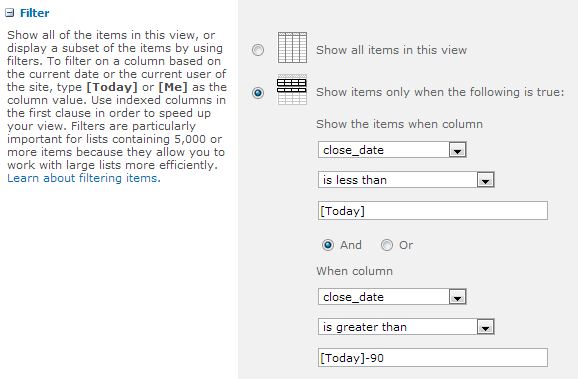
You could just use the filter without adding an extra column. Something similar to below should do the job:
Tuesday, January 8, 2013 5:13 PM
Create a new column in the list to filter by. Have the new column be a Calculated field. For the formula, enter: CLOSE_DATE-90 and choose Date Only as the format. Then create a new view. In the filter section, choose the new column, the less than operator and enter [Today] as a value.
Tuesday, January 8, 2013 8:11 PM
I tried this but all of the rows get displayed. The filter does not do anything because the new calculated field will always be less than [Today]. I tried changing the filter to greater than [Today]-90 but I get 0 rows.