Note
Access to this page requires authorization. You can try signing in or changing directories.
Access to this page requires authorization. You can try changing directories.
Question
Sunday, June 9, 2019 9:24 AM
Hi, my problem would be this:
I can get the json string from the given site, which would be this:
{"accessToken":"01203912938","clientToken":"1e10wefwef7faf-fwef6e-47b6-b17ef5-23548b8d7558","selectedProfile":{"agent":"MC","id":"74c85f32c5d5e74d8c8a75e4ccd003b63a","name":"NameExample","userId":"userexample","createdAt":1503581587000,"legacyProfile":false,"suspended":false,"tokenId":"203858332","paid":true,"migrated":false}
Now, I want a certain element of the string to be seen in a textbox, let's put "Id" in case
I use this code:
Sub InfoAccount()


        Try
            Dim rawresp As String = TextBoxInfo.Text
            Dim jss As New JavaScriptSerializer
            Dim dict As Dictionary(Of String, String) = jss.Deserialize(Of Dictionary(Of String, String))(rawresp)

            RichTextBox2.Text = dict("id")

        Catch ex As Exception

        End Try

    End Sub
However, it doesn't show me the string in the richtextbox, I think it's due to the various "false" "true" and some strings that don't contain the ""
How can I solve it?
All replies (3)
Sunday, June 9, 2019 10:33 AM ✅Answered
Hello,
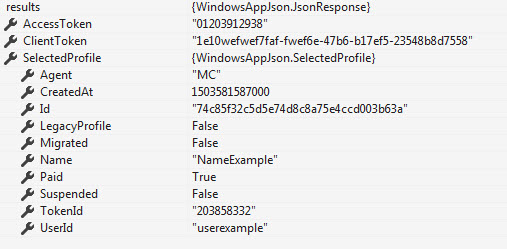
Generally speaking the best way to work with Json is with Json.NET library. To read your data to classes are needed to strongly type your data. In the following code sample jsonData is your data shown formatted below.
To install Json.net
https://www.nuget.org/packages/Newtonsoft.Json/
{
   "accessToken":"01203912938",
   "clientToken":"1e10wefwef7faf-fwef6e-47b6-b17ef5-23548b8d7558",
   "selectedProfile":{
      "agent":"MC",
      "id":"74c85f32c5d5e74d8c8a75e4ccd003b63a",
      "name":"NameExample",
      "userId":"userexample",
      "createdAt":1503581587000,
      "legacyProfile":false,
      "suspended":false,
      "tokenId":"203858332",
      "paid":true,
      "migrated":false
   }
}
Code requires the following import
Imports Newtonsoft.Json
Public Class SelectedProfile

    <JsonProperty("agent")>
    Public Property Agent As String

    <JsonProperty("id")>
    Public Property Id As String

    <JsonProperty("name")>
    Public Property Name As String

    <JsonProperty("userId")>
    Public Property UserId As String

    <JsonProperty("createdAt")>
    Public Property CreatedAt As Long

    <JsonProperty("legacyProfile")>
    Public Property LegacyProfile As Boolean

    <JsonProperty("suspended")>
    Public Property Suspended As Boolean

    <JsonProperty("tokenId")>
    Public Property TokenId As String

    <JsonProperty("paid")>
    Public Property Paid As Boolean

    <JsonProperty("migrated")>
    Public Property Migrated As Boolean
End Class

Public Class JsonResponse

    <JsonProperty("accessToken")>
    Public Property AccessToken As String

    <JsonProperty("clientToken")>
    Public Property ClientToken As String

    <JsonProperty("selectedProfile")>
    Public Property SelectedProfile As SelectedProfile
End Class
Code to get your data
Dim results = JsonConvert.DeserializeObject(Of JsonResponse)(jsonData)
Dim identifier = results.SelectedProfile.Id
Documentation
https://www.newtonsoft.com/json/help/html/DeserializeWithJsonSerializerFromFile.htm
Please remember to mark the replies as answers if they help and unmarked them if they provide no help, this will help others who are looking for solutions to the same or similar problem. Contact via my Twitter (Karen Payne) or Facebook (Karen Payne) via my MSDN profile but will not answer coding question on either.
NuGet BaseConnectionLibrary for database connections.
StackOverFlow
Sunday, June 9, 2019 10:27 AM
You can copy the Json you have and do what is in the link, which can be done for a VB class too.
https://www.matthewproctor.com/json-to-c-sharp-class-using-paste-special/
You can import Newtonsoft.Json after you install Newtonsoft using Nuget and do something similar in converting the Json into a .NET object and address the public property of the object.
dim id = dto.ProjectId
public Function GetProjByIdApi(id As int32) as DtoProject Implements IWebApi.GetProjByIdApi

            dim dto as DtoProject

            dim url = "http://localhost/WebApiVB/api/project/GetProjectById?id=" & id

            Using webclient As New WebClient
                dim json  = webclient.DownloadString(url)
                Dim project = JsonConvert.DeserializeObject(of DtoProject)(json)
                dto = project
            End Using

            Return dto

        End Function
Public Class DtoProject

    Public Property ProjectId As Int32
    Public Property ClientName As String
    Public Property ProjectName As String
    Public Property Technology As String
    Public Property ProjectType As String
    Public Property UserId As String
    Public Property StartDate  As DateTime
    Public Property EndDate As DateTime?
    Public Property Cost As Decimal

End Class
Sunday, June 9, 2019 9:27 PM
LOL! I show the OP the same concept. But it's not an answer? :)