Note
Access to this page requires authorization. You can try signing in or changing directories.
Access to this page requires authorization. You can try changing directories.
Question
Tuesday, May 19, 2015 8:39 AM
Hello All
I have Encrypted a folder (in windows server 2012 R2) to secure its contains. After encryption, it show folder in green color, the folder exist on a share so other users can see it but cannot access it, I would like to add some other authorized user to access it as well, but when Right Click on Encrypted Folder>> Advanced >> Advanced Attribute >> details, I cannot see any add option to add any other use.
Please see the attached scan shot:
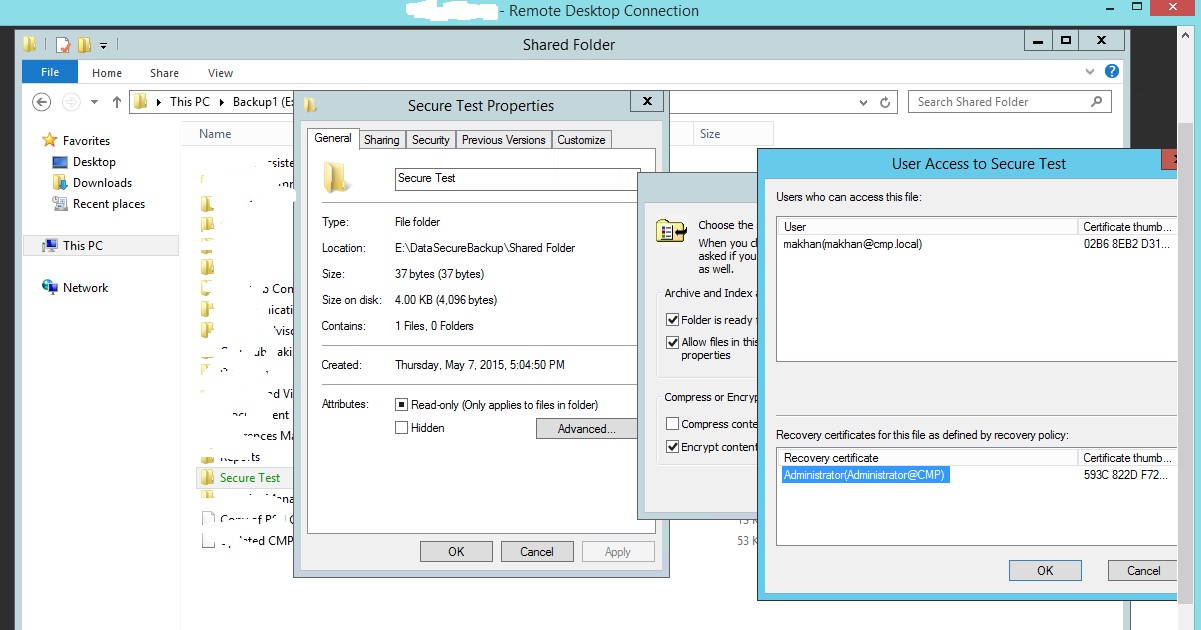
I will appreciate any possible help in this please.
Thanks
Ali
All replies (3)
Wednesday, May 20, 2015 7:31 AM
Hi,
As you said it will not work. There is a Microsoft article which mentioned that it will work, but in our test it won't.
Another solution is to export the certification to the other user. After import the user could able to access these encrypted files.
Please remember to mark the replies as answers if they help and un-mark them if they provide no help. If you have feedback for TechNet Support, contact [email protected].
Wednesday, May 20, 2015 10:35 AM
Hi
Thanks for your reply, I have tried to export the certificate of the user who encrypted the file, and import the same certificate into another PC, but still access is denied.
The following setups I have taken:
open mmc on server, Add Certificate Snap-in, >> Right-click and export the certificate (.pfx file)
Copy the certificate file into another PC, Double Click on it and install it.
I can see the certificate has been installed properly for that particular user on 2nd machine, but that user still not be able to open the file.
on 2nd computer, I have also tried > Cipher /flushcache command on command prompt
Did I miss any other configuration ?
Ali
Wednesday, June 3, 2015 8:28 AM
Hi,
Sorry for the delay in reply.
We did some more tests and noticed that we can barely get it work except in this situation:
1. Export User1's cer. and import in User2. Share and encrypt folderA on Server1 with User1.
2. Logon User1 on Server1 and access folderA before trying to use User2 to access it on Server2.
This will work until user1 logged off.
It is very strange as it is different as what it should. We have already tried to contact EFS team but still not get response about it.
Please remember to mark the replies as answers if they help and un-mark them if they provide no help. If you have feedback for TechNet Support, contact [email protected].