Note
Access to this page requires authorization. You can try signing in or changing directories.
Access to this page requires authorization. You can try changing directories.
Question
Saturday, March 11, 2017 2:21 PM
I have a pivot table that I created using VBA. I want to read the value of each total and if it is 0 I want to hide the entire row.
Here is the example below, this is a pivot table and in this situation I want to hide "Joe's" row.
Name Budget Spend Total
Joe 1000 1000 0
Jane 500 100 400
Total 1500 1100 400
ruth
All replies (2)
Sunday, March 12, 2017 12:36 AM
Excel 2016 Pro Plus with PowerPivot.
Filter records that have Budget=Spent.
PowerPivot with DAX has its own unique VBA macro terms.
Nowadays, Power Query with M takes the place of VBA to prepare data for a PivotTable.
http://www.mediafire.com/file/34jbjj36xn1pe2e/04_28_14a.xlsm
Monday, March 13, 2017 6:19 AM
Hello,
You could use PivotTable.ColumnRange Property (Excel) to return the column number of "Grand Total". Then get each cell from PivotTable.TableRange1 Property (Excel), use Visible property of PivotItem to hide the whole row.
For example, the code below could hide the row Jane (if Grand Total =100).
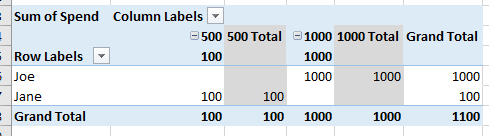
Sub test()
Dim pvtTable As PivotTable
Set pvtTable = Worksheets("Sheet2").PivotTables("PivotTable1")
pvtTable.PivotFields("Name").ClearAllFilters
Dim col As Integer
For Each pvtCol In pvtTable.ColumnRange
If pvtCol.Value = "Grand Total" Then
col = pvtCol.Column
End If
Next pvtCol
For i = 1 To pvtTable.TableRange1.Rows.Count
If pvtTable.TableRange1.Cells(i, col).Value = 100 Then
pvtTable.PivotFields("Name").PivotItems(pvtTable.TableRange1.Cells(i, 1).Value).Visible = False
End If
Next
End Sub
Regards,
Celeste
MSDN Community Support
Please remember to click "Mark as Answer" the responses that resolved your issue, and to click "Unmark as Answer" if not. This can be beneficial to other community members reading this thread. If you have any compliments or complaints to MSDN Support, feel free to contact [email protected].