Note
Access to this page requires authorization. You can try signing in or changing directories.
Access to this page requires authorization. You can try changing directories.
Question
Wednesday, November 4, 2015 5:01 PM
I am attempting to use the HelpMessage attribute for my PowerShell parameters, however, when I am prompted for the parameters while running my PowerShell script, I do not see any Help Message that provides insight about what to enter for my parameters.
[CmdletBinding()]
Param(
[Parameter(Mandatory=$True,HelpMessage="Please enter the SQL sysadmin username", Position=1)]
[string]$SQLUsername
)
How do I get Help information that informs the user what to enter for a particular parameter when they are prompted for a particular parameter?
Please advise.
All replies (2)
Wednesday, November 4, 2015 5:53 PM ✅Answered | 3 votes
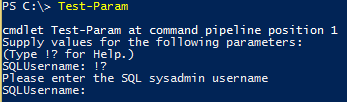
You're not going to see the option to show the help message unless someone doesn't enter a value for your mandatory -SQLUsername parameter. And even if they don't enter a value, they're going to have to enter !? to actually be presented with your help message. Take a look at the image I've included when running jrv's function.
jrv's idea to use the ValidateSet attribute is a nice option to display the acceptable values from this parameter, by using Tab. Also be sure to include comment-based help, so users can run Get-Help against your function and find out what you function requires. Help messages are nice, but they are often not included because full and complete comment-based help, to include some examples, is where people should go that need assistance using a function or cmdlet.
Wednesday, November 4, 2015 5:11 PM
Use auto-complete with "ValidateSet"
function Test-Param{
    [CmdletBinding()]
        Param(
            [ValidateSet('Admin1','Admin2','Admin3')]
            [Parameter(
                Mandatory=$True,
                HelpMessage="Please enter the SQL sysadmin username",
                Position=1
            )][string]$SQLUsername
        )
}

Test-Admin -SQLUsername <tab>
Just hit <tab> to fill in.
\(ツ)_/