Note
Access to this page requires authorization. You can try signing in or changing directories.
Access to this page requires authorization. You can try changing directories.
Question
Wednesday, December 27, 2017 5:53 PM
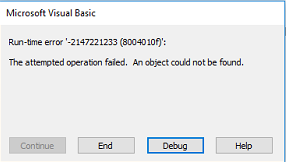
I have a saved Outlook Macro that calls a saved form template and it is supposed to generate an email from the template. I have this exact same macro setup on approximately 30 end user machines and I am seeing this issue on 3 of them. I am not sure what is wrong as I have followed the same setup procedure on all of the machines. Below is a screen shot of the error.
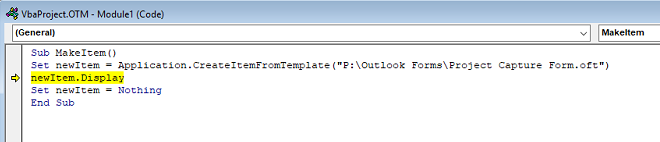
When I select debug it highlights the following line in the screen shot below.
I am not sure what is going on here and I am not a developer so it took me forever to get the code to work as is!
Can anyone assist?
All replies (12)
Wednesday, December 27, 2017 5:57 PM
Thursday, December 28, 2017 3:09 AM
at first place you can check that oft file is available on that location or not.
if the file is not available then you can get this error.
if the file is available then try to open it manually by double clicking on it.
check whether it get successfully get open or not.
if not , it is possible that some issue with file or file get corrupted.
in that case you can try to create a new oft file and again make a test.
further, you can also check that you have proper permissions to access and use the files from that folder.
below is the simple example you can refer, in which first you can create oft file by running the second sub.
then you can create a mail item using CreateItemFromTemplate method by running the first sub.
Sub CreateFromTemplate()
 Dim MyItem As Outlook.MailItem

 Set MyItem = Application.CreateItemFromTemplate("C:\Users\v-padee\Desktop\statusrep.oft")
 MyItem.Display
End Sub

Sub CreateTemplate()
 Dim MyItem As Outlook.MailItem

 Set MyItem = Application.CreateItem(olMailItem)
 MyItem.Subject = "Status Report"
 MyItem.To = "Dan Wilson"
 MyItem.Display
 MyItem.SaveAs "C:\Users\v-padee\Desktop\statusrep.oft", OlSaveAsType.olTemplate
End Sub
you will notice that if you delete the oft file then you will get same kind of error.
Reference:
Application.CreateItemFromTemplate Method (Outlook)
Regards
Deepak
MSDN Community Support
Please remember to click "Mark as Answer" the responses that resolved your issue, and to click "Unmark as Answer" if not. This can be beneficial to other community members reading this thread. If you have any compliments or complaints to MSDN Support, feel free to contact [email protected].
Thursday, December 28, 2017 10:10 PM
Thank you for the repy Deepak, I have tested that the end user can successfully manually open the file with out issues. Like I stated in my original post I have deployed this macro on 30+ machines and I am only seeing 2 end users that are getting this issue. I have attempted to copy the .oft file locally to each of their machines and update the macro to point to the new local target location but they still get the same error. I have checked the end users permissions to the target location and they have full read/write/modify permissions.
Friday, December 29, 2017 6:33 AM
did you find any difference between these 2 machines and other working machines?
are there using any shared mailbox?
I find that in some machine shared mailbox create issue.
other thing try to check if there any other update get installed on this machine for outlook or not.
if you find any then you can try to rollback that update and try to again make a test.
you can try to test it and let me know the result.
we will try to provide further suggestions to solve the issue.
Regards
Deepak
MSDN Community Support
Please remember to click "Mark as Answer" the responses that resolved your issue, and to click "Unmark as Answer" if not. This can be beneficial to other community members reading this thread. If you have any compliments or complaints to MSDN Support, feel free to contact [email protected].
Friday, December 29, 2017 8:45 AM
Hi Nicholas,
In my option, there is no problem in your code.
If you follow link below to create the mail from template, will you receive any error?
# Send an email message based on a template
I suggest you follow link below to create a new profile.
# You receive the "The operation failed. An object could not be found" error message when you click Send and Receive in Outlook
If it did not work, I would suggest you repair your Office and try again.
Best Regards,
Tao Zhou
MSDN Community Support
Please remember to click "Mark as Answer" the responses that resolved your issue, and to click "Unmark as Answer" if not. This can be beneficial to other community members reading this thread. If you have any compliments or complaints to MSDN Support, feel free to contact [email protected].
Friday, December 29, 2017 2:07 PM
Thank you for your reply Tao, I will try recreating the Profile as suggested and update the tread accordingly. If that still doesn't work I will run a repair on the office installation and try again. Thank you for your response!
Friday, December 29, 2017 5:05 PM
I blew away the existing users profile and setup a new profile and the issue still persisted. I am going to attempt to repair office and try again. I appreciate all support any other suggestions would be greatly appreciated!
Tuesday, January 2, 2018 2:16 AM
you can also try to check the version of update installed in this machine and check the updates installed on working machines.
if there are different version of updates are installed on both machine then I suggest you to install the same version of updates as installed on working machine.
then again try to make test and let us know about the result.
if issue persist then we will try to provide you further suggestions to solve it.
Regards
Deepak
MSDN Community Support
Please remember to click "Mark as Answer" the responses that resolved your issue, and to click "Unmark as Answer" if not. This can be beneficial to other community members reading this thread. If you have any compliments or complaints to MSDN Support, feel free to contact [email protected].
Tuesday, January 2, 2018 5:05 PM
Thank you for your response Deepak, Automatic update is disabled on all machines as we control the patch process for our machines. All of the machines both working and not working are on the same patch level and have the same patches installed. Outside of patches we use a preconfigured image to build each machine off of. All machines are build with this image and then a script is run to configure settings after the image process is completed. So all machines are build the same way and have the same settings completed on them. I am at a loss to explain why it is just a few machines that are having the issues and why others are working as intended. Any further suggestions you have would be greatly appreciated!
Wednesday, January 3, 2018 7:23 AM
what is the result of Office Repair?
if you did not done it then try it and let us know about the result.
we will try to find for any other possibility that cause this issue and let you inform you if anything useful we get.
Thanks for your understanding.
Regards
Deepak
MSDN Community Support
Please remember to click "Mark as Answer" the responses that resolved your issue, and to click "Unmark as Answer" if not. This can be beneficial to other community members reading this thread. If you have any compliments or complaints to MSDN Support, feel free to contact [email protected].
Wednesday, January 3, 2018 6:17 PM
Thank you for your response Deepak! I performed the office repair which completed successfully and then I rebooted the system. Upon the completed restart I attempted to execute the macro and I received the same error. I then attempted to uninstall all office products and reinstall from a clean installation file. After the re-installation I attempted to execute the macro before applying office patches. The attempt before patches failed, I then patched the machine completely with latest office updates and tried again. Post applying latest office patches the macro still failed with the same error.
I also saved a new .oft file out to the target .oft store location and updated the macro to target the new .oft file thinking that it may be a corruption of the original file. The macro failed with the same error! I did have the end user manually UNC path to the target store location and the end user was successfully able to UNC path to the store location. This proves that it is truly not a permissions issue but I am still at a loss to understand why this issue is still be experienced!
Friday, January 5, 2018 9:36 AM
till now , we try to suggest many approach but nothing works for you.
it is a strange issue for us because it can be only reproduce on some machines.
it is possible that some specific scenario plays a role here and cause this issue.
I suggest you to share your experience and provide your feedback to Outlook User Voice.
if you are using Outlook Insider then it has the option to provide feedback for bug report / issue with Outlook.
Outlook developer will try to check for the issue and if there is some problem then they will try to fix it in future updates.
Thanks for your understanding.
Regards
Deepak
MSDN Community Support
Please remember to click "Mark as Answer" the responses that resolved your issue, and to click "Unmark as Answer" if not. This can be beneficial to other community members reading this thread. If you have any compliments or complaints to MSDN Support, feel free to contact [email protected].