Note
Access to this page requires authorization. You can try signing in or changing directories.
Access to this page requires authorization. You can try changing directories.
Question
Tuesday, May 27, 2014 7:43 AM
Dear sir/madam
I installed exchange server 2013
my clients want to attache more than 10 MB
when they attache more than 10 MB they got this massage "The following files weren't attached because adding them would cause the message to exceed the maximum size limit of 10 MB"
so how can you help me to increase the attachment size and the way to do that
how can I change the default 10 MB
Please can you help me as soon as
Rawa Zangana
All replies (4)
Tuesday, May 27, 2014 8:43 AM ✅Answered
Hi
Take a look at this article for the size limits and steps to change them: http://technet.microsoft.com/en-us/library/bb124345(v=exchg.150).aspx
Steve
Tuesday, May 27, 2014 11:42 AM
To set a global value, run the following from the Exchange Shell.
Set-transportconfig -maxsendsize 50mb -maxreceivesize 20mb
Tweak the values the way you want.
Wednesday, May 28, 2014 7:59 AM
Hi Rawa,
You can use EAC or EMS to set the MaxSendSize. The default value of MaxSendSize is 10 MB.
If you use EAC, here is the steps:
Logon to EAC -> Mail flow -> Receive connectors -> settings-> type the Maximum send message size you want to set
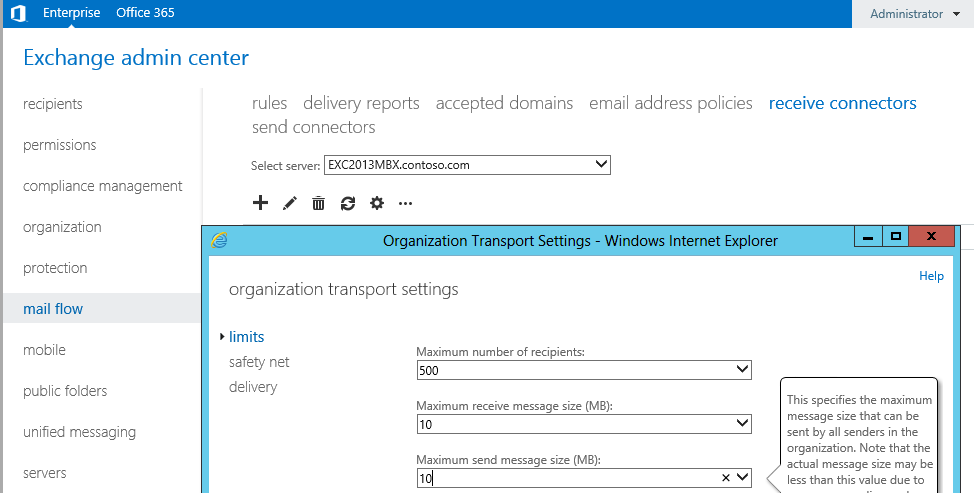
If you use EMS, please use the cmdlet Rajith provided.
Hope it helps.
Best regards,
If you have feedback for TechNet Subscriber Support, contact [email protected]
Amy Wang
TechNet Community Support
Friday, May 30, 2014 1:29 AM
Hi Rawa,
Have you checked the suggestion I provided?
Is there any update with your issue?
Best regards,
If you have feedback for TechNet Subscriber Support, contact [email protected]
Amy Wang
TechNet Community Support