Note
Access to this page requires authorization. You can try signing in or changing directories.
Access to this page requires authorization. You can try changing directories.
Question
Wednesday, November 6, 2013 1:53 PM
I don't know what the codes are please help.......
Dim filepath As String....... >Global
for btnlocate....
Dim dlg As OpenFileDialog = New OpenFileDialog
         Dim res As DialogResult = dlg.ShowDialog

         With dlg
             .Filter = "PDF Files(*.pdf)|*.pdf|All Files(*.*)|*.*"
             .Title = txtpdf.Text

         End With

         If res = Windows.Forms.DialogResult.OK Then

             Dim str As String()
             str = Split(dlg.FileName, "\")

             For Each c As String In str
                 If c.EndsWith(".pdf") Then
                     txtpdf.Text = c
                     filepath = dlg.FileName
                     txtpdf.Text = filepath
                 End If
             Next

         End If
for btnsave......
Dim filefaculty As String
         Dim filetocopy As String
         Dim NewCopy As String

         filetocopy = filepath

         NewCopy = "C:\Users\DEVANATH\Dropbox\Capstone- Final\System\Library Buddy The AMACC Davao Library BrowsingApplication\PDF\" & txtpdf.Text

         If System.IO.File.Exists(filetocopy) = True Then
              System.IO.File.Delete(NewCopy)
              System.IO.File.Copy(filetocopy, NewCopy)
              filepath = txtebook.Text
              filefaculty = filepath

         End if
All replies (6)
Wednesday, November 6, 2013 2:34 PM ✅Answered | 1 vote
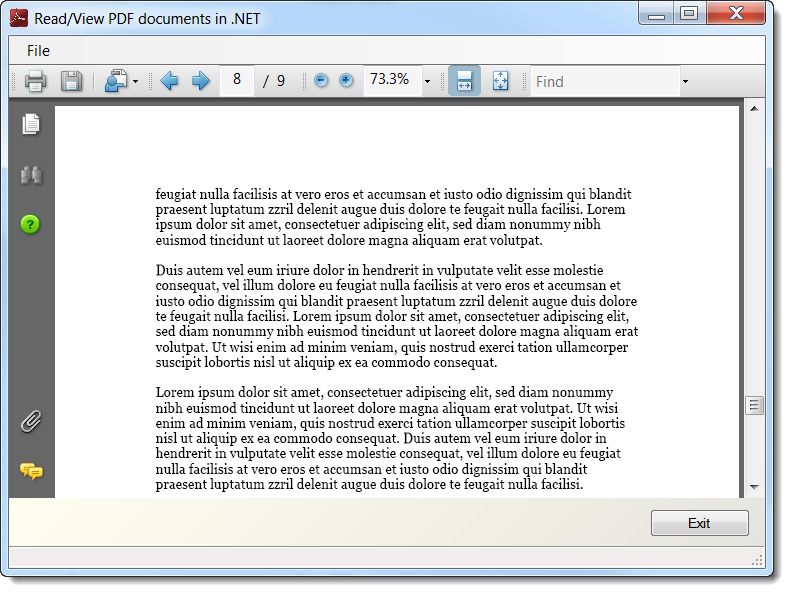
Here is a project that shows how to open a PDF file into a web brower on a form. Now on some versions of Windows after selecting the PDF document Adobe will push out a message followed by a) showing the document in the browser window b) not show it in the browser window but in the Adobe Reader. Either case there is nothing you can do to change this. The other option is after selecting the file is to use Process.Start to open the PDF document in Adobe Reader.
Screenshot after selecting a known PDF, we open the document and navigate to page 8.
Please remember to mark the replies as answers if they help and unmark them if they provide no help, this will help others who are looking for solutions to the same or similar problem.
Wednesday, November 6, 2013 9:21 PM ✅Answered | 1 vote
You must initialise your dialog before your show it.
Dim dlg As OpenFileDialog = New OpenFileDialog
           With dlg
             .Filter = "PDF Files(*.pdf)|*.pdf|All Files(*.*)|*.*"
             .Title = txtpdf.Text
          End With
         Dim res As DialogResult = dlg.ShowDialog
         If res = Windows.Forms.DialogResult.OK Then
I think that the purpose of the subsequent code is to get the filename part of the selected file. To do that you should use the GetFileName method of the Path class. There is an example here:
http://msdn.microsoft.com/en-us/library/system.io.path.getfilename(v=vs.110).aspx
For the third part I think that the problem is that you never put the file name into your global variable.
If res = Windows.Forms.DialogResult.OK Then
filepath = dlg.Filename
...
If you need assistance with fixing this code you must describe what you are trying to do. Trying to work out what you want to do by looking at code that is not working is likely to produce unsuitable responses.
Tuesday, November 12, 2013 5:13 AM
thank you but i already fix the problem.....
Tuesday, November 12, 2013 5:13 AM
thank you but i already fix the problem.....
Tuesday, November 12, 2013 5:13 AM
thank you but i already fix the problem.....
Tuesday, November 12, 2013 9:27 PM | 1 vote
thank you but i already fix the problem.....
Hello,
For the benefit of others reading this post could you please indicate how you fixed the problem.
Please remember to mark the replies as answers if they help and unmark them if they provide no help, this will help others who are looking for solutions to the same or similar problem.