Note
Access to this page requires authorization. You can try signing in or changing directories.
Access to this page requires authorization. You can try changing directories.
Question
Sunday, April 7, 2019 10:34 AM
Hi,
I have this issue:
Cannot connect to Windows share via local network IP address, but can by localhost
But I can't solve this issue. Please help me.
Thanks
All replies (10)
Sunday, April 7, 2019 1:30 PM
Can someone help me, please?
Sunday, April 7, 2019 2:03 PM | 4 votes
Hi Amirhossein Karimpour
Please try the below steps
- Check the IP address is reachable ,do Ping ,traceroute.
- Check windows firewall is configured to block the SMB traffic. ( in both source server and the users machine). Telnet SMB port by IP address and host name
- Try to restart ComputerBrowser service in services.msc and see if it is working.
- Check SMB configuration in registry SMB needs to be enabled on source and destination systems. ( see Additional references)
- Check for DNS name resolution forward lookup and reverse lookup in your scenario the ip address to host name resolution needs to be verified.
- Check the NIC Binding IP V 6 vs IP V4 and binding order.
- Delete all the hidden Network adapters or network adapters from device manager restart the server then reinstall the adapters and then try to access using IP.
HOW TO REMOVE HIDDEN NETWORK ADAPTERS
Windows automatically hides devices that are not presently connected to the system, but they still exist in Windows' configuration. This is especially problematic when changing virtual network adapters and not being able to remove IP configurations from old adapters. To resolve:
- Click Start, click Run, type cmd.exe, and then press ENTER.
- Type "set devmgr_show_nonpresent_devices=1", and then press ENTER.
- Type Start DEVMGMT.MSC, and then press ENTER.
- Click View, and then click Show Hidden Devices.
- Expand the Network Adapters tree.
- Right-click the dimmed network adapter, and then click Uninstall.
Additional references
How to check SMB status ?
How to Remove Hidden NIC / Unused NIC ?
Regards,
Ramabadran Vasudevan
Please don't forget to mark Propose as answer, to help others who have the same issue.
Tuesday, April 9, 2019 6:24 AM
Hi,
Just want to confirm the current situation.
Please feel free to let us know if you need further assistance.
Best regards,
Michael
Please remember to mark the replies as an answers if they help.
If you have feedback for TechNet Subscriber Support, contact [email protected]
Tuesday, April 9, 2019 1:15 PM
Yes, I need further assistance if it is possible. Thanks Michael
Best Regards
Wednesday, April 10, 2019 8:17 AM
Hi,
Thanks for your update.
Would you mind providing detailed information of your current situation? Have you tried Ramabadran Vasudevan's suggestion?
Highly appreciate your effort and time. If you have any question or concern, please feel free to let me know.
Best regards,
Michael
Please remember to mark the replies as an answers if they help.
If you have feedback for TechNet Subscriber Support, contact [email protected]
Wednesday, April 10, 2019 9:03 AM
Hi,
Yes, I did what he said. But no result has been achieved. What kind of information do you want to know?
Friday, April 12, 2019 8:33 AM
Hi,
Thanks for your update.
Did you try the solution in the link you mentioned?
Please type the following commands to check if the SMB ports are listening.
netstat -ano | find ":139"
netstat -ano | find ":445"
Furthermore, would you mind posting your IP setting of the sharing computer by IPCONFIG command?
Please note to cover up your sensitive privacy information while you uploading the screenshot.
Please also check the option "Enabled NetBIOS over TCP/IP" in TCP/IP Advanced Setting is selected as below.
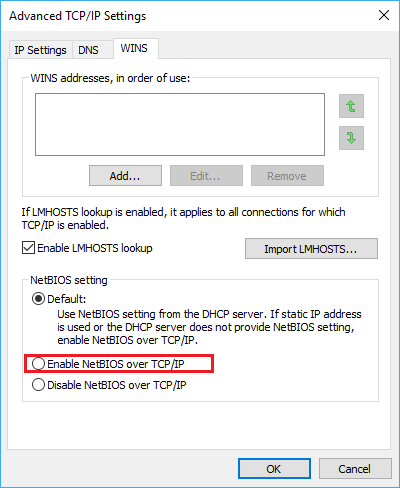
In addition, may I ask whether you access to the address/hostname locally or from other PCs?
Highly appreciate your effort and time. If you have any question or concern, please feel free to let me know.
Best regards,
Michael
Please remember to mark the replies as an answers if they help.
If you have feedback for TechNet Subscriber Support, contact [email protected]
Monday, April 15, 2019 9:47 AM
Hi,
Could the above reply be of help? If yes, you may mark it as answer, if not, feel free to feed back.
Best Regards,
Michael
Please remember to mark the replies as an answers if they help.
If you have feedback for TechNet Subscriber Support, contact [email protected]
Monday, April 15, 2019 10:37 AM
Damn Windows! I had to re-install the windows. Windows the most ignorant operating system that I've seen in all my life.
Tuesday, April 16, 2019 10:39 AM
Hi,
I'm sorry for that the information wasn't helpful for your issue.
I'll continue to pay attention for this thread, hope everything goes working. If I would have researched regarding your issue, I'll post here.
Meanwhile, if you need further assistance on this case, please feel free to let me know.
Have a nice day!
Best regards,
Michael
Please remember to mark the replies as an answers if they help.
If you have feedback for TechNet Subscriber Support, contact [email protected]