Note
Access to this page requires authorization. You can try signing in or changing directories.
Access to this page requires authorization. You can try changing directories.
Question
Saturday, July 22, 2017 9:15 PM
Hi good night i using visual studio 2017
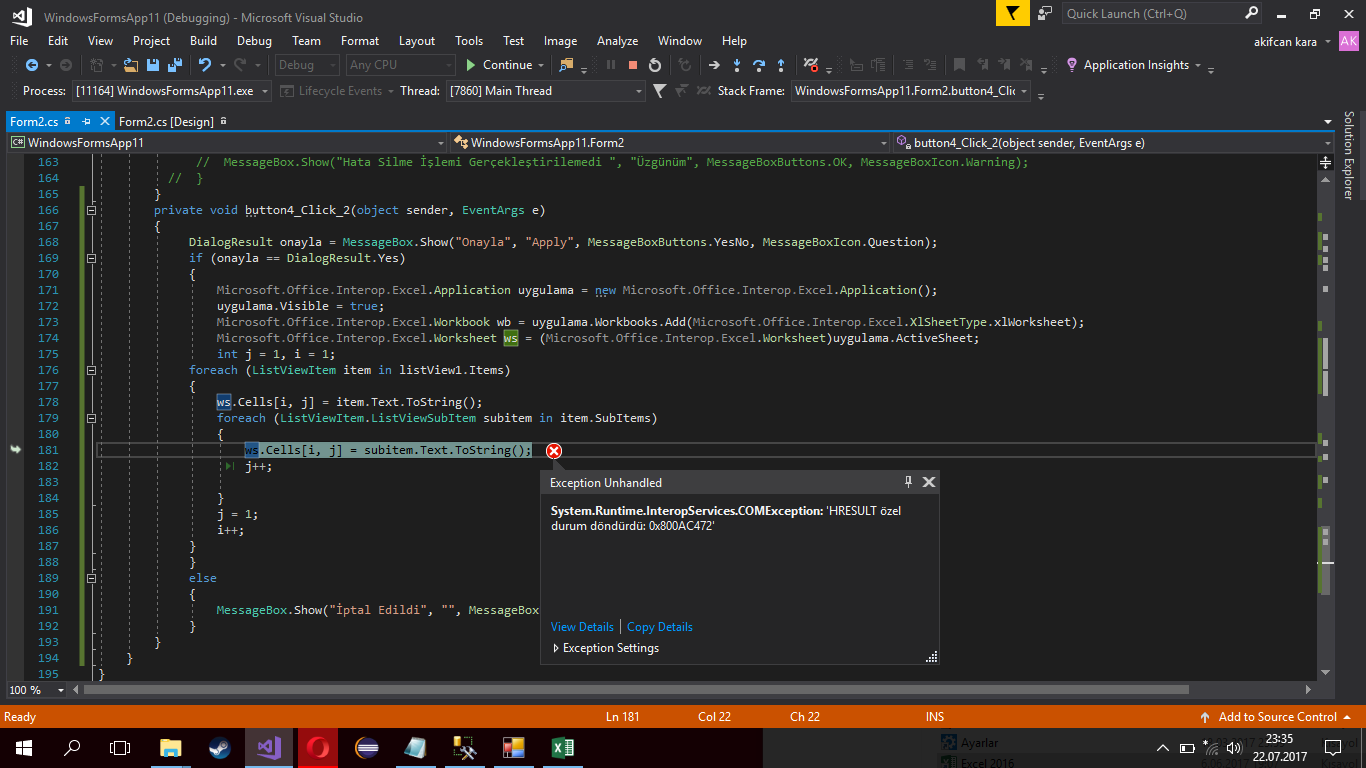
i do it simple application ı am trying to add excite data from listview but i take 0x800AC472 how i solved ?
System.Runtime.InteropServices.COMException: 'HRESULT özel durum döndürdü: 0x800AC472'
https://i.hizliresim.com/OLajJA.png
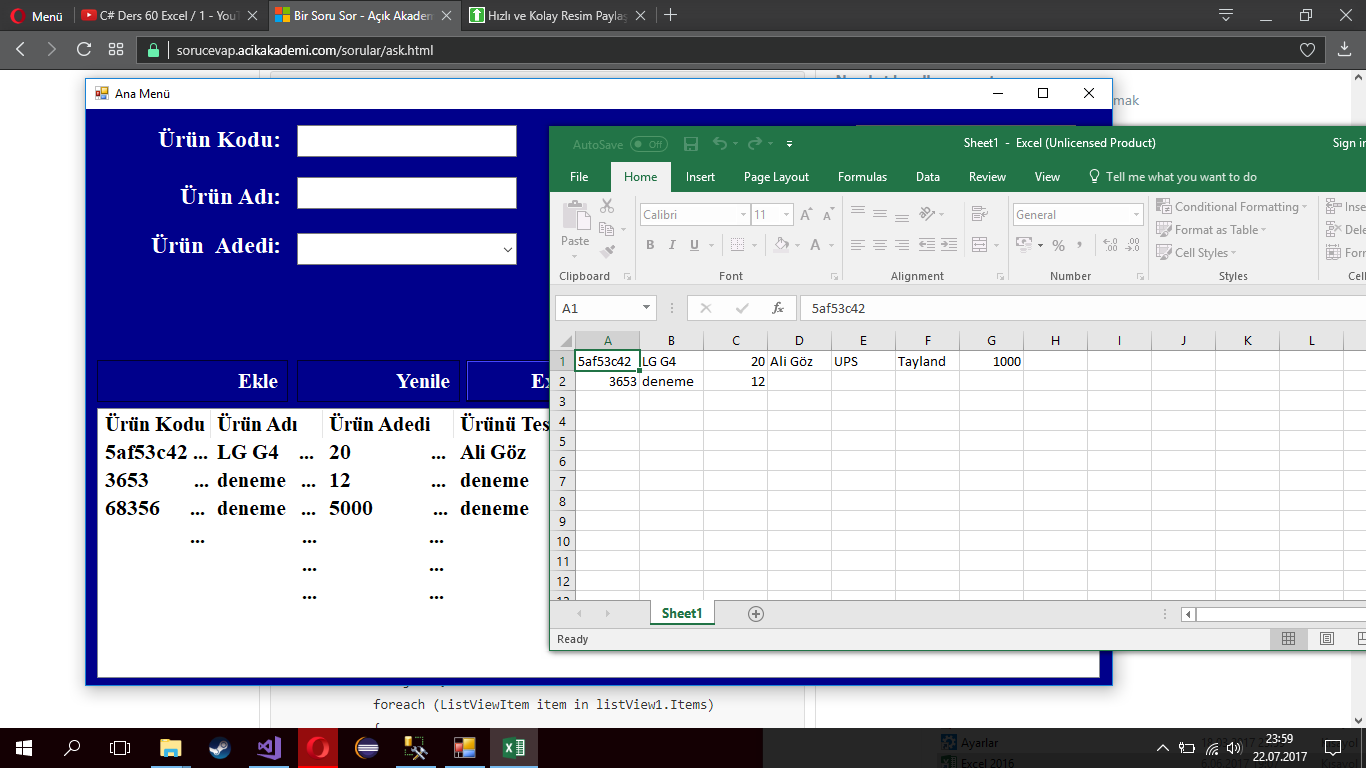
https://i.hizliresim.com/y3jknN.png
private void excelcagir()
{
Microsoft.Office.Interop.Excel.Application app = new Microsoft.Office.Interop.Excel.Application();
app.Visible = true;
Microsoft.Office.Interop.Excel.Workbook calismakitabi = app.Workbooks.Add(Microsoft.Office.Interop.Excel.XlSheetType.xlWorksheet);
Microsoft.Office.Interop.Excel.Worksheet calismasayfasi = (Microsoft.Office.Interop.Excel.Worksheet)app.ActiveSheet;
int i = 1;
int j = 1;
foreach (ListViewItem item in listView1.Items)
{
calismasayfasi.Cells[i, j] = item.Text.ToString();
foreach (ListViewItem.ListViewSubItem subitem in item.SubItems)
{
calismasayfasi.Cells[i, j] = subitem.Text.ToString();
j++;
}
j = 1;
i++;
}
}
sorry for my bad english
All replies (4)
Saturday, July 22, 2017 11:01 PM
You should set Value for cell value. Here is an pre-written example which demo's this.
private void Demo()
{
    string SheetName = "Sheet1";
    string FileName = System.IO.Path.Combine
        (AppDomain.CurrentDomain.BaseDirectory, "Demo.xlsx");

    bool Proceed = false;

    Excel.Application xlApp = null;
    Excel.Workbooks xlWorkBooks = null;
    Excel.Workbook xlWorkBook = null;
    Excel.Worksheet xlWorkSheet = null;
    Excel.Sheets xlWorkSheets = null;
    Excel.Range xlCells = null;

    xlApp = new Excel.Application();
    xlApp.DisplayAlerts = false;
    xlWorkBooks = xlApp.Workbooks;
    xlWorkBook = xlWorkBooks.Open(FileName);

    xlApp.Visible = false;

    xlWorkSheets = xlWorkBook.Sheets;

    for (int x = 1; x <= xlWorkSheets.Count; x++)
    {
        xlWorkSheet = (Excel.Worksheet)xlWorkSheets[x];

        if (xlWorkSheet.Name == SheetName)
        {
            Proceed = true;
            break;
        }

        System.Runtime.InteropServices.Marshal.FinalReleaseComObject(xlWorkSheet);
        xlWorkSheet = null;
    }

    for (int row = 0; row < dataGridView1.Rows.Count; row++)
    {
        xlCells = xlWorkSheet.Range["A" + (row + 1)];
        xlCells.Value = dataGridView1.Rows[row].Cells["Column1"].Value;
        Marshal.ReleaseComObject(xlCells);
        xlCells = null;

        xlCells = xlWorkSheet.Range["B" + (row + 1)];
        xlCells.Value = dataGridView1.Rows[row].Cells["Column2"].Value;
        Marshal.ReleaseComObject(xlCells);
        xlCells = null;
    }

    xlWorkSheet.SaveAs(FileName);
    xlWorkBook.Close();
    xlApp.UserControl = true;
    xlApp.Quit();

    ReleaseComObject(xlCells);
    ReleaseComObject(xlWorkSheets);
    ReleaseComObject(xlWorkSheet);
    ReleaseComObject(xlWorkBook);
    ReleaseComObject(xlWorkBooks);
    ReleaseComObject(xlApp);

    MessageBox.Show("Done");
}
private void ReleaseComObject(object obj)
{
    try
    {
        Marshal.ReleaseComObject(obj);
        obj = null;
    }
    catch (Exception)
    {
        obj = null;
    }
}
Please remember to mark the replies as answers if they help and unmark them if they provide no help, this will help others who are looking for solutions to the same or similar problem. Contact via my Twitter (Karen Payne) or Facebook (Karen Payne) via my MSDN profile but will not answer coding question on either.
VB Forums - moderator
Wednesday, July 26, 2017 2:55 AM
Hi Akifcan,
I failed to reproduce your issue, I tested your code and I didn't get error.
What's the value of subitem.Text.ToString() when the error occurs? If you repeat to test, will the error occur on the same subitem?
I suggest you use calismasayfasi.Cells[i, j].Value2 to set value of the cell.
It seems your office has not been activated, I suggest you activate your office or test on computer with activated office.
Besides, I also suggest you tell use your version of office and share use your project so we could try to reproduce your issue.
Best Regards,
Terry
Sunday, July 30, 2017 7:55 PM
Hi Terry
İ cant using value2 code line give error not in opsions
When the error occurs Subitem.Text.ToString () value 5af53c42 ListViewD key value
Best regards
Code line error
Code line error
When the error occurs Subitem.Text.ToString () value 5af53c42 ListViewD key value
When the error occurs Subitem.Text.ToString () value 5af53c42 ListViewD key value
Monday, July 31, 2017 10:53 AM
Hi Akifcan,
I have also tested with value 5af53c42 but still not error.
Since we have different results with the same code. I have to confirm with you some question.
Could you please tell me the testing result of the other suggestions? Have you tested on other pc or activated your office? What's your office version?
Thanks for understanding.
Best Regards,
Terry