Note
Access to this page requires authorization. You can try signing in or changing directories.
Access to this page requires authorization. You can try changing directories.
Question
Thursday, February 20, 2020 2:26 PM
Hi all
Two of our clusters are running on shared storage, through SOFS:
- hypervCluster1 - Windows Server 2016 - Running Virtual machines
- hypervCluster2 - Windows Server 2019 - Empty
- sofsCluster1 - Windows Server 2016
Both of our HyperV clusters have access to the same SOFS shares, granted through SCVMM.
This means that when we are doing Virtual Machine Migrations between the two clusters, SCVMM isn't initiating a storage migration, since both clusters have access to the same storage (SOFS Shares).
Question1:
Can anyone able to tell me if the ConfigStoreRootPath should be different on each cluster, or if we should keep this the same?
We have tried both, without live migrations working.
Question2:
Why isn't live migration working?
Events on source Hyper-V host (Hyper-V-VMMS-Admin):
- Virtual machine migration for 'vm01' failed because configuration data root cannot be changed for a clustered virtual machine. (Virtual machine ID ...)
- Virtual machine migration operation for 'vm01' failed at migration source 'hypervHost03'. (Virtual machine ID ...)
- Planned virtual machine creation failed for virtual machine 'vm01': %%2147778642 (0x80048052). (Virtual Machine ID ...).
- Virtual machine migration operation for 'vm01' failed at migration source 'hypervHost03'. (Virtual machine ID ...)
Events on target Hyper-V host (Hyper-V-VMMS-Admin):
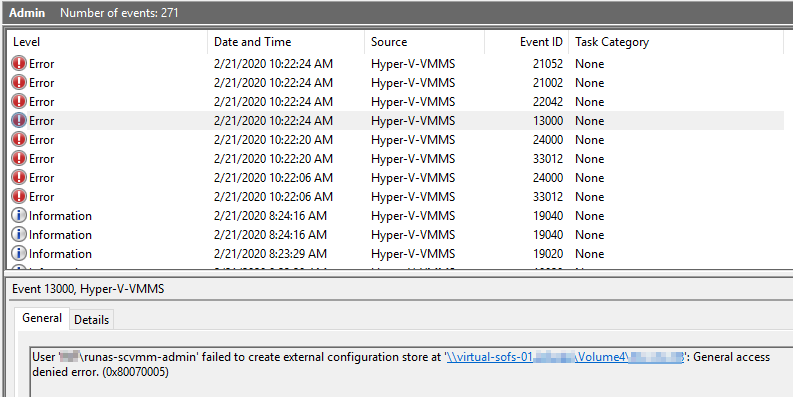
- User 'runas-scvmm-admin' failed to create external configuration store at '\sofs\Volume4\vm01': General access denied error. (0x80070005)
- Received invalid or corrupted data for a Virtual Machine migration.
- 'vm01' Failed to create Planned Virtual Machine at migration destination: General access denied error (0x80070005). (Virtual machine ID ...)
- You are using Kerberos authentication option for live migration which requires setting up credential delegation. The access denied might have been caused by incorrect credential delegation setup.
Thanks in advance for any replies!
All replies (8)
Friday, February 21, 2020 8:52 AM
Hi ,
>>this means that when we are doing Virtual Machine Migrations between the two clusters
What did you mean about doing VM migrations between the two cluster?
Did you mean that remove the VM from the cluster and then move the VM to the one of the servers in the new cluster? Please feel free to let me know if my understanding is wrong.
Were the two cluster in the same domain?
Please try to create a normal VM on one of the node and do not join to cluster ,then live migration to a node on the new cluster. See if this can be successful.
In addition, check the Delegation settings.
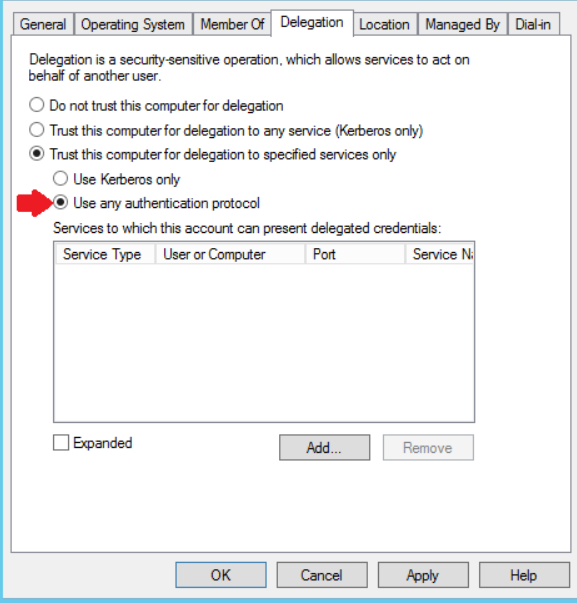
For your reference:
Set up hosts for live migration without Failover Clustering
Best Regards,
Candy
Please remember to mark the replies as an answers if they help.
If you have feedback for TechNet Subscriber Support, contact [email protected]
Friday, February 21, 2020 9:36 AM
Sorry that the information provided were insufficient.
- Both Clusters are in the same domain
- Both Cluster are using the same SOFS storage
- Both Clusters are connected to the same network
- Initiating Live Migration from SCVMM
- We have tried migrating when VM being migrated is:
- a) a cluster resource (in source cluster)
- b) not a cluster resource (in source cluster)
The error messages I am seeing on the source Hyper-V Host suggest that the virtual machine migration fails because configuration data root cannot be changed for a clustered virtual machine.
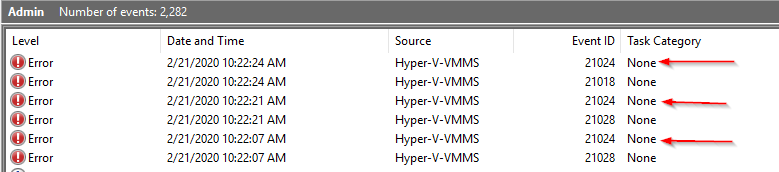
On the target Hyper-V host we are seeing a similar error:
Friday, February 21, 2020 9:52 AM
Hi ,
Thanks for the detailed information.
>>Initiating Live Migration from SCVMM
We have tried migrating when VM being migrated is:
a) a cluster resource (in source cluster)
b) not a cluster resource (in source cluster)
I noticed that you are running live migration from SCVMM. In order to narrow the issue, please try it from the Failover Cluster instead.
In Failover Cluster, remove the VM from the cluster and then move the VM to the one of the servers in the new cluster.
If it succeeds: The problem is in SCVMM.
If it still fails, please post the error message for us to do further troubleshooting.
Also check if you have given effective permission on SOFS.
Best Regards,
Candy
Please remember to mark the replies as an answers if they help.
If you have feedback for TechNet Subscriber Support, contact [email protected]
Friday, February 21, 2020 10:19 AM
Hi
This is very interesting!
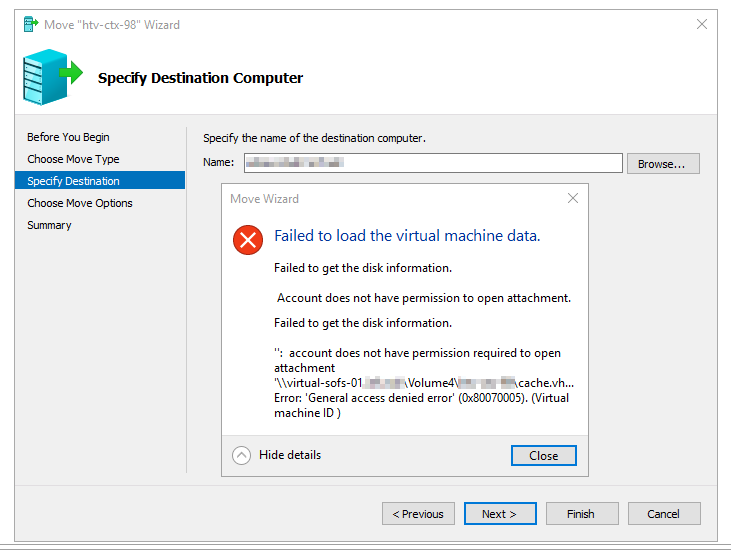
When trying to migrate from one HyperV host to another HyperV host using HyperV manager (after removing the Virtual Machine from the cluster using FCM), I get the following error (which is very similar to what I see in the event log):
Friday, February 21, 2020 10:29 AM
Hi ,
>>account does noy have permission required to open attachment
According to the error message, it seems like a permission related issue.
Please check if you have given effective permission on SOFS share.
Best Regards,
Candy
Please remember to mark the replies as an answers if they help.
If you have feedback for TechNet Subscriber Support, contact [email protected]
Monday, February 24, 2020 1:27 AM
Hi ,
Did you have any updates on this issue?
Please feel free to share us the current situation.
Best Regards,
Candy
Please remember to mark the replies as an answers if they help.
If you have feedback for TechNet Subscriber Support, contact [email protected]
Monday, February 24, 2020 8:27 AM
Hi
I unfortunately haven't had the time to look more into this yet, but I have checked effective permissions on the SOFS shares, and they all look good.
- All service accounts / accounts used = Full Control
- All hyper-v hosts = Full Control
Not sure where to continue to look.
Any advice is appreciated!
Tuesday, February 25, 2020 3:51 AM
Hi ,
Thanks for your updating.
I need to do more research on it. If you have any updates during this process, please feel free to let me know.
It is also appreciated that the other members in our forum can share their experience with us about this issue.
Best Regards,
Candy
Please remember to mark the replies as an answers if they help.
If you have feedback for TechNet Subscriber Support, contact [email protected]