Note
Access to this page requires authorization. You can try signing in or changing directories.
Access to this page requires authorization. You can try changing directories.
Question
Thursday, October 26, 2017 1:38 PM
Hello,
I'm currently getting this error when users try to login to Office365 using IPAD.
You cant access this application
IOS accounts needs permission to access resources in your organization that only an admin can grant
AADSTS90094: The grant requires admin permission
If i configure it manually by typing the password on the app and not at the ADFS screen, it works but IPad gets that error after authenticating with ADFS.
Anyone understand what the problem could be? Its affecting every IOS we have at the moment
All replies (12)
Thursday, November 2, 2017 1:51 PM ✅Answered | 1 vote
Hi,
We had the same issue with one user in our company today.
I'm not sure which of my steps did it, but now it is working.
The first thing I changed was in Azure AD and discribed at this Microsoft site:
Second thing I did, was to click on manual configuration at the users device and put "outlook.office365.com" in the server field.
After that the sync startet.
br, Michael
Thursday, October 26, 2017 2:11 PM
This is not an ADFS issue, as the error message suggest, it blocks at the Azure AD level (AADSTS90094).
It could be that the application you are using on your system is not capable of displaying the consent page or that the admin did not allow the user to access the workload you are trying to access to. You can have a look here to see how admin can give consent: /en-us/azure/active-directory/develop/active-directory-v2-scopes
Note: Posts are provided “AS IS” without warranty of any kind, either expressed or implied, including but not limited to the implied warranties of merchantability and/or fitness for a particular purpose.
Tuesday, October 31, 2017 2:03 PM
Did you manage to fix this?
/Frederik Leed
Tuesday, October 31, 2017 2:07 PM
Not Yet. I am planning to enabled modern auth of Office365. We turned this off a long time ago and from my research it appears the browser on IOS 11 is using OAuth. Will get back to you as soon as i get the approval to enabled it.
Wednesday, November 1, 2017 5:06 PM | 1 vote
I'll have to follow this thread. I too have 1 user out of 200+ reporting this error when setting up his iPhone.
Wednesday, November 1, 2017 9:01 PM
I'll have to follow this thread. I too have 1 user out of 200+ reporting this error when setting up his iPhone.
I too. Out of 10000+ clients. Only 1 that has this problem. and they're an exec assistant to top it off.
Thursday, November 2, 2017 6:01 AM
Following this post.
I just had a user who reported the same issue after changing their password - this appears to be the only post on the internet related to it. I've raised a Microsoft support ticket so will feedback anything i get of use.
Andrew
Andrew
Friday, November 3, 2017 4:37 AM
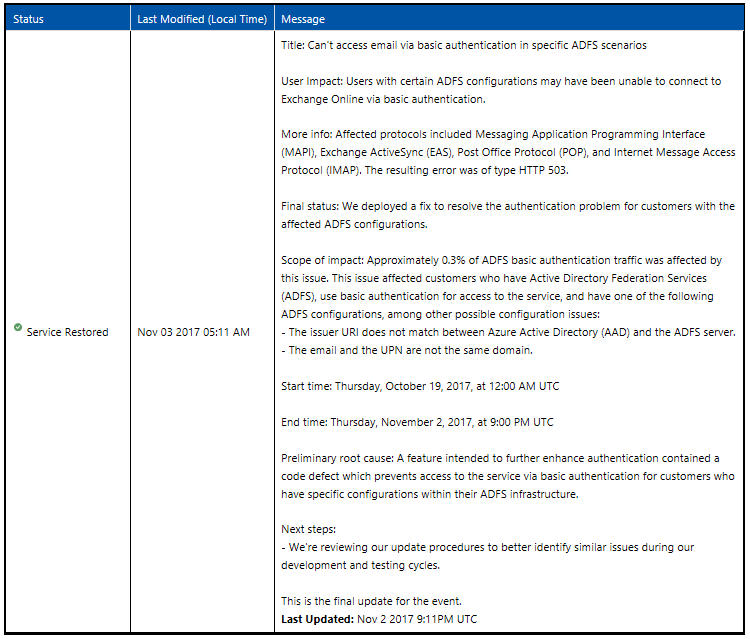
I was given this by a Microsoft Technician, it describes my issue where our email address and upn are on different addresses. Item is resolved by Microsoft and i can confirm the issue is resolved for me.
Issue begun October 19th
Andrew
Wednesday, November 29, 2017 8:03 PM | 3 votes
See here for an explanation of what iOS is doing:
EDIT: to approve this app, you can login as a global admin and paste in this constructed url:
https://login.microsoftonline.com/<TenantID>/oauth4/authorize?client_id=<AppID>&response_type=code&redirect_uri=<RedirectURI>&prompt=admin_consent
The "iOS Accounts" Application ID is f8d98a96-0999-43f5-8af3-69971c7bb423.
ref:
- https://stackoverflow.com/questions/45084430/how-do-i-grant-application-access-to-new-user-accounts-using-azure-active-direct
- https://www.admin-enclave.com/en/articles/office-365/410-resolved-ios-accounts-needs-permission-to-access-resources-in-your-organization-that-only-an-admin-can-grant.html
e.g.
This will allow a global admin to approve the "ios accounts" app. After clicking accept, you'll be asked how you want to open the oauth application, but you can ignore that. apple doesn't offer a valid redirect url off the iphone but you can confirm your success by visiting this site and looking for "ios accounts":
https://login.microsoftonline.com/baselinetechnologies.onmicrosoft.com/oauth4/authorize?client_id=f8d98a96-0999-43f5-8af3-69971c7bb423&response_type=code&redirect_uri=com.apple.Preferences://oauth-redirect/&prompt=admin_consent
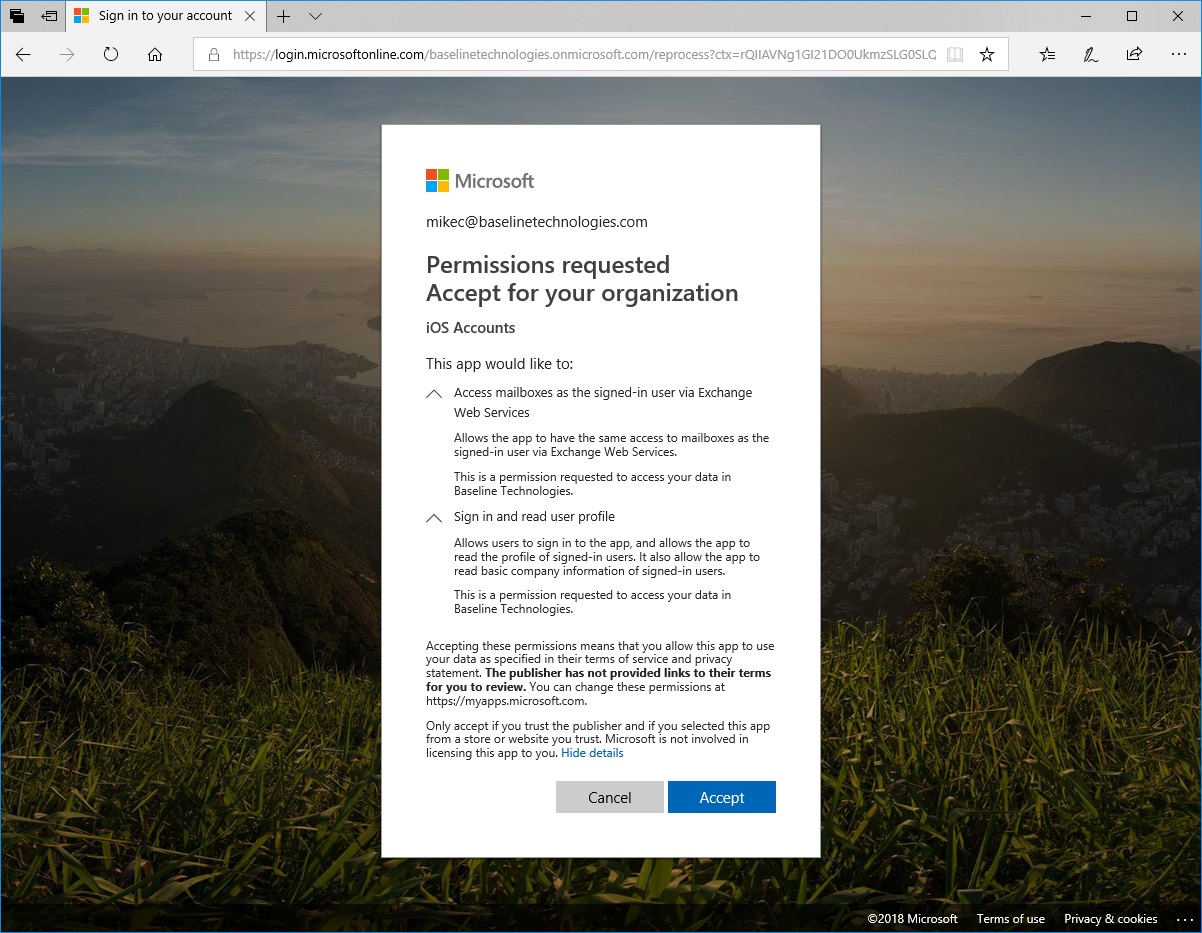
BTW, I learned the redirect uri by doing this after approving the app in another tenant, but be aware, this isn't a valid url off an iPhone, hence my comment about an invalid url

Mike Crowley | MVP
My Blog -- Baseline Technologies
Friday, January 12, 2018 12:00 PM
We had this issue. And it can be as simple as making sure the client is properly configured with "outlook.office365.com" as server.
Friday, January 26, 2018 10:41 AM
Yep. thia worked for me too. https://answers.microsoft.com/en-us/msoffice/forum/msoffice_o365admin-mso_exchon-mso_o365b/cannot-sign-in-to-office-365-exchange-with-azure/5a804d1f-c0e6-4f61-89b1-682077f2ed38?auth=1
Friday, February 9, 2018 9:34 PM | 1 vote
Above article should not followed, it will be open risk if we open it for all apps instead allow it only for iOS built app, follow below article :