Note
Access to this page requires authorization. You can try signing in or changing directories.
Access to this page requires authorization. You can try changing directories.
Question
Saturday, February 9, 2013 3:51 PM
I am trying to create iSCSI virtual disk on Windows Server 2012, I have added the "iSCSI Target Server" role, but when I try to create a virtual disk, I receive an error message stating "Unable to connect to the server"! Please help.....Thanks.
All replies (46)
Thursday, April 11, 2013 8:30 PM ✅Answered
How weird it is. I ran into the same issue however I was able to fix it. Funny thing is that the first server I installed Server 2012 it was Standard Edition and everything went well with creating iSCSI VHD.
Second server, it was Datacenter Edition (Thanks MSDN) and ran into the message:
The Microsoft iSCSI Software Target service could not create the virtual disk using device s:\iscsi\backup.vhd. The operation failed with error code 2147942560.
I said no way! So, I started to pock around thinking that my NIC Teaming was the issue, removed it, rebooted, nope! Then looking in the logs (you have two sets of logs, one for iSCSI and one on the local server tab, look for iscsi in the filter) I found the following:
In the logs, you should see a message similar to this one:
Status 0x00001069 determining that device interface \?\ROOT#WTLMDRV#0000#{2accfe60-c130-11d2-b082-00a0c91efb8b} does not support iSCSI WMI interfaces. If this device is not an iSCSI HBA then this error can be ignored.
I went in the registry, looked for 2accfe60-c130-11d2-b082-00a0c91efb8b** and deleted all the ones with ROOT inside (you have it a couple of times across the registry.
I restarted the server, logged in and tried to create a VHD file using the iSCSI tab et voila! Success!
I'm thinking that because of the issue on whatever hardware being recognized as an iSCSI HBA, the creation was failing (I don't have any iSCSI HBA) and the message "this error can be ignored", I say right, let's not ignore it!
Hope this helps.
Monday, February 11, 2013 7:19 AM | 1 vote
Hi,
When trying to create a VHD file, it will ask for choosing a server and a volume to create. Are you choosing the local server or another server in server pool?
As a workaround, please go to Disk Management to create a VHD file on a local volume, then right click and choose "Import iSCSI virtual disk" in iSCSI management page to see if it could be imported.
TechNet Subscriber Support in forum |If you have any feedback on our support, please contact [email protected].
Monday, February 11, 2013 8:44 PM
Hi and thank you for getting back to me, much appreciated.
I choose the local server and the local hard drive C:. It has 2.4GB free space...this is is just for testing at home....
I did create a virtual disk through "Disk Management" and it does the same thing.....frustrating.....why is it so difficult to create a virtual hard disk?!
Please see the screenshots attached. Thanks.
Kind regards,
Hasan
11 attachments — Download all attachments View all images Share all images
| iSCSI 1.jpg 13K View Share Download |
| iSCSI 2.jpg 65K View Share Download |
| iSCSI 3.jpg 39K View Share Download |
| iSCSI 4.jpg 36K View Share Download |
| iSCSI 5.jpg 44K View Share Download |
| iSCSI 6.jpg 38K View Share Download |
| iSCSI 7.jpg 46K View Share Download |
| iSCSI 8.jpg 49K View Share Download |
| iSCSI 9.jpg 56K View Share Download |
| iSCSI 10.jpg 56K View Share Download |
| iSCSI 11.jpg 50K View Share Download |
Monday, March 4, 2013 12:19 AM | 1 vote
This forum has contributors who use their spare time in order to try to help people who have run across some issues. It is not a Microsoft support forum. It is not necessarily that nobody wanted to assist, but what often happens is that there is not enough information in the original post. I see that you apparently tried to post some images of something, but you put them in an area that requires a username and password to get to.
Maybe if you gave the steps you followed, it would be more helpful. I've been using the iSCSI Target since the Windows Server 2003 days and have never seen your issue. I've been creating VHDs with Disk Management since Microsoft added that option and have never seen your issue. But without more information, nobody will be able to assist.
.:|:.:|:. tim
Monday, March 4, 2013 2:21 AM
I appreciate the reply, but I beg to differ on a few points. If someone cared to help, you did, they could have easily asked for more information. Besides, I have attached all the screen shots, not sure what you mean I have posted them in an area where user name and password are required.
I have spent hours if not days to solve this issue to the point that I just gave up. The odd thing is that there is no messages in any logs despite receiving one when creating a virtual hard drive.
I have used the disk management utility and created the .vhd file, but it does not help other nodes see the vhd.
I was VERY frustrated and that is why that I used the language I am not proud I have used, but that should easily suggest how frustrated I have become.
I, myself, have 18 years of experience in IT and wonder why such a simple task is almost impossible.....
I thank you for taking the time to respond.
Were you able to see the screen shots I provided?
Kind regards,
Hasan
Thursday, March 7, 2013 9:06 AM
Hi,
It asks for log on a gmail account when I try to view or download a screenshot. And as Tim said it should just working fine -- Have a try to disable Windows Firewall and any security program.
TechNet Subscriber Support in forum |If you have any feedback on our support, please contact [email protected].
Thursday, March 7, 2013 2:47 PM
The products works fine, your problem is unique. I have setup and used the iSCSI several times already.
The pictures you posted are just links to some GMmail location. We can NOT see them. If you will give us exact directions on what you do to the get the error (step-by-step) we can probably help you.
Also, I find it rude that you complain no one is helping you when you have never helped anyone else (0 points on your profile). We are IT techs and consultants, not MS employees on paid support.
C Shane Cribbs
http://www.georgiatechnologies.com
Thursday, March 7, 2013 5:27 PM
I thank you for the reply.
Here are the steps I have taken to create a .vhd, please see below, I appreciate all the help. Thank you.
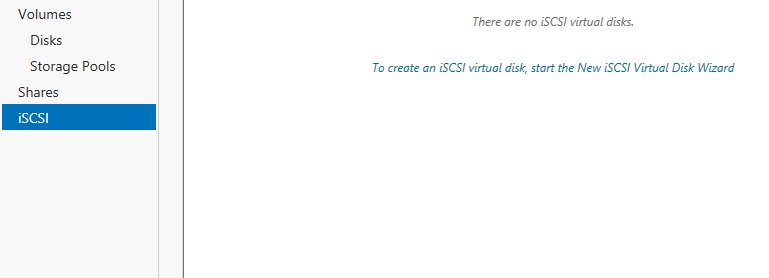
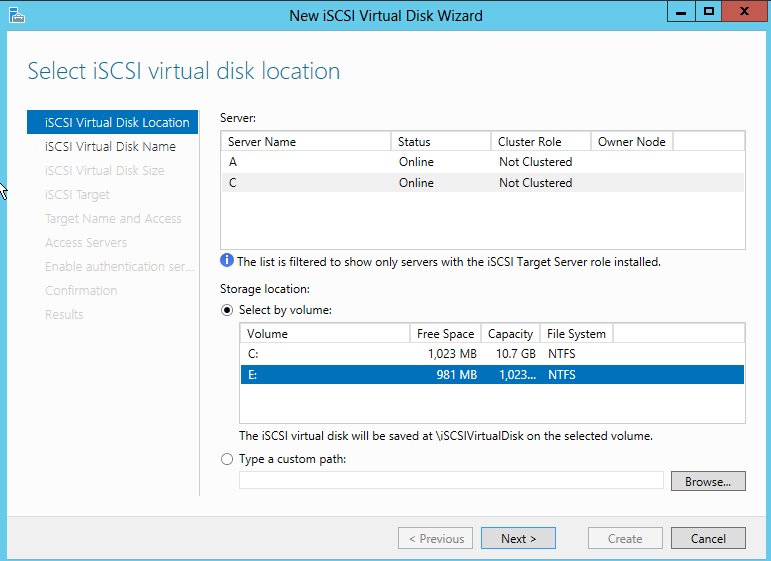
Thursday, March 7, 2013 5:28 PM
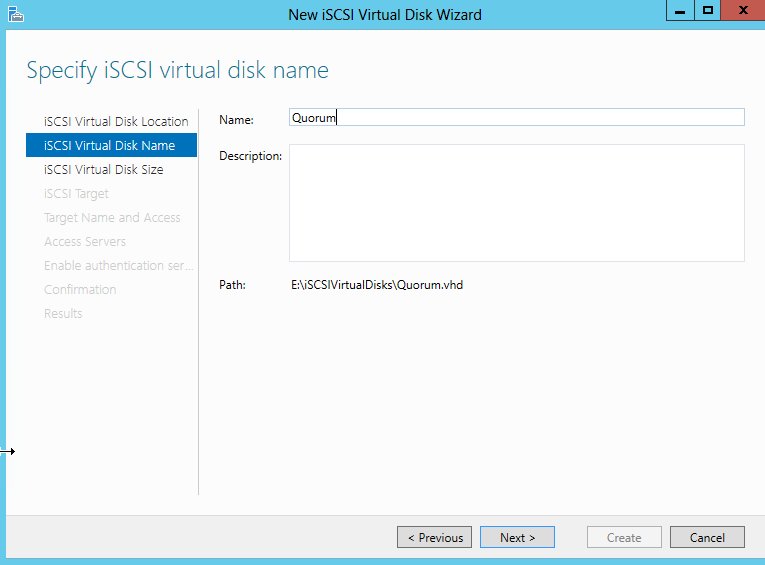
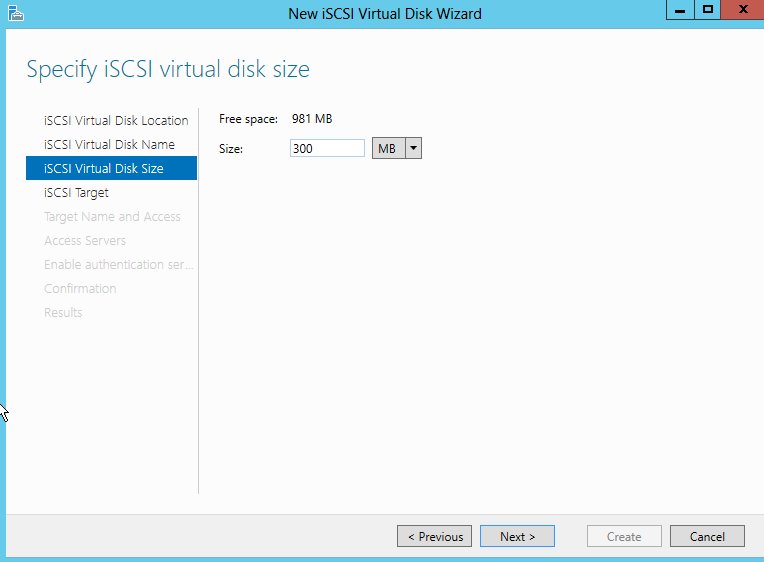
Thursday, March 7, 2013 5:28 PM
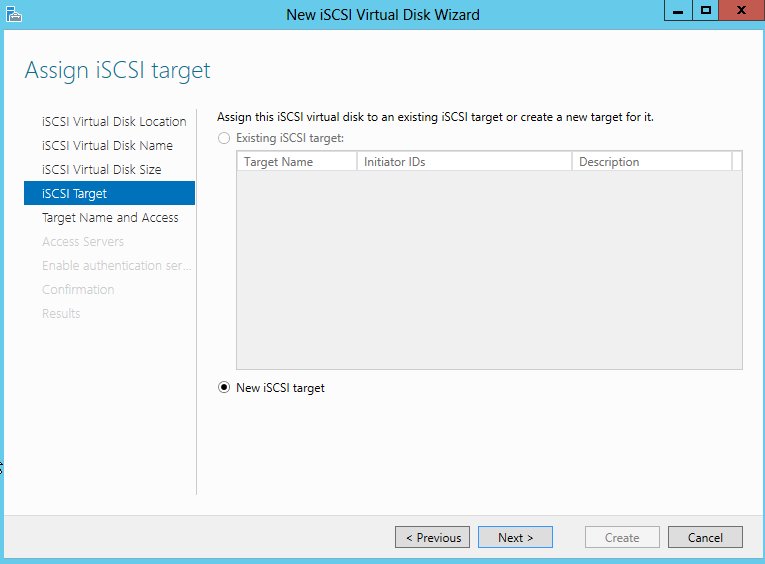
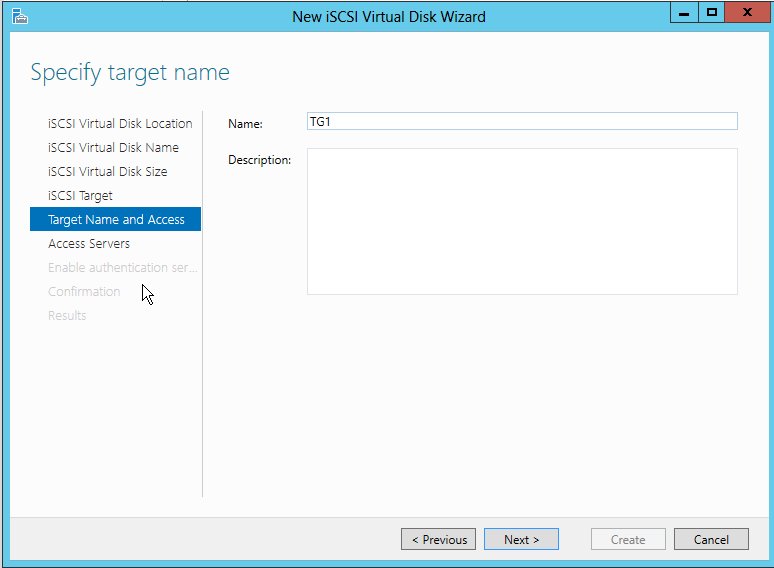
Thursday, March 7, 2013 5:30 PM
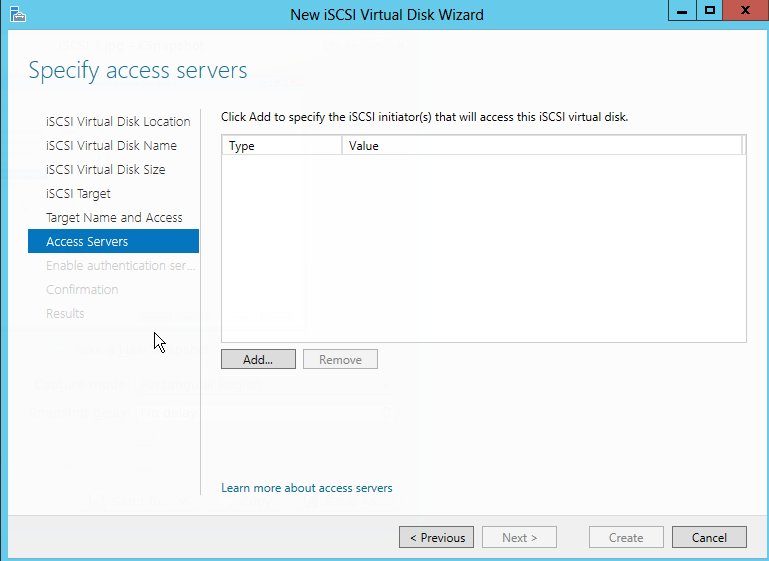
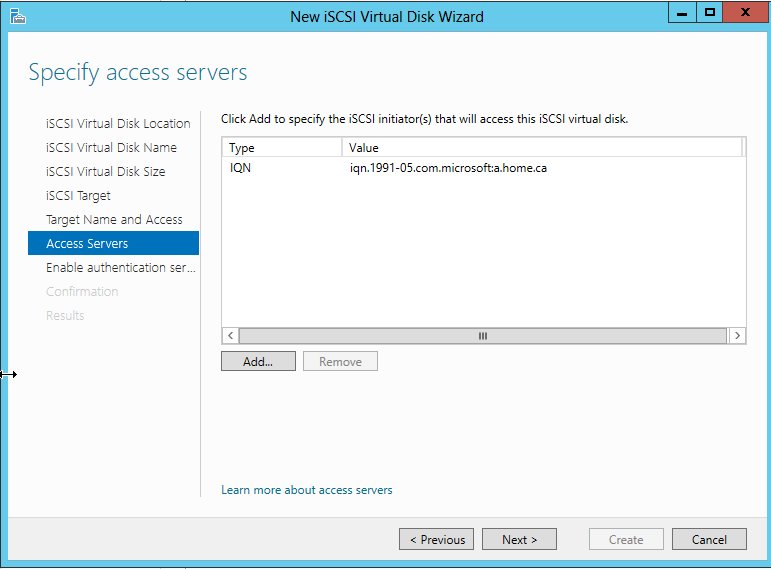
Thursday, March 7, 2013 5:30 PM
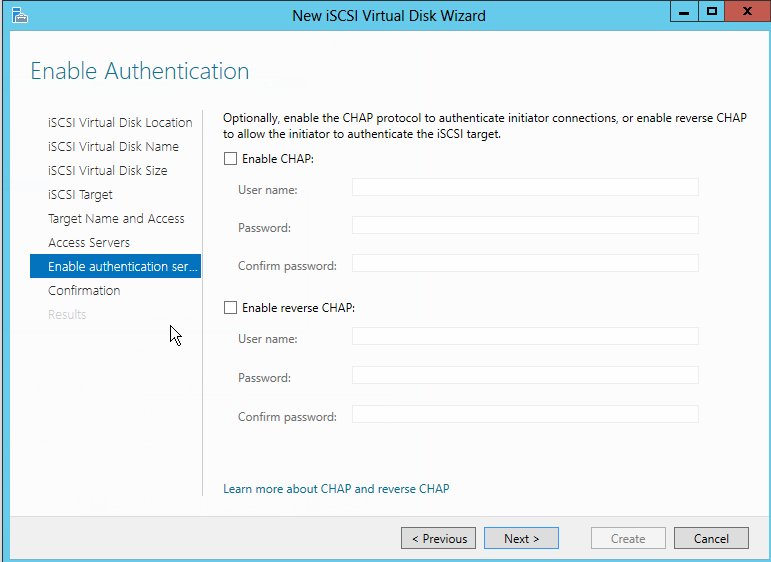
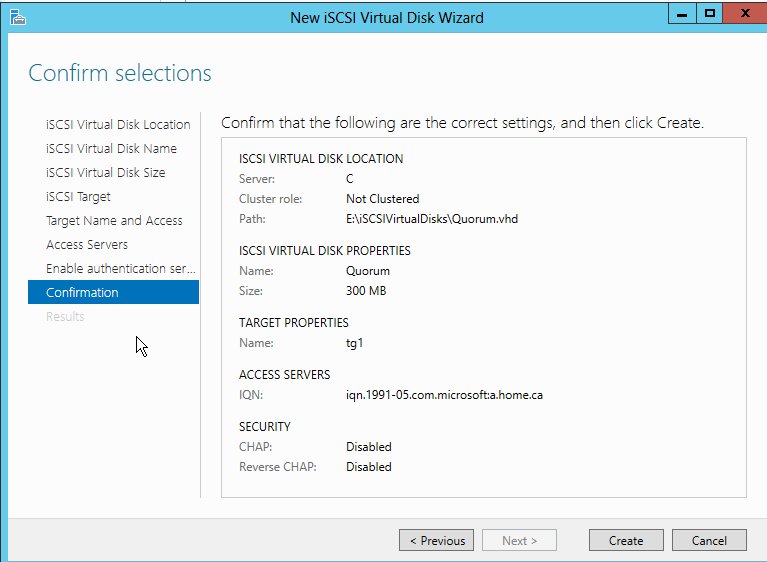
Thursday, March 7, 2013 5:30 PM
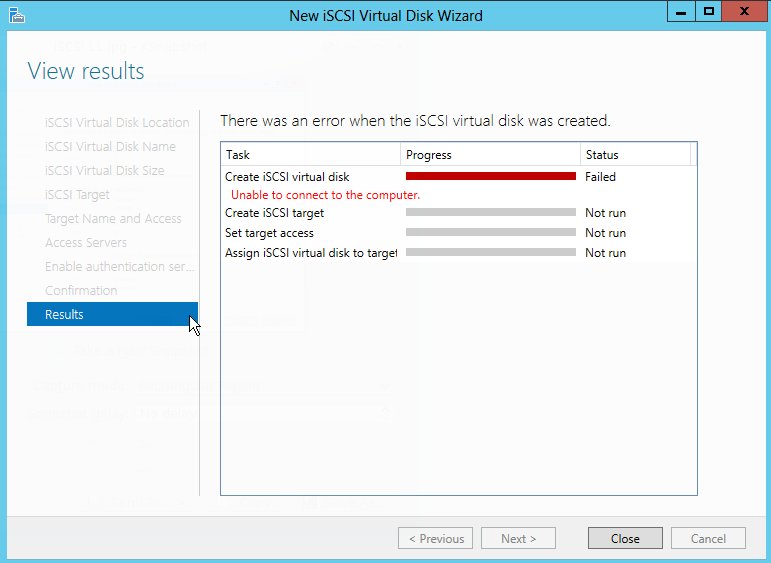
Thursday, March 7, 2013 5:31 PM
This all looks good. Did the creation work? If it works to create the disk and target, then you have to grant access to the target. By default no one has access to the targets you create. Maybe that's your problem??
Hope that helps!
C Shane Cribbs
http://www.georgiatechnologies.com
Thursday, March 7, 2013 5:37 PM
Hi again,
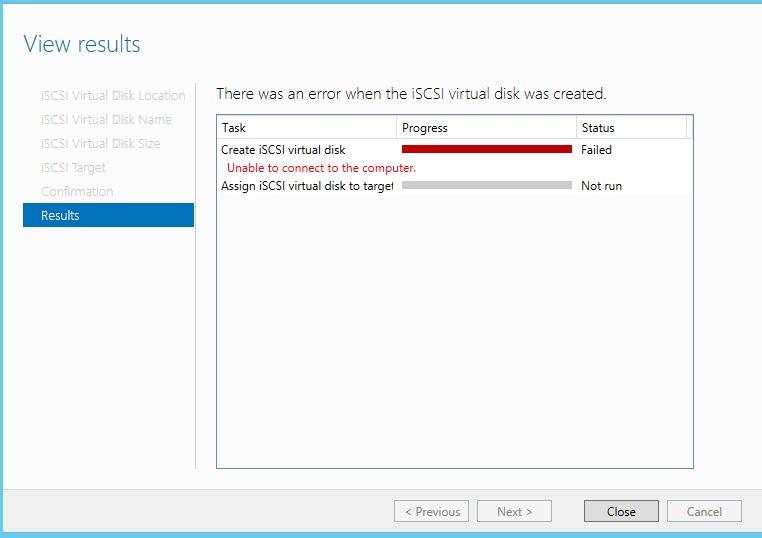
No, it did not work as you noticed that at the end of the process, it said "Unable to connect to the computer". I am perplexed as to why it could not connect to the computer, it is a local computer. I tried this on 4 brand new servers, they all behaved in a same manner......strange to say the least UNLESS I am doing something really wrong.
Thanks again for trying to help, much appreciated.
Thursday, March 7, 2013 5:42 PM
Oh, sorry. Those pics hadn't posted when I replied (or I hadn't refreshed). I don't see anything crazy. Trying running through this post to see if you find any enlightenments:
C Shane Cribbs
http://www.georgiatechnologies.com
Thursday, March 7, 2013 5:54 PM
No problem, it would not allow me to insert more than 2 pictures at a time, hence multiple posts.
I will surely go through the link provided, thank you.
Thursday, March 7, 2013 6:19 PM
I thank you for the link. I have followed the exact instructions and sadly the very same result. I find it quite strange that there is NOTHING in the "Event Viewer" indicative of a problem on the system. Thanks.
Thursday, March 7, 2013 6:42 PM
Are these machines in a domain? What are they using for DNS? With four servers doing this it almost has to be a configuration issue that you seem to be repeating. What is the hardware and network setup?
C Shane Cribbs
http://www.georgiatechnologies.com
Thursday, March 7, 2013 6:47 PM
Sorry to ask more questions but can you answer the following:
- Is the iSCSI Target Server service started? I take it you had no errors installing the role?
- What is the E: drive, is it a USB disk? Is it a VHD already?*
- If you have already created the VHD did you ensure it was a fixed size disk?
- Have you looked for the temp log file? These are saved for most tasks run in 2012 and provide much more detail, as you say there's nothing in the event log.
I've always used this excellent article when creating iSCSI LUNs: http://blogs.technet.com/b/filecab/archive/2012/05/21/introduction-of-iscsi-target-in-windows-server-2012.aspx
*I believe USB & VHD disks are unsupported as targets for creating iSCSI LUNs, however I haven't double checked this so apologies if someone from MS now says i'm wrong!
Monday, March 11, 2013 2:40 AM
Hi,
I noticed that you chose "Server C" in server pool when trying to create the VHD, so is that the local server or a server on network? From the error it is more likely a remote server which failed to create files onto it. Also I'm trying to involve someone familiar with this topic to further look at this issue. There might be some time delay. Appreciate your patience.
TechNet Subscriber Support in forum |If you have any feedback on our support, please contact [email protected].
Monday, March 11, 2013 3:36 AM
Hi,
True, I was on server C when I attempted to create the .vhd. That is why that I am quite surprised to get that message "Unable to connect to the computer". I appreciate your help.
This error message basically has stopped me doing my project, setting up a cluster.....I do not have money to pay Microsoft for support....Thx.
Monday, March 11, 2013 3:41 AM
I am so sorry for the late response, for some reasons, I did not see your posting...I apologize.
- Is the iSCSI Target Server service started? I take it you had no errors installing the role? Yes
- What is the E: drive, is it a USB disk? Is it a VHD already? E: Drive is a virtual drive I created using the Disk Management Utility.
- If you have already created the VHD did you ensure it was a fixed size disk? Yes, I did
- Have you looked for the temp log file? Not sure where the temp log is, I am sorry.
I will happily check the article you suggested, appreciate our help.
Wednesday, March 13, 2013 1:20 PM
I have the same problem. "unable connect to computer" during creating virtual iscsi disk or importing vhd disk. Event Log is empty.
I think where the problem is. I installed new system Win2012 STD then I created new iSCSI Target and new vhd iscsi disk all worked fine. Then I added featue " Fail Over Cluster" and joined server to new cluster. My target and vhd dissapeared from GUI. After destroying clustrer and restaring server iscisi target reappeared. I seems that you can't have iscsi target( non clustered ) and cluster on the same machine but maybe i'm wrong. Does anyone know if this is possible to have iscsi ( non clustered ) target on machine joined to cluster?
Thursday, March 14, 2013 7:38 AM
Apparenly the iSCSI server in the server manager wants to know the computer name. I haven't figured out how to set it for the system manager, I was able to make my iscsi target work by setting it up in PS and by adding computername for each command, as follows:
New-IscsiVirtualDisk C:\iSCSIVirtualDisks\backup.vhd –size 40GB -computername <server>
new-IscsiServerTarget <target name> -initiatorId dnsname:<name1.domain.com>, dnsname:<name2.domain.com>, ipaddress:<xx.xx.xx.xx> -computername <server>
Add-IscsiVirtualDiskTargetMapping <target> C:\iSCSIVirtualDisks\backup.vhd -computername ws2012
It did not work if I used the domain name as computername.
Here are more PS commands:
http://technet.microsoft.com/en-us/library/jj612803.aspx
Update:
I was able to set up iSCSI target from Server Manager after i removed the server from my domain. I did a fresh install and didn't join the domain, and it worked.
Thursday, March 14, 2013 10:54 PM
Hi,
I appreciate taking the time to reply. I was able to create the .vhd using the Powershell commands, but when trying to assign iSCSI Virtual Disk, I encountered an issue using the GUI in Server Manager (Unable to connect to the computer). I used the Powershell command to create a target (TG1), but was not able to assign the .vhd to the TG1. Although it created the target TG1, but it is not listed when using the GUI in Server Manager. Not sure where to go from here. I thank you once again trying to help. :)
Friday, March 15, 2013 11:22 AM
Saman,
from what I can see you are trying to create a VHD (Quorum.vhd) on a VHD drive (E:) - this is unlikely to work and if it does the performance will be poor. Once you have formatted a VHD file, as you have done with E:, it is not possible to add it to an iSCSI target - you need to let the wizard create the unformatted VHD file for you on C:. Alternatively if you create an unformatted VHD file using PowerShell on C: then you should be able to point your iSCSI target at it.
Sheff
Friday, March 15, 2013 2:52 PM
Sorry, somehow missed this message.
The servers are in the same domain. They are using a domain controller that happens to be server C as a DNS Server. I can ping the servers and access them by simply using the server name, etc....
These servers are all virtual servers running on a Linux box. I am using a SONY VAIO quad, 4GB RAM, i5 Intel chip.
Friday, March 15, 2013 3:18 PM
Hi there - This is a quick set up for configuring a simple cluster, this is not an actual clustering in a production environment....simply trying to see how to set up a cluster in Windows Server 2012 environment.
I have provided the screen shots after trying to make the Wizard create a simple .vhd. As you see, it gives the same illogical error message of "Unable to connect to the computer"!. Do you not find it weird as I am on the same server, I can ping server "C" from anywhere.......Thank you.
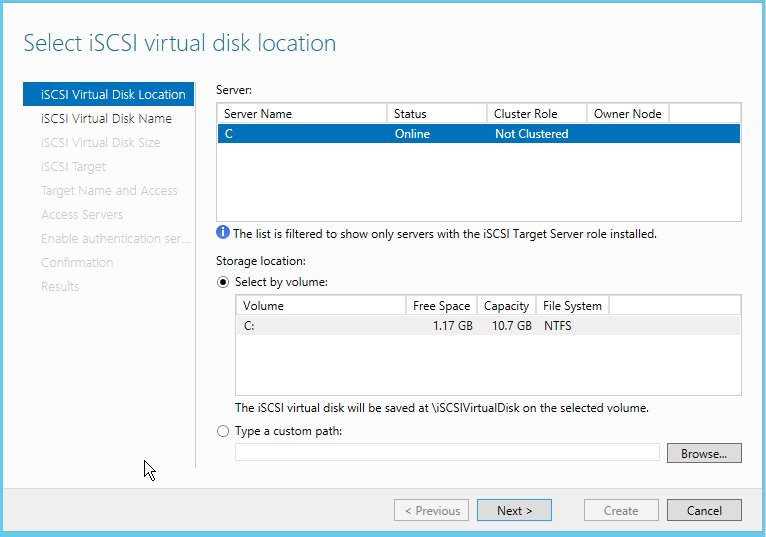
Saturday, March 16, 2013 10:26 AM
I know you probably can't do it, but, if you can, downgrade to S2008R2 and you won't have these problems. We use S2008R2 to make NAS devices and have NO problems. Stick with some that doesn't emulate Apple.
"Saman111" wrote in message ...
Hi there - This is a quick set up for configuring a simple cluster, this is not an actual clustering in a production environment....simply trying to see how to set up a cluster in Windows Server 2012 environment.
I have provided the screen shots after trying to make the Wizard create a simple .vhd. As you see, it gives the same illogical error message of "Unable to connect to the computer"!. Do you not find it weird as I am on the same server, I can ping server "C" from anywhere.......Thank you.
Tomás Mason
Saturday, March 16, 2013 4:14 PM
Thank you. I have already done that on Server 2008(R2) and it worked very well. Wanted to try in Server 2012. Microsoft has issues in Server 2012, for example you can not install Exchange Server 2010 on a clean fresh install of Server 2012. Microsoft needs to clean up its acts....really. I have been using Linux on my laptop for years and could not be happier.......did not have to spend a dime for heaven sake......:)
Thursday, March 21, 2013 4:50 PM
Hi Guys
I'm fairly new in here posting :) and Im visiting this forum very often, I think I found solution for this problem :) had the same error massage while I was trying to import vhd, then I found this forum :) and didnt get an answer, so I started to think :) it took me half an hour to solve it :) My Storage ComputerName was longer then NetBIOS name and NetBIOS name cut the last letter from my computer name and i came up with an idea to do in powershell a test :) Import-IscsiVirtualDisk -ComputerName abcd-efg-storag the oryginal name was abcd-efg-storage :) and it worked :) I tried to remove this disk after and I couldnt cos still my computername was abcd-efg-storage and it gave me the same error couldnt connect to the computer, eventualy I changed the name of the computer to abcd-efg-storag and it started to work in GUI as well. Simple as that :)
Cheers Guys
Hope you find this helpful
Peter :)
Thursday, March 21, 2013 7:07 PM
Hi Peter,
Thank you for your willingness to help. My server's name is "C", I am not really sure what you mean by "My Storage ComputerName"? Would you be kind to elaborate please? Thanks.
Thursday, March 21, 2013 9:29 PM
hmm
ComputerName is your Computer when you are naming it. Storage, as I presume you are trying to create cluster doesnt have to be joined to the domain. I think this is a bug in windows 2012. However your ComputerName is C mine was 16 characters abcd-efg-storage NetBios cut me this name to abcd-efg-storag and thats how iscsi see your computer not by the oryginal name which is something wrong with windows cos on 2008R2 everything was fine. I'm before migration my cluster to 2012 and I was testing iSCSI Target. I get this same error message as you. I go to powershell and I tried in powershell this shorter NetBIOS name, command I gave you in previous post. But Im still concern why you can not create this disk if your name got only 1 character "C". Try to use this shell command or create iscsi disks on 2008R2 and then import like me. For me it is working, maybe name your computer just STORAGE and try. I wasnt creating over 2012 iscsi disks. I'll try with your name "C" on monday cos Im off for the rest of the week, post in here what is your progres cos Im very cureas. ill be monitoring this forum tomorow cos now Im going to sleep :)
RGDS
Peter
Friday, March 22, 2013 4:28 AM
Peter, I know what "Computer name" is. At the DOS prompt, one can simply type "hostname" and get the computer name.
I have used the Powershell command and created the virtual disk, but when using the GUI, I try to add it to the Target, I have created using Powershell, it just can not connect to the computer and says "Unable to connect to the computer"! I thank you again for consistently willing to help, much appreciated.
Thanks.
Friday, March 22, 2013 8:44 AM
what Im trying to say all the time is, that the problem is in GUI itself related to the computername, the best solution is to create a vhd file in 2008r2 and import it or when you create iscsi target in 2008r2 export all iscsi target settings to the xml file and then import that xml file in 2012 that works for sure.
These are the steps to export and import on 2012 iscsi target settings:
In Windows Server 2012, the Microsoft iSCSI Software Target and Microsoft iSCSI VDS/VSS providers are available as a built-in sub feature of the File and Storage Services Role.
To resolve this problem, the settings from earlier versions of Microsoft iSCSI Software Target must be manually imported and the Microsoft iSCSI Software Target should be un-installed from down level operating systems before performing the upgrade to Windows Server 2012.
The following steps can be used to export and import the Microsoft iSCSI Software Target 3.3 configuration settings:
Open an elevated Windows PowerShell prompt, and change directory to C:\Program Files\Microsoft iSCSI Software Target
Make sure your ExecutionPolicy can run scripts. You can temporarily set the execution policy to unrestricted for just the current session, using the following command: Set-ExecutionPolicy Unrestricted
Run the following command to export the Microsoft Software Target 3.3 configuration settings:
.\iSCSITargetSettings.ps1 –Export –Filename C:\temp\iSCSISettings.xml
Note: For a cluster, run the script on each node in the cluster. You can also run the script remotely from another server where target is installed.
Uninstall Microsoft iSCSI Software Target 3.3 and then upgrade the operating system to Windows Server 2012.
After the upgrade, open an elevated Windows PowerShell prompt and then set the execution policy to unrestricted:
Set-ExecutionPolicy Unrestricted
Enable the Microsoft iSCSI Software Target feature using the following command:
**
Add-WindowsFeature FS-iSCSITarget-Server -IncludeManagementTools**
From the PowerShell prompt, change the directory to C:\Windows\System32\WindowsPowerShell\v1.0\Modules\IscsiTarget
Run the following command to import the Microsoft Software Target configuration settings:
.\iSCSITargetSettings.ps1 –Import –Filename C:\temp\iSCSISettings.xml
Note that the script does not migrate your VHD files or CHAP secrete, which users should migrate separately.
In this way you can easily make your vhd file over 2008r2 create iscsi target with those disks and then export those settings into xml file and import over 2012 and it works.
That is my plan to migrate storage from 2008r2 to 2012 for tommorow :)
One way or another you will reach your goal if you combine that whole story together, somehow :)
Hope you can find this helpful
Peter :)
Friday, March 22, 2013 8:49 AM
O
One more thing I remaind myself, when you install the iscsi target sever role from shell and you include management tools that helped as well I think, so uninstall your role and install again like this: Add-WindowsFeature FS-iSCSITarget-Server -IncludeManagementTools
Sunday, March 24, 2013 7:04 PM
Peter, THANK YOU so much for trying to help.
Why does Microsoft make it so difficult? I have a clean and fresh install of Windows server 20012 and why should the GUI or the Powershell commands fail to create a simple .vhd file and allow me add it to the existing or new iSCSI target?! I am perplexed....
I have done all that in Windows 2008(R2) and it worked like a charm, isn't the idea of making things better lie behind coming up with a new product?! If so, why server 2012 is failing us!? Thx.
Saturday, April 13, 2013 2:39 PM
Good morning,
THANK YOU so much for replying back and good digging. I am very grateful that you brought this to my attention, appreciated it very much.
My issue is resolved as well, once again "THANK YOU".
Cheers :)
Saturday, May 4, 2013 11:07 PM
GUI calls don't pass through computer name to system functions. It's a bug. NetBIOS match or not... above example succeeded due to parameter inclusion.
I too am emulating Server 2012 environment in a virtual dev config - hit my head there too. At this time, I have 4 servers (AD, SAN, Cluster1, Cluster2) and am trying to make a ISCSI target available from SAN. I am using VirtualBox, but this is OS not host related. Trial and error led me (for a whole Saturday) to the point where I have, on VM_SAN, a iSCSI target (by following the disk creation up with allocating it to a new target) like so:
Emulated in powershell: Executed on VM_SAN
emulate if you will:
New-ISCSIVirtualDisk -path E:\iSCSIVirtualDisks\Space.vhd -size 2gb [This generates Computer Not Found error]
New-ISCSIVirtualDisk -path E:\iSCSIVirtualDisks\Space.vhd -size 2gb -computername VM_SAN
New-ISCSIServerTarget -TargetName Space -InitiatorIDs "IQN:iqn.1991-05.com.microsoft:vm-primary.v.dev.com,IQN:iqn.1991-05.com.microsoft:vm-secondary.v.dev.com" -ComputerName VM_SAN
Add-ISCSIVirtualDiskTargetMapping -TargetName Space -Path E:\iSCSIVirtualDisks\Space.vhd -ComputerName VM_SAN
Here I sit with the target, but no client can see it...
When trying to connect (from VM_Primary, or VM_Secondary, or VM_AD, or VM_SAN) I get "target name is not found or is marked as hidden from login"
Connect-IscsiTarget -NodeAddress iqn.1991-05.com.microsoft:vm-san-space-target
Saturday, August 17, 2013 6:51 PM
Hi there,
I thank you again for your response......
I am not able to locate the logs you are referring to, would you be kind to let me know how I can find the logs you mentioned?
Thank you
Saturday, February 1, 2014 12:20 AM
Sorry to open this thread back up but I am having a similar issue. I am running VirtualBox and I've created a server with the iSCSI Target Server feature and have attempted to create a iSCSI virtual disk and I am getting the same error. I've created a 200 GB virtual hard disk and attached it to iSCSI target server. I go through the iSCSI virtual hard disk wizard and everything works until the end. The hard disk image file that I named in the wizard gets created on my 200 GB vdi. I am unable to disable or remove the hard disk image file via the gui and/or PowerShell. I receive the same error as the original poster mentioned. I was able to set this up fine in Hyper-V. I am wondering if it has something to do with the vdi?
Tuesday, April 22, 2014 6:39 AM
i had the same problem, finally i got the solution for it.
the mistake i have is that i used to create my test lab domain as "K.com" and DC as "VC" which is less than 3 characters.
later i observed this , change my domain to "contoso.com" and DC to "vcenter"
Try this solution, if you still have this probem..
Wednesday, May 14, 2014 2:34 PM
All,
we ran into the same issue as you - after spending a lot of time together with Microsoft (thanks to Bernd), we were able to find the root cause of this issue.
I'm sure, you have a domain name or a computer name with only one label. :-) This is a bug in the iSCSI-Powershell command.
Please take notice of the released hotfix in KB2953557 (http://support.microsoft.com/kb/2953557/en-us) and install the hotfix on your server.
Cheers,
Tom
Saturday, July 8, 2017 10:52 AM | 1 vote
Nothing on this thread helped me fix the gui.
The PS did work, but only when i set computer name to IP address of the server.
turns out there is a bug. your server can't be called "server" renaming the server fixed it for me.
thanks to this thread for helping me find the answer.
Friday, August 18, 2017 12:56 PM
Thank you!
I named my lab server as Server for convenience, and I cannot figure out why I can't create iSCSI virtual disk.
Renaming the server name to something else worked.