Note
Access to this page requires authorization. You can try signing in or changing directories.
Access to this page requires authorization. You can try changing directories.
Question
Wednesday, January 28, 2015 8:24 AM
How can I move mailboxes of users in a corrupted database.
I have tried many things:
1. repairing the database by eseutil /p It says corrupted database file
2. I could not mount the database and it says "Corrupted file".
3. I tried to move the mailboxes of this database by "New local move request".. I got this error
"Mailbox database '43c78979-9331-414a-a0e7-a839c56ce708' is offline."
Now I want to move the mailboxes to another database and deleted this corrupted database. Is there a way to do this without losing any mailboxes???
All replies (13)
Monday, February 2, 2015 8:35 AM ✅Answered
Thank you guys for your replies.
Here you go what I did:
1. I "disabled" every mailbox which is related to this corrupted database in Exchange 2010.
2. I started to create each mail box again from scratch and put it in another database (working one).
3. (In client side) when I open outlook, it asked me
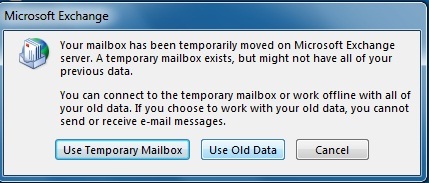
so I started with "Use Temporary Mailbox" and I backed up the old mails.
4. Then I deleted the email from Account settings and built it again.
5. (Is optional) if I want my old emails, I can import them from backup.
That is what I did to solve my problem. I hope I was clear.
Wednesday, January 28, 2015 8:59 AM | 1 vote
If the Database is corrupted, then you would need to restore from backup if Eseutil /p doesn't help.
Other things you may consider if you don't have Exchange Backup is:
1. If Outlook is in Cached Mode then Export Data to PST. you will have to do it for all mailboxes.
2. Create a New Database and Re-home all mailboxes to new databases and import PSTs
to Re-home all mailboxes to another database you can run the commands below:
Get-Mailbox -Database <Source/CorruptedDatabase> | Set-Mailbox -Database <NewDatabase>
Please note that after running this command you may have to reconfigure profile in case if outlook clients are Outlook 2003. For Outlook 2007 and 2010 and later you may close and reopen outlook.
For more information about Re-homing Mailboxes to another database refer to the link below:
http://blogs.technet.com/b/nawar/archive/2010/05/03/what-happened-to-configurationonly.aspx
Please only follow this if you feel comfortable and if you are aware of what you are doing. If you have any doubts then i would recommend you open a ticket with Microsoft.
Pavan Maganti ~ ( Exchange | 2003/2007/2010/E15(2013)) ~~ Please remember to click “Vote As Helpful" if it really helps and "Mark as Answer” if it answers your question, “Unmark as Answer” if a marked post does not actually answer your question. ~~ This Information is provided is "AS IS" and confers NO Rights!!
Wednesday, January 28, 2015 9:02 AM | 1 vote
after running repair did is your database in clean shutdown state ?
can you run Eseutil /mh "MailboxDatabaseName.edb" and tell me what you see for state whether if it is in clean shutdown or in dirty shutdown ?
if your database is in clean shutdown then move existing logs/.chk and.jrs files from the existing folder and then access the properties of mailbox database object on exchange management console and then select the option "This Database Can be overwritten by a restore" and then see if it mounts fine.
it it mounts then you can create a new mailbox database and move all mailboxes from this repaired database to other DB/DB's.
Revert back with the outcome after following above or what you did to fix the issue.
Pavan Maganti ~ ( Exchange | 2003/2007/2010/E15(2013)) ~~ Please remember to click “Vote As Helpful" if it really helps and "Mark as Answer” if it answers your question, “Unmark as Answer” if a marked post does not actually answer your question. ~~ This Information is provided is "AS IS" and confers NO Rights!!
Wednesday, January 28, 2015 9:16 AM
Thank you so much for your quick response.
I run this command "Operation terminated with error -1811 (JET_errFileNotFound, File not found) after 0.0 seconds. "and I got this:
Operation terminated with error -1811 (JET_errFileNotFound, File not found) after 0.0 seconds.
So I could not even know if the database shutdown was clean or dirty.
Wednesday, January 28, 2015 9:18 AM
Seems like the command is incorrect.
You must have to specify complete path of the database.
Eseutil /mh "EdbFilePath\fileName.Edb"
i would suggest you navigate to the directory on the command prompt in which EDB file is located then run Eseutil /mh FileName.Edb
Pavan Maganti ~ ( Exchange | 2003/2007/2010/E15(2013)) ~~ Please remember to click “Vote As Helpful" if it really helps and "Mark as Answer” if it answers your question, “Unmark as Answer” if a marked post does not actually answer your question. ~~ This Information is provided is "AS IS" and confers NO Rights!!
Wednesday, January 28, 2015 9:30 AM
I have tried it again as you said
"This may have happenned due to a corrupted database header. Explicitly setting a page size might bypass this failure."
When I check the size of the database, it says "0 bytes".
Is there a way to restore it by logs files???
Wednesday, January 28, 2015 9:32 AM
do you have all transaction logs starting from the day exchange server was deployed ?
if you do have all logs starting from the day Exchange was installed then it is possible to create database using logs. so, Please confirm
Pavan Maganti ~ ( Exchange | 2003/2007/2010/E15(2013)) ~~ Please remember to click “Vote As Helpful" if it really helps and "Mark as Answer” if it answers your question, “Unmark as Answer” if a marked post does not actually answer your question. ~~ This Information is provided is "AS IS" and confers NO Rights!!
Wednesday, January 28, 2015 9:45 AM
Unfortunately No I have deleted some old logs.
How about the "Public" folder, can I get it back by this folder???
Wednesday, January 28, 2015 9:48 AM
Public Folder is another Database on the server. is it also in dirty shutdown ?
For Public Folders you must have backup as Public Folder Data is not a Cached Data in Exchange 2010.
I think the only Option left is either to restore from backup or follow the process which i enclosed in my first reply which is to rehome mailboxes to a new db after exporting pst's and then import pst's
Pavan Maganti ~ ( Exchange | 2003/2007/2010/E15(2013)) ~~ Please remember to click “Vote As Helpful" if it really helps and "Mark as Answer” if it answers your question, “Unmark as Answer” if a marked post does not actually answer your question. ~~ This Information is provided is "AS IS" and confers NO Rights!!
Wednesday, January 28, 2015 9:56 AM
I will try what you have said and get back to you if it is work.
Thank you.
Wednesday, January 28, 2015 10:07 AM
Sorry but one last question:
If I deleted the corrupted database from "ADSI" what will happen with the mailboxes which are related with this deleted database?
Wednesday, January 28, 2015 10:38 AM
That would make scenario even worse as All Mailboxes which are in the corrupted database will have HomeMDB Attribute Pointing to Deleted Objects.
and you will not be able to rehome mailboxes as the source database object is deleted.
that would end up in a situation where you would need to disable/Renable mailboxes.
If you have not deleted the Database from ADSIEDIT, i would suggest not to do it.
Viable thing to now is to export pst, rehome mailboxes and re-import PST's if you don't have backup.
if you are looking for alternate options that i would recommend you open a ticket with MICROSOFT.
Pavan Maganti ~ ( Exchange | 2003/2007/2010/E15(2013)) ~~ Please remember to click “Vote As Helpful" if it really helps and "Mark as Answer” if it answers your question, “Unmark as Answer” if a marked post does not actually answer your question. ~~ This Information is provided is "AS IS" and confers NO Rights!!
Friday, January 30, 2015 9:17 AM
Hi,
As Pavan clarified, if you delete the corrupted database from ADSIEdit, more serious issue will occur. Other import information will loss if you delete this database from ADSIEdit. It is not recommended to delete items from it.
Hope my clarification can be helpful to you.
Best regards,
Amy Wang
TechNet Community Support