Note
Access to this page requires authorization. You can try signing in or changing directories.
Access to this page requires authorization. You can try changing directories.
Question
Sunday, February 10, 2013 1:49 PM
I have a Windows 2012 DC on my lab and when I check the adapter settings its showing like this:
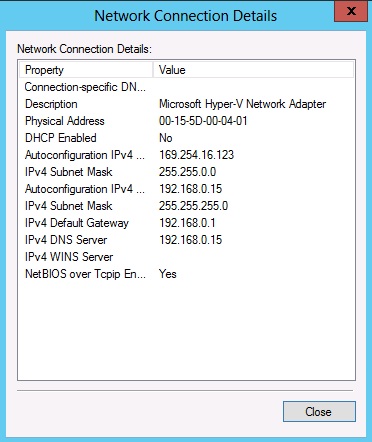
Not sure from where the first IP is coming? Also this is a DNS server and other domain members can't able to contact this DNS server. It was working fine before.
All replies (2)
Thursday, February 14, 2013 7:41 AM ✅Answered
Hi Askwizard,
Based on my knowledge, it could be an IP conflict issue and Windows assign it an APIPA address instead.
Therefore, please check if there is another machine uses this IP address.
Hope this helps.
Jeremy Wu
TechNet Community Support
Sunday, February 10, 2013 10:21 PM
You can assign multiple IPs to a single network interface. One address appears to be an APIPA and the other is a standard private network address. If you open Powershell as an administrator and type:
Get-NetAdapter
Then note the interface number of the adapter you wish to affect. Then enter the following command:
Remove-NetIPAddress -Interface <interface number> -IPAddress <IP Address that you want to remove>
Check your IP configuration and the offending address should be gone!