Note
Access to this page requires authorization. You can try signing in or changing directories.
Access to this page requires authorization. You can try changing directories.
Question
Monday, March 25, 2019 9:16 AM
Hi there,
After updating, I see that the translation tool under "Review" is grey (disabled).
Do you know how I could enable the feature again?
Best,
S
All replies (4)
Tuesday, March 26, 2019 2:10 AM ✅Answered | 1 vote
Hi S,
If you select the text you want to translate, will Translator option be enabled?
Can you use Translator in other Office applications? Such as Word?
According to my research, we need connect to the internet, and have Office Intelligent services to use Translator.
Please open File > Options > General. Check the option “Enable service” under Office intelligent service. Restart PowerPoint to see if it works.
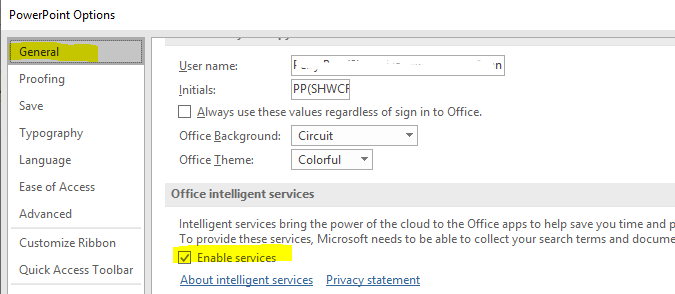
Besides, what's the detailed version of PowerPoint? You can check this via File > Account. Please install available updates for Office.
Any updates with this issue, please feel free to post back.
Regards,
Perry
Please remember to mark the replies as answers if they helped. If you have feedback for TechNet Subscriber Support, contact [email protected].
Click here to learn more. Visit the dedicated forum to share, explore and talk to experts about Microsoft Teams.
Thursday, March 28, 2019 5:44 AM ✅Answered | 1 vote
Hi S,
I'm wondering whether the reply is helpful to you. Can you use Translator feature now?
Please feel free to post back if you need further assistance.
Regards,
Perry
Please remember to mark the replies as answers if they helped. If you have feedback for TechNet Subscriber Support, contact [email protected].
Click here to learn more. Visit the dedicated forum to share, explore and talk to experts about Microsoft Teams.
Thursday, March 28, 2019 8:14 AM
Hi Perry,
First, thank you very much for your answer.
I tried quite everything but in the end it was a software problem.
This morning I had an update which solved the issue. I honestly do not know what could have solved it if not that.
Best,
Simone
Thursday, March 28, 2019 8:17 AM
Hi Simone,
Actually, upgrading is a good and first choice to fix many issues. So glad to see that your issue has been fixed. You can feel free to post in this forum if you have other questions :-)
Have a nice day!
Regards,
Perry
Please remember to mark the replies as answers if they helped. If you have feedback for TechNet Subscriber Support, contact [email protected].
Click here to learn more. Visit the dedicated forum to share, explore and talk to experts about Microsoft Teams.