Note
Access to this page requires authorization. You can try signing in or changing directories.
Access to this page requires authorization. You can try changing directories.
Question
Wednesday, June 26, 2019 11:05 AM
Hi,
We are managing a couple of servers in several places. One time, our Engineer (Admin level) accidentally clicked restart, causing a wide and long effect on every users.
Is there a way that we can disable this feature or limit it to a couple of users? GPO?
Thanks,
JG
All replies (4)
Wednesday, June 26, 2019 11:17 AM | 1 vote
http://www.itingredients.com/remove-shutdown-start-menu-via-gpo/
Thanks!
-mario
Wednesday, June 26, 2019 11:23 AM | 2 votes
Hi Joseph,
Unfortunately administrators will always have a way of shutting down or restarting a server, you can however remove these options from the Start Menu, this should minimize the chance of accidental restart/shutdown of the servers.
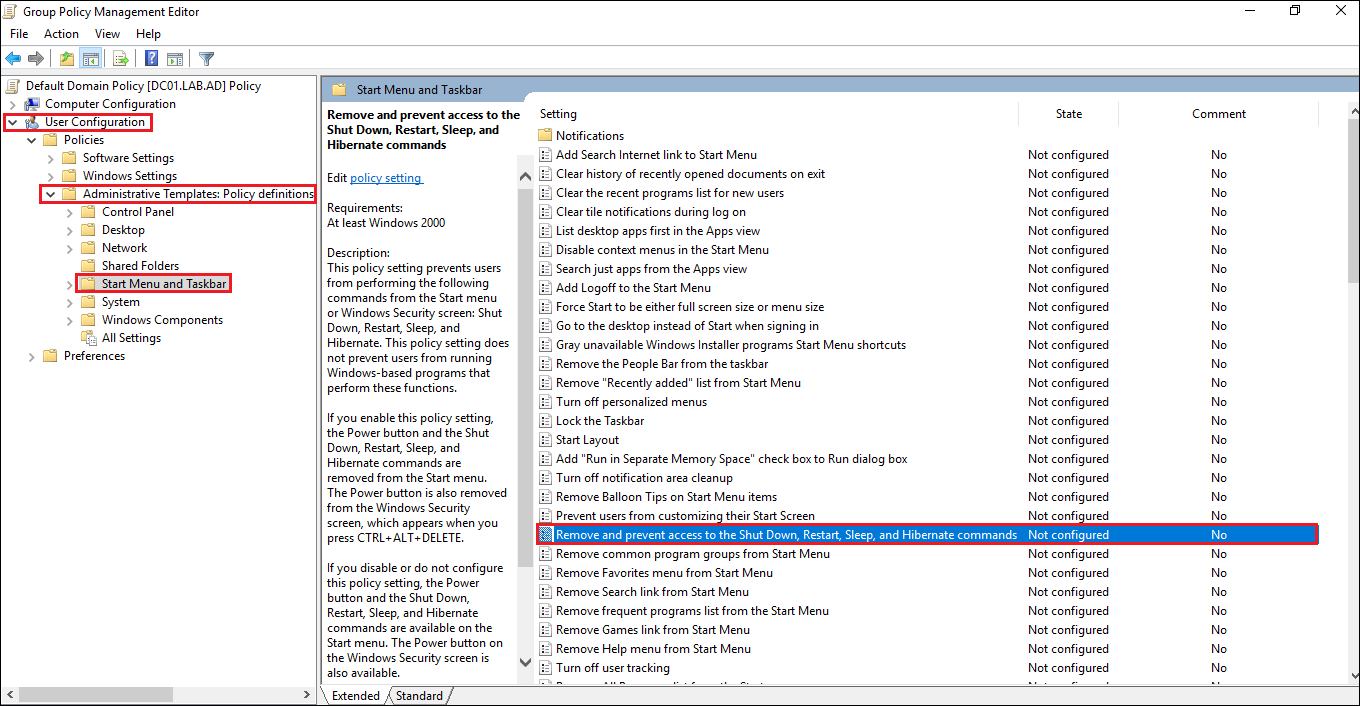
You can remove these options by using the following Group Policies (GPO):
**GPO Path:
**User Configuration > Administrative Templates > Start Menu and Taskbar
**GPO:
**Remove and prevent access to the Shut Down, Restart, Sleep and Hibernate commands
Best regards,
Leon
Blog: https://thesystemcenterblog.com LinkedIn:
Friday, June 28, 2019 8:37 AM
Hi,
If this question has any update or is this issue solved? Also, for the question, is there any other assistance we could provide?
Best Regards,
Daisy Zhou
Please remember to mark the replies as answers if they help.
If you have feedback for TechNet Subscriber Support, contact [email protected].
Monday, July 1, 2019 9:11 AM
Hi,
I am just writing to see if this question has any update. If anything is unclear, please feel free to let us know.
Thanks for your time and have a nice day!
Best Regards,
Daisy Zhou
Please remember to mark the replies as answers if they help.
If you have feedback for TechNet Subscriber Support, contact [email protected].