Note
Access to this page requires authorization. You can try signing in or changing directories.
Access to this page requires authorization. You can try changing directories.
Question
Wednesday, September 21, 2016 9:46 AM
Hi,
We have 2 units of Exchange 2013 servers generating a lot of logon (Event ID: 4648, 4624), logoff (4634) and special logon (4672) by HealthMailbox in Security Log every second. It generates 1GB of Security Log daily.
I have done a lot of research online and know that it is "normal", many people see this in their Security Log. However, it is not feasible to save 365GB of Security Log in a year.
How can I disable this log or do you have better suggestion?
All replies (11)
Wednesday, September 28, 2016 4:57 AM ✅Answered | 1 vote
Hi,
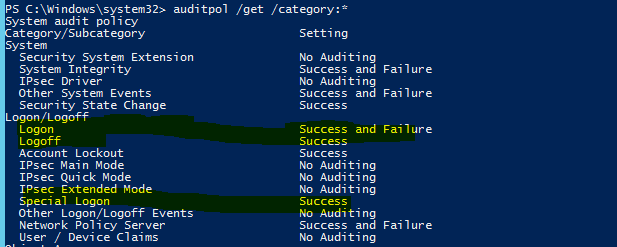
We could use the Advanced Security Audit Policy to disable it.
We can retrieves the system policy, per-user policy, auditing options, and audit security descriptor object via the following command.
See: Auditpol get: https://technet.microsoft.com/en-us/library/cc772576(v=ws.11).aspx
Advanced Security Audit Policy Step-by-Step Guide: https://technet.microsoft.com/en-us/library/dd408940(v=ws.10).aspx
Configuring Audit Policies: https://technet.microsoft.com/en-us/library/dd277403.aspx
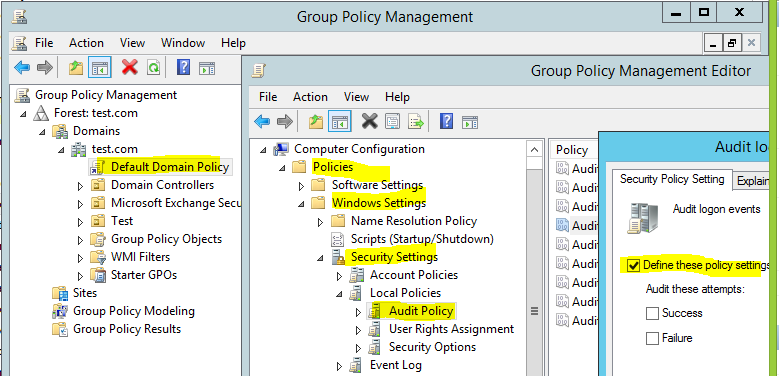
Please note: Ensure that Advanced Audit Policy Configuration settings are not overwritten.
It’s also recommended to post to windows server forum for further help.
BR.
Jason Chao
TechNet Community Support
Please remember to mark the replies as an answer if they help and unmark them if they provide no help.
If you have feedback for TechNet Subscriber Support, contact [email protected]
Tuesday, October 11, 2016 10:22 AM ✅Answered
Hi Jason,
I am not sure who has marked your post as an answer. While I appreciate your information, but I do not think disabling the Security Log is a good practice. There is no way to trace / audit in the event of security breach, which is the purpose of having a Security Log in the first place. But the inability of Microsoft Event Log to granularly select the type of event we want to log while ignoring other activities that is not important to us in order to save disk space, I do not think there is any good solution to solve the mentioned huge log size problem.
Maybe we have to look at 3rd party Event Log management software for any possible solution. Thank you very much for your effort and information provided.
Wednesday, September 21, 2016 10:44 PM
Why do anything?
Ed Crowley MVP "There are seldom good technological solutions to behavioral problems."
Celebrating 20 years of providing Exchange peer support!
Friday, September 23, 2016 9:45 AM
If you have lots of users this may be expected behavior, you can tone it down by adjusting your local policy settings to only log events relevant to what you want.
I will suggest logging failures, and not all successful, (unless you want to go all super security audit and maintain tons of large log files). This article may helps you - https://www.lepide.com/blog/audit-successful-logon-logoff-and-failed-logons-in-activedirectory/
Organizations who want increase their visibility as to what's happening in their IT environments but are perhaps limited on time, resources or budget. Lepide 2020 audit & change control suite provides instant access to see who, what, where and when changes are being made to Active Directory, Group Policy, SQL Servers, SharePoint, File Servers, Exchange Servers and more.
Friday, September 23, 2016 11:12 AM
Hi As mention in my main post, there will be too much noise to when we frequently check the log for suspicious hacking activities. We are required to keep the log for 2 years for audit record, which will take too much space. It will take 5 to 10 minutes to filter a 4GB Security Log in Event Viewer. Imagine if you are required to filter 365GB of log sizes.
Friday, September 23, 2016 11:21 AM
Hi Thank you for your reply. I have actually read this same website previously. One of our Exchange server already configured according to this guide and another Exchange server with default GPO policy. However, both servers are having the same large amount of Security Log entries as mentioned in my main post. We still need to keep the successful login activities because that will be a record to trace back if there is unauthorized login detected. Basically I ONLY would like to disable the logging of those "very specifically" repeated and common login, log off, special login generated by the Exchange server to itself. These Security logs only appear in Exchange servers; but not in other servers such as Active Directory server.
Thursday, September 29, 2016 6:11 AM
Hi Jason,
Thank you very much for your suggestions.
I agree with the Special Logon option, but for the Logon and Logoff option, if I disable them, it mean that I cannot track any illegal login from the hacker or intrusion.
I have uploaded a 5 seconds Security Event Log for you to check:
https://drive.google.com/open?id=0B8slDkTIj-fSaWw5M0pfdE5ITzQ
Do you have any other suggestions?
Friday, September 30, 2016 9:49 AM
Hi jwchong,
I've checked the log file. And talked with windows server guys, we can not achieve log the illegal logins from the hacker or intrusion only. It's recommended to only log Failure log on/off.
BR.
Jason Chao
TechNet Community Support
Please remember to mark the replies as an answer if they help and unmark them if they provide no help.
If you have feedback for TechNet Subscriber Support, contact [email protected]
Thursday, October 6, 2016 10:57 AM
Hi Jason,
Thank you very much for your advice. Although I am not very satisfied with the proposed solution, I think I have no other choices to log only specific activity that I need.
I have another question. Referring to below:
https://technet.microsoft.com/en-us/library/dd408940(v=ws.10).aspx
========= In Computer Configuration\Policies\Windows Settings\Security Settings\Local Policies\Audit Policy, there is only one policy setting for logon events, Audit logon events. In Computer Configuration\Policies\Windows Settings\Security Settings\Advanced Audit Policy Configuration\System Audit Policies, you can instead choose from eight different policy settings in the Logon/Logoff category. This provides you with more detailed control of what aspects of logon and logoff you can track.
Whats the differences between the above 2 GPO policy? I think "Advanced Audit Policy Configuration" allow me to have more detailed control such as disable "Audit Special Logon" etc. Please guide me on which of these policies can disable the audit log that I have uploaded here:
https://drive.google.com/open?id=0B8slDkTIj-fSaWw5M0pfdE5ITzQ
Thank you.
Friday, October 7, 2016 3:51 AM
Hi,
https://www.newnettechnologies.com/windows-advanced-audit-policy-configuration.html#logon-logoff
Above are several recommendations from the Internet that we log both success and failure of many activities for auditing or PCI compliance. I wonder how they could manage that huge amount of log file size. I think it will be more than 365GB per year of event log. Max file size for Event Log is 4GB and it will be ultra slow if you try to filter what you want.
Is there any good free / reasonable priced software to manage and filter Event Log very fast and without this 4GB limitation? I think with the appropriate software, I can record these audit log without worry about the time needed to filter and check the log.
Monday, October 10, 2016 3:01 AM
Hi,
Thanks for your reply. For your question “What’s the differences between the above 2 GPO policy?” Please refer to the following article:
“What is the difference between audit policies located in Local Policies\Audit Policy and audit policies located in Advanced Audit Policy Configuration? ” in Advanced Security Auditing FAQ: https://technet.microsoft.com/en-us/library/ff182311(v=ws.10).aspx#BKMK_2
For the software, I agree with you, but sorry for the deficient knowledge of the three-party software, it’s recommended to google for it. Thanks for your understanding.
BR.
Jason Chao
TechNet Community Support
Please remember to mark the replies as an answer if they help and unmark them if they provide no help.
If you have feedback for TechNet Subscriber Support, contact [email protected]