Note
Access to this page requires authorization. You can try signing in or changing directories.
Access to this page requires authorization. You can try changing directories.
Question
Friday, April 4, 2014 12:10 PM
Hi,
Im using:
dim ie as object
set ie = createobject("internetexplorer.application")
s = ie.document.body.innerhtml
to retrieve the html source for the s variable.
This has worked until we switched to windows 7 and internet explorer 9.
How do I get the html now?
thanks!
All replies (8)
Tuesday, April 8, 2014 5:10 AM ✅Answered
Hi,
Welcome to MSDN forum.
Since you didn’t assign the address, ie.document was not available.
You could debug the code and find the object as below:
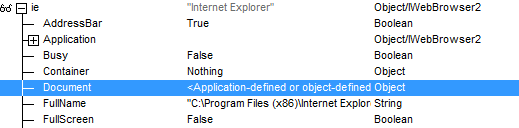
Here is a sample to get HTML for your reference:
Sub testIE()
    Dim ie As Object
    Set ie = CreateObject("internetexplorer.application")
    ie.Visible = True
    ie.Navigate2 "www.msdn.com"
    Do Until ie.ReadyState = 4
        DoEvents
    Loop
    Do While ie.Busy
        DoEvents
    Loop
    s = ie.Document.Body.innerhtml
End Sub
We are trying to better understand customer views on social support experience, so your participation in this interview project would be greatly appreciated if you have time. Thanks for helping make community forums a great place.
Click HERE to participate the survey.
Friday, April 4, 2014 1:01 PM
Hello Black Santa,
Could you please be more specific? Do you get any error or exception? If so, what property or method exactly fires the exception?
Friday, April 4, 2014 2:30 PM
Thanks for replying.
It says "automation error 2147023179 The user interface is unknown"
When debugging, the document.body.innerhtml is empty.
Friday, April 4, 2014 6:11 PM
Try to turn off the Protected mode in Internet Explorer settings.
Monday, April 7, 2014 9:52 AM
Hi again,
I can´t find that option in IE? I can set the security settings to "low", but that doesn´t help. Should I be looking some place else?
Thanks.
Monday, April 7, 2014 2:28 PM
When I have issues like that I add the library to my references so I can see the properties and methods in the Intellisense by declaring the variable specifically. Maybe that doesn't exist in IE 9.
Once you debug you can always remove the library.
Bill Mosca
www.thatlldoit.com
http://tech.groups.yahoo.com/group/MS_Access_Professionals
Friday, November 6, 2015 2:50 PM
Sub testIE()
    Dim ie As Object, s As Variant, objDoc As Object
    Set ie = CreateObject("internetexplorer.application")
    ie.Visible = True
    ie.Navigate2 "http://www/" '"www.msdn.com"
    Set objDoc = ie.Document
    Set ie = Nothing
End Sub
Set objDoc = ie.Document '...ERROR...WHY ?
Hi , it was yesterday OK (DEBUG.WATCH.IE...) , TODAY...ERR
? err, err.Description
-2147023179 Automation error,The interface is unknown.
? ie.ReadyState
0 //READYSTATE_UNINITIALIZED
.............AFTER NAVIGATE // MANUALLY OR PROGRAMMATICALLY...
ie.Navigate2 "http://www/" ' PAGE IS LOADING...OK
-2147023179 Automation error,The interface is unknown.
dBase,FoxPro,MS Access 2003,(2010=Not rec.),Office 2010+ACC.2013 ,Symbian C++, AC.2013.SystemResource.GetCurrentFreeSize=?
Friday, November 6, 2015 4:19 PM
possible reason....?
IE9 "Protected Mode"... causes com objcreate pointer to be invalid
ie9-protected-mode-causes-comobjcreate-pointer-to-be-invalid
dBase,FoxPro,MS Access 2003,(2010=Not rec.),Office 2010+ACC.2013 ,Symbian C++, AC.2013.SystemResource.GetCurrentFreeSize=?