Note
Access to this page requires authorization. You can try signing in or changing directories.
Access to this page requires authorization. You can try changing directories.
Question
Thursday, September 20, 2018 7:07 PM
Hi,
I would like to move database from current database server to new server
We have cluster scvmm both running on windows 2012 R2. e.g. SCVMM01, SCVMM02
Things I tried
- Backup the SCVMM Database (from SQL Management)
- Stop SCVMM Services, Agent on activat node (e.g. SCVMM01)
- Take the VMM cluster resource offline
- Restore the DB onto new server with SCVMM login account (Same db account which was use on other server)
- Change reg "HKEY_LOCAL_MACHINE \ SOFTWARE \ Microsoft \ Microsoft System Center Virtual Machine Manager Server \ Settings \ Sql"
- [HKEY_LOCAL_MACHINE\SOFTWARE\Microsoft\Microsoft System Center Virtual Machine Manager Server\Settings\Sql]
"InstanceName"= "SCVMMDB01_NEW\DB_INSTANCE_NAME"
"DatabaseName "= "VirtualManagerDB"
"ConnectionString"="Integrated Security = SSPI;Application Name= VirtualMachineManager;Max Pool Size=500;Encrypt=true;TrustServerCertificate=true;Server=SCVMMDB01_NEW\DB_INSTANCE_NAME;database=VirtualManagerDB"
"OnRemoteServer"=dword:00000001
"MachineName"= "SCVMMDB01_NEW"
"MachineFQDN"= "SCVMMDB01_NEW.Domain.com"
"Port"= dword: 00000000
6. Bring Cluster Online which now it keep failing to start and also unable to restart the scvmm services.
"Clustered role 'ClusterName' has exceeded its failover threshold. It has exhausted the configured number of failover attempts within the failover period of time allotted to it and will be left in a failed state. No additional attempts will be made to bring the role online or fail it over to another node in the cluster. Please check the events associated with the failure. After the issues causing the failure are resolved the role can be brought online manually or the cluster may attempt to bring it online again after the restart delay period."
Can you please let me know what i'm doing wrong here.
All replies (8)
Tuesday, September 25, 2018 12:16 PM ✅Answered
Hi,
I believe you will need to uninstall one node at the time (first passive, then active) and remember to retain the database, as you will most likely get conflicts if you still have the same database in use even on just one cluster node.
Pretty much as stated in here:
https://blogs.technet.microsoft.com/virtual-mite/2014/06/02/how-to-move-a-vmm-sql-database/
The SCVMM servers themselves is not a big thing to reinstall, just make sure you have a backup of your database and you are just fine!
Blog: https://thesystemcenterblog.com LinkedIn:
Thursday, September 20, 2018 7:30 PM
Hi!
I believe migrating/moving the SCVMM database without reinstalling is not supported, so you will have to reinstall your SCVMM servers. Reinstalling is not a big thing, just make sure to back everything up before doing this.
You can follow the guide on the page below on how to move the SCVMM SQL database:
https://blogs.technet.microsoft.com/virtual-mite/2014/06/02/how-to-move-a-vmm-sql-database/
Best regards,
Leon
Blog: https://thesystemcenterblog.com LinkedIn:
Friday, September 21, 2018 11:20 AM
Can I do a full backup and restore onto new sql server and then run new installation on new server 2016 without remove the current scvmm setup.
Because I try this and I keep getting this error message.
"
Unable to connect to the VMM database because of a general database failure.Ensure that the SQL Server is running and configured correctly, then try the operation again."
Friday, September 21, 2018 11:21 AM
As I said, you will have to uninstall the current SCVMM servers and reinstall them once you have restored the database to it's new server.
Blog: https://thesystemcenterblog.com LinkedIn:
Tuesday, September 25, 2018 11:10 AM
Hi Leon,
I'm going to remove SCVMM and retain the database and install it as single vm.
What do I need to do to remove it as cluster based SCVMM to single VM.
Do I need to remove SCVMM from both servers in cluster or I can remove it from activate node and then reinstall it on new vm which is not part of cluster
Wednesday, September 26, 2018 8:26 AM
When I try to remove the SCVMM from passive node, it keep closing the "select feature to remove" page. I'm unable to remove the scvvm from passive node
Wednesday, September 26, 2018 12:04 PM
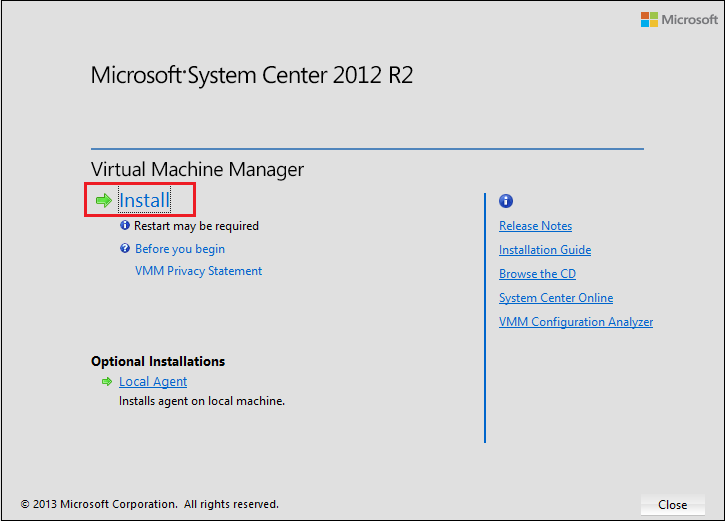
You can also uninstall by booting up the SCVMM ISO image:
1) Mount the SCVMM ISO image and open it, then click Install.
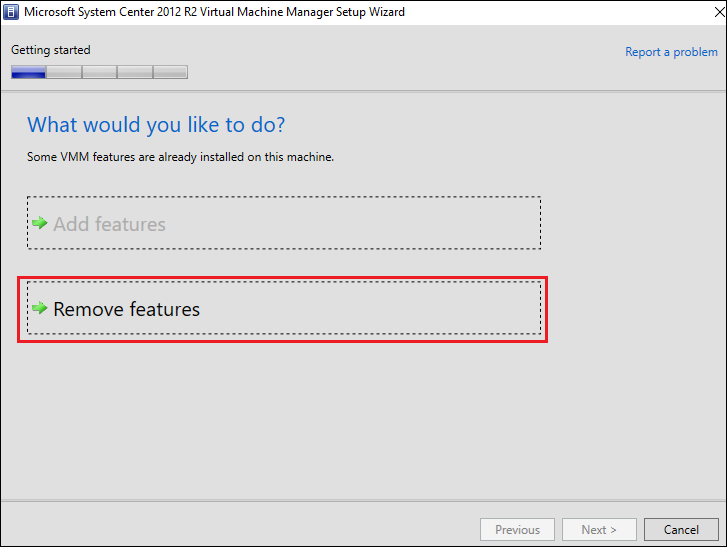
2) Then choose Remove features
3) Now select the features you want to uninstall
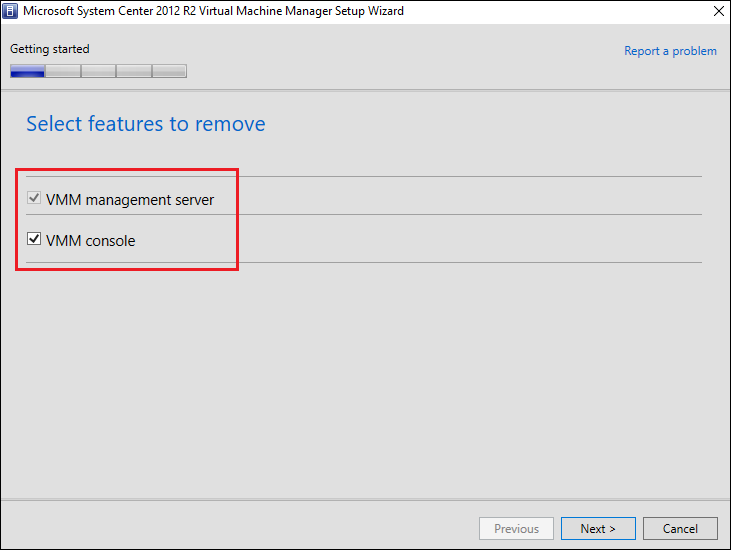
Hope this helps!
Blog: https://thesystemcenterblog.com LinkedIn:
Thursday, September 27, 2018 7:23 AM
Thank you for all your help. Its all working fine.