Note
Access to this page requires authorization. You can try signing in or changing directories.
Access to this page requires authorization. You can try changing directories.
Question
Thursday, February 27, 2020 11:17 AM
Hi,
I want to get only the columns which is modified from the version history via REST api, same like we see in Version history. In the SharePoint Version history (versions.aspx) we are able to see only the changed columns and its data. Via REST api, I am unable to get this option. Please advise.
All replies (2)
Friday, February 28, 2020 8:21 AM ✅Answered
Hi,
By design, the REST API below get all the version history information of a list item.
https://tenant.sharepoint.com/sites/team/_api/web/lists/getbytitle('MyListName')/items(ITEMID)/versions
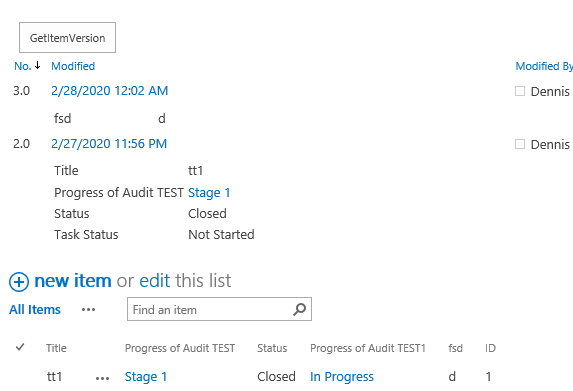
If you only want to get the data like Version History page(versions.aspx), we can using jQuery ajax to get the data from versions.aspx page, then show data using HTML code.
The following example code for your reference.
<script src="https://code.jquery.com/jquery-1.12.4.min.js" type="text/javascript"></script>
<script type="text/javascript">
$(function(){
    $("#getItemVersion").click(function(){
        var listId = _spPageContextInfo.pageListId;
        var itemId=1;
        var url = _spPageContextInfo.webAbsoluteUrl + "/_layouts/15/Versions.aspx?list="+listId+"&ID="+itemId;
        $.ajax({
            url: url,
            method: "GET",
            headers: { "Accept": "application/json; odata=verbose" },
            success: function (data) {
                var tableHtml=$(data).find("table.ms-settingsframe")[0].outerHTML;
                $("#versionhistory").html(tableHtml);
            },
            error: function (error) {
                console.log(JSON.stringify(error));
            }
        });
    });
});
</script>
<input id="getItemVersion" type="button" value="GetItemVersion"/>
<div id="versionhistory"></div>
Best Regards,
Dennis
Please remember to mark the replies as answers if they helped. If you have feedback for TechNet Subscriber Support, contact [email protected].
SharePoint Server 2019 has been released, you can click
here to download it.
Click
here to learn new features. Visit the dedicated
forum to share, explore and talk to experts about SharePoint Server 2019.
Friday, February 28, 2020 9:54 AM
Thanks for your help