Note
Access to this page requires authorization. You can try signing in or changing directories.
Access to this page requires authorization. You can try changing directories.
Question
Wednesday, October 4, 2017 2:57 PM
I generate SAS token for file in this way:
 private string GeFileSASToken(CloudFile file)
    {
        SharedAccessFilePolicy policy = new SharedAccessFilePolicy()
        {
            Permissions = SharedAccessFilePermissions.Read | SharedAccessFilePermissions.Write | SharedAccessFilePermissions.List,
            SharedAccessStartTime = DateTime.Now,
            SharedAccessExpiryTime = DateTime.UtcNow.AddHours(24),
        };
        return file.GetSharedAccessSignature(policy);
    }
If I open file link with this token in browser all works fine and file is downloaded. But If I try to use this link in javascript(ViewerJS) like this:
<iframe src = "https://myaccount.file.core.windows.net/ViewerJS/#../linktofile" width='300' height='300'></iframe>
I see error message:
<Error>
   <Code>InvalidHeaderValue</Code>
   <Message>
The value for one of the HTTP headers is not in the correct format. RequestId:8888888888888888888Time:2017-10-04T08:58:13.8876684Z
   </Message>
   <HeaderName>x-ms-version</HeaderName>
   <HeaderValue/>
</Error>
All replies (6)
Wednesday, October 4, 2017 4:18 PM
You may refer to the suggestion mentioned the SO link.
Do click on "Mark as Answer" on the post that helps you, this can be beneficial to other community members.
Thursday, October 5, 2017 8:26 AM
I think something wrong with my Url for ViewerJs. Url should be: domain+ViewerJS/#../+filePath. And this error happen because of domain part without SAS token, only file part have a SAS token in my Url. My url look like: 'http://mydomain/ViewerJS/index.html#https://myazureaccount.file.core.windows.net/myshare/mydirectorypath/myfile?SASTOKEN'
Thursday, October 5, 2017 12:44 PM
I changed url for ViewerJs to blob url, and I see this error now:
Failed to load blob: https://myazureaccount.file.core.windows.net/myshare/mydirectorypath/myfile?SASTOKEN: Cross origin requests are only supported for protocol schemes: http, data, chrome, chrome-extension, https.
Thursday, October 5, 2017 3:14 PM
http:// URL and is probably a file: URL. The browser will not, by default, permit cross origin requests from a file: URL.
You need to load the web page through your web server, not via the file system if you want to use ajax requests.
Here are some suggestions about that specific error that all point to the wrong type of URL being used to load the page. Try those suggestion and let me know the outcome
"Cross origin requests are only supported for HTTP." error when loading a local file
React.js: Example in tutorial not working
Cross origin requests are only supported for HTTP but it's not cross-domain
https://groups.google.com/forum/#!topic/tincr-for-chrome-devtools/nA9k2qh7F-g
Disclaimer: This response contains a reference to a third-party World Wide Web site. Microsoft is providing this information as a convenience to you. Microsoft does not control these sites and has not tested any software or information found on these sites; therefore, Microsoft cannot make any representations regarding the quality, safety, or suitability of any software or information found there.
There are inherent dangers in the use of any software found on the Internet, and Microsoft cautions you to make sure that you completely understand the risk before retrieving any software from the Internet.
Do click on "Mark as Answer" on the post that helps you, this can be beneficial to other community members.
Friday, October 6, 2017 2:38 PM
Oh, yes, url was not completely correct. Eventually I need to send XMLHttpRequest to Azure
function getDocument(documentUrl) {
var http = new XMLHttpRequest();
http.open('GET', documentUrl);
http.send();
}
Where url is https://myazureaccount.file.core.windows.net/myshare/mydirectorypath/myfile?SASTOKEN
And my CORS Settings in Azure:
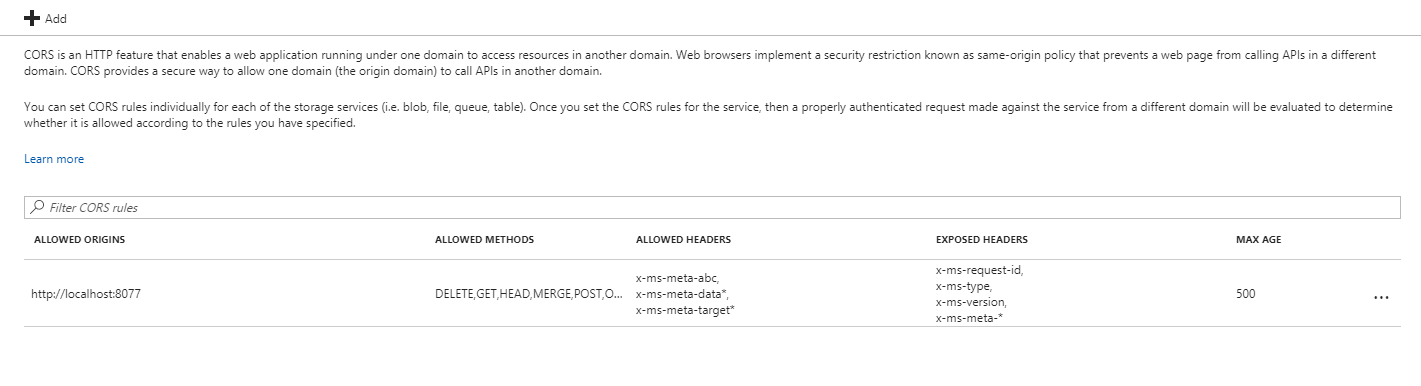
Now if I call this script I see CORS Error:
Failed to load https: //myazureaccount.file.core.windows.net/myshare/mydirectorypath/myfile?SASTOKEN": No 'Access-Control-Allow-Origin' header is present on the requested resource. Origin 'http: //localhost:8077' is therefore not allowed access.
Wednesday, October 18, 2017 4:09 PM
Hi, I suggest using Fiddler to see what the browser is passing as the Origin header and then ensure that your CORS rule on the file service matches.