Note
Access to this page requires authorization. You can try signing in or changing directories.
Access to this page requires authorization. You can try changing directories.
Question
Friday, June 15, 2018 12:51 PM | 1 vote
Hi,
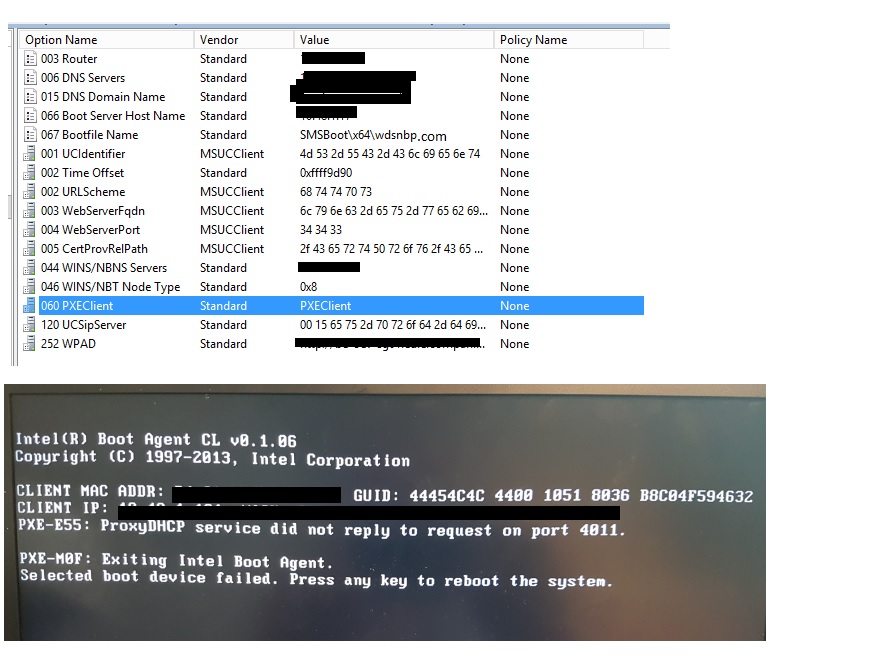
PXE-E55: proxyDHCP did not reply to request on port 4011 after pressing F12. DHCP 066 and 067 are set correctlly. 060 option is visible in the below screenshot and it is not configured.
It was working till last week and did not work from this week. please help to solve the issue
Regards, Boopathi
All replies (12)
Friday, June 15, 2018 2:21 PM
Not exactly the solution to your problem, but save yourself the headache and use iphelpers instead :-)
Martin Bengtsson | Blog: www.imab.dk | Twitter: @mwbengtsson
If a post helps to resolve your issue, please remember to click Mark as Answer.
Friday, June 15, 2018 4:00 PM
IP Helpers also added in the switch. but retured the same error.
Regards, Boopathi
Friday, June 15, 2018 4:03 PM
What does smspxe.log say on the pxe server?
Martin Bengtsson | Blog: www.imab.dk | Twitter: @mwbengtsson
If a post helps to resolve your issue, please remember to click Mark as Answer.
Monday, June 18, 2018 9:01 AM
Hi boopathi,
Please check this: When you create an OS deployment that targets only x64 BIOS computers, both the x64 boot image and x86 boot image must be available on all of your DPs.
Also, here is a similar post:
https://prajwaldesai.com/pxe-e55-proxydhcp-did-not-reply-to-request-on-port-4011/
Best regards,
Xuezhi
Please remember to mark the replies as answers if they help. If you have feedback for TechNet Subscriber Support, contact [email protected].
Monday, June 18, 2018 2:25 PM
Hi,
Does it mean to remove Option 60 from Scope? If it is removed from Super Scope, will it create any issues? Because I see that Option 60 is enabled in Supor scope and i am not sure whether will it create any problem in removing the it from super scope
Regards, Boopathi
Tuesday, June 19, 2018 9:50 AM
Hi boopathi,
Has anyone made any changes to the BIOS/Router/Switch/Firewall? Maybe you need the assistance of your network team. But before that, make sure you have checked this:
When you create an OS deployment that targets only x64 BIOS computers, both the x64 boot image and x86 boot image must be available on all of your DPs.
Have you checked the log file Martin mentioned above?
Best regards,
Xuezhi
Please remember to mark the replies as answers if they help. If you have feedback for TechNet Subscriber Support, contact [email protected].
Tuesday, June 19, 2018 2:11 PM
Hi Xuezhi Zhou,
I have uploaded the SMS PXE Logs in the below One Drive.
https://1drv.ms/f/s!Aj2wii50lHANhHz2IblQJhX0e2ri
Below worksation mac address is the one which Boot from network (Refer SMSPXE.log) and after that no workstations boot from network. Refer
D4:81:D7:94:6B:2A, 4C4C4544-0050-4C10-8036-B9C04F594632: Updating Device Cached LastAdv Time. Time=29/05/2018 12:16:46 LastAdvID=D01200E4 SMSPXE 5/29/2018 2:16:46 PM 3724 (0x0E8C)
I worked with network team also. It did not help. Kindly check the logs and update me
Regards, Boopathi
Tuesday, June 19, 2018 2:11 PM
Hi Martin Bengtsson,
I have uploaded the SMS PXE Logs in the below One Drive.
https://1drv.ms/f/s!Aj2wii50lHANhHz2IblQJhX0e2ri
Below worksation mac address is the one which Boot from network (Refer SMSPXE.log) and after that no workstations boot from network. Refer
D4:81:D7:94:6B:2A, 4C4C4544-0050-4C10-8036-B9C04F594632: Updating Device Cached LastAdv Time. Time=29/05/2018 12:16:46 LastAdvID=D01200E4 SMSPXE 5/29/2018 2:16:46 PM 3724 (0x0E8C)
I worked with network team also. It did not help. Kindly check the logs and update me
Regards, Boopathi
Tuesday, June 19, 2018 10:00 PM
The only time that the MAC address or SMBIOS of the client showed up in the SMSPXE log file was in 2018/05/17.
This means that the PXE packets from that client are not getting the PXE server.
It is hard to believe that your network team does know what to do with this.
Friday, June 22, 2018 3:00 PM
Hello Kerwin Medina,
Please look at the below screenshot. 10:65:30:28:59:08 MAC Address was "Looking for bootImage D01005F3" on 5/17/2018.
But it is not able to do that on 6/19/2018.
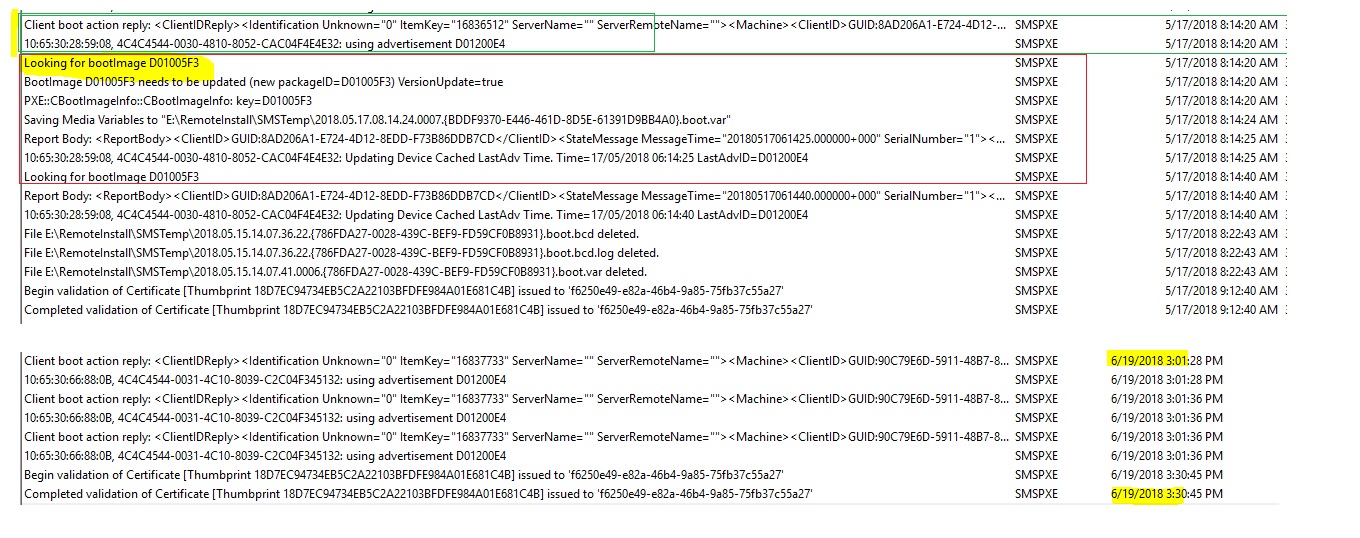 I worked with network team and tried to change the Option 66 and IP Helper as different SCCM PXE server. It also did not help.
Below message appears when the F12 pressed in the machine in the SMS PXE logs.
Client boot action reply: <ClientIDReply><Identification Unknown="0" ItemKey="16826801" ServerName="" ServerRemoteName=""><Machine><ClientID>GUID:90C79E6D-5911-48B7-8C5F-68678A76EC77</ClientID><NetbiosName/></Machine></Identification><PXEBootAction LastPXEAdvertisementID="" LastPXEAdvertisementTime="" OfferID="D01200E4" OfferIDTime="3/11/2018 6:53:00 PM" PkgID="D01006C0" PackageVersion="" PackagePath="http://Secondary.contoso.com/SMS_DP_SMSPKG$" BootImageID="D01005F3" Mandatory="1"/></ClientIDReply>
SMSPXE 6/22/2018 3:31:50 PM 6896 (0x1AF0)
10:65:30:66:88:0B, 4C4C4544-0031-4C10-8039-C2C04F345132: using advertisement D01200E4 SMSPXE 6/22/2018 3:31:50 PM 6896 (0x1AF0)
After that it did not looking for boot image.
Please help to understand why it was not looking for boot image
As per the https://support.microsoft.com/en-us/help/10082/troubleshooting-pxe-boot-issues-in-configuration-manager-2012 URL
I think PXE CLient is not getting the BootFileName location and the WDS network boot program (NBP). Please let me know how to solve it
The PXE Boot Process
The example boot process described here involves three machines: The DHCP server, the PXE enabled DP and the client (an x64 BIOS computer). All are located on the same subnet.
**Note **You must make sure that the DHCP (67 and 68), TFTP (69) and BINL (4011) ports are open between the client computer, the DHCP server and the PXE enabled DP.
In the PXE boot process, the client must first acquire TCP/IP parameters and the location of the TFTP boot server. Once a device is powered on and completes the POST, it will begin the PXE boot process (usually prompted via the boot selection menu).
- The first thing the PXE firmware will do is send a DHCPDISCOVER(a UDP packet) broadcast to get TCP/IP details. This will include a list of parameter requests, and below is a sample network trace with the parameter list from a DHCPDISCOVER packet:
The PXE client then identifies the vendor and machine specific information so that it can request the location and file name of the appropriate boot image file.
- The DHCP server and the PXE enabled DP then sends a DHCPOFFER to the client containing all of the relevant TCP/IP parameters. In the example DHCP offer below, note that it does not contain the server name or boot file information because this is the offer from the DHCP server rather than the PXE enabled DP.
- The client then replies with a DHCPREQUEST once it has selected a DHCPOFFER. This contains the IP address from the offer that was selected.
- The DHCP server responds to the DHCPREQUEST with a DHCPACK which contains the same details as the DHCPOFFER. The server host name and the boot file name are not provided here:
- At this point we still don’t have the boot file information, however now the client has an IP address. The PXE client next sends a new DHCPREQUEST to the PXE enabled DP after also receiving a DHCPOFFER from the earlier DHCPDISCOVER broadcast.
- The PXE enabled DP sends a DHCPACK which contains the BootFileName location and the WDS network boot program (NBP).
<input name="step-4-pane-4-actn" type="radio" value="7|Next step: Downloading the boot files" />Next step: Downloading the boot files
<input name="step-4-pane-4-actn" type="radio" value="8|That’s enough with the overview, let’s get on with the troubleshooting" />That’s enough with the overview, let’s get on wit
Regards, Boopathi
Tuesday, June 26, 2018 11:05 AM
Hello,
can you please someone guide on this issue.
Regards, Boopathi
Thursday, June 28, 2018 11:20 AM
Hi,
I checked that 4011 port listern to Windows deployment services in WDS server.
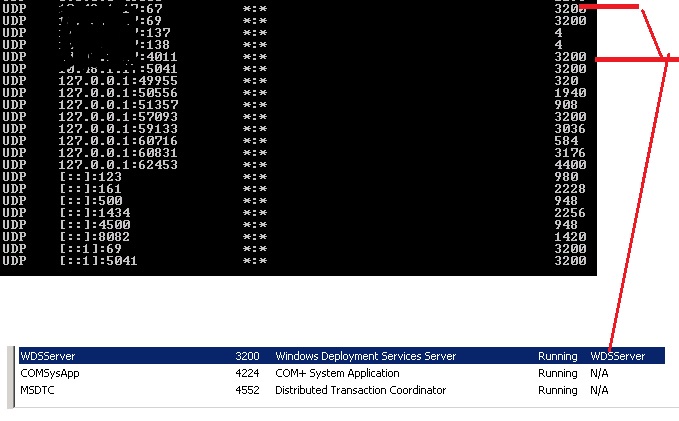
Below is the scenrio of my setup
ComputerA sends a DHCP broadcast packet and receives an IP address lease from a DHCP server. The lease also contains values for DHCP options 66 and 67, referring ComputerA to download the file \boot\ x86\wdsnbp.com from WDSServer1. ComputerA downloads Wdsnbp.com from WDSServer1. Wdsnbp.com contacts WDSServer1 on port 4011. WDSServer1 refers ComputerA to download the \boot\x86\wdsnbp.com from WDSServer2. ComputerA downloads Wdsnbp.com from WDSServer2.
I really do not understand what is the issue and why the error occurs PXE-E55: ProxyDHCP service did not reply to request on port 4011"
Regards, Boopathi