Note
Access to this page requires authorization. You can try signing in or changing directories.
Access to this page requires authorization. You can try changing directories.
Question
Monday, April 11, 2016 1:24 AM
using (var fs = new FileStream("C:\\test.txt", FileMode.Open, FileAccess.Read, FileShare.ReadWrite | FileShare.Delete))
            using (var reader = new StreamReader(fs))
            {
                while (true)
                {
                    var line = reader.ReadLine();

                    if (!String.IsNullOrEmpty(line))
                    {
                        MessageBox.Show("Line read: " + line);
Hi friends, current code can read all line when running the application, but I want it to read the last line when ever the text file are updated/modify only? Need help on this please?
Loginthiren
All replies (6)
Monday, April 11, 2016 2:53 AM
Hello,
Here is a Console Project example using VS2010/dotNet4/Vista;
static void Main( string[] args )
{
    StreamReader sr = new StreamReader( File.OpenRead( "X:\\Temp\\MusicList.txt" ) );

    if ( sr != null )
    {
        int x = 0, y = 0;
        string s1 = "", s2 ="";

        while( !sr.EndOfStream )
        {
            s1 = sr.ReadLine();

            x = s1.Length;

            Console.WriteLine( "{0} : {1} = {2}", y, s1, x );

            y++;
        }

        Console.WriteLine( "\nNumber of Lines  : {0} (Zero based index)", y );
        Console.WriteLine( "Last Line Length : {0}", x );
        Console.WriteLine( "\nEOF = FileLength @ {0}", sr.BaseStream.Position );

        sr.BaseStream.Seek( ( sr.BaseStream.Length - 2 ), SeekOrigin.Begin );

        // If 0x0D0A present, Subtract 2 more, Return/NewLine codes
        if ( sr.Read() == 0x0D && sr.Read() == 0x0A )
        {
            x += 2;
        }

        sr.BaseStream.Seek( (sr.BaseStream.Length - x ), SeekOrigin.Begin );

        Console.WriteLine( "Last Line FPOS   @  {0}", sr.BaseStream.Position );

        s2 = sr.ReadLine();

        if ( s1 == s2 )
        {
            Console.WriteLine( "Match" );
        }
        else
        {
            Console.WriteLine( "FPOS MisMatch" );
        }

    sr.Close();
    }
}
Here is output results:
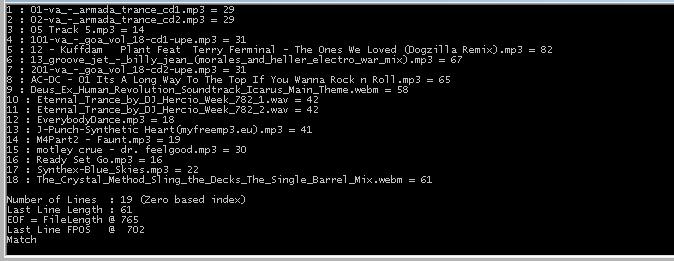
Just remember, CR/LF codes, are dropped after the read into object type string. Unless stated
otherwise in the Stream.
Hope this helps! :)
Monday, April 11, 2016 3:23 AM
I need the application always monitor the last update bro, current my code always monitor last line but the problem is when I start run the application for the 1st time, it's read all the line 1st, then only it read the last line if have updated.
Loginthiren
Monday, April 11, 2016 7:04 AM
If you only want to display the last line, then you have to go find the last line. That's pretty easy; just read every line, but don't print anything until you hit end of file. Then you know that whatever line you read last was the last line of the file.
Tim Roberts, Driver MVP Providenza & Boekelheide, Inc.
Monday, April 11, 2016 9:48 AM
Reading the last line of a file is roughly:
var lastLine = File.ReadLines(@"C:\\test.txt").Last();
Hope that helps.
Technet articles: WPF: Layout Lab; All my Technet Articles
Monday, April 11, 2016 5:23 PM
If you are interested in appended lines, then read the current contents of the file (when your application starts):
string [] lines = File.ReadAllLines( @"C:\test.txt" );
Then you can obtain the new lines that are added to this file:
string [] lines2 = File.ReadAllLines( @"C:\test.txt" );
string [] added_lines = lines2.Skip( lines.Count() ).ToArray();
lines = lines2;
The added_lines array, if not empty, will contain the lines that were appended to the file since previous check. Repeat the last fragment according to your needs.
Wednesday, April 20, 2016 6:02 AM
string line2 = File.ReadAllLines(@"C:\LoomisLog_duplicate\Loomis Logfile.txt").Last();
This code able to read last line, but now the problem is, the last line is blank, so how to skip the blank line and read the last text line?
Loginthiren