Note
Access to this page requires authorization. You can try signing in or changing directories.
Access to this page requires authorization. You can try changing directories.
Question
Friday, February 7, 2020 4:42 PM
We have a user that is getting this message, "You need a current Plan or trial to use Power Apps", when trying to edit a SharePoint list. They do not have a license to use Power Apps and did not try to use Power Apps to initiate a Power Apps application from the list. Any thoughts...thanks!!!
All replies (1)
Monday, February 10, 2020 5:45 AM ✅Answered
Hi,
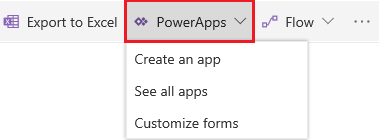
How did this user try to edit the list when getting this message? As far as I know, we receive this message only when we try to customize the list with PowerApps in modern experience.
If PowerApps is enabled for the tenant, any users have Contribute or higher permission to a site collection can see the button in a modern-experience list/library.
According to the official document, any individual has access to Power Apps trial plan and this option cannot be disabled by an admin.
Please confirm if the tenant has once enabled PowerApps trial plan for the organization and if it has expired. Log in as a global admin and then check the available licenses via Microsoft 365 admin center > Billing > Licenses.
Here’s your reference.
Manage Power Apps licenses in your organization.
/en-us/power-platform/admin/signup-question-and-answer
Best regards,
Chelsea Wu
Please remember to mark the replies as answers if they helped. If you have feedback for TechNet Subscriber Support, contact [email protected].
SharePoint Server 2019 has been released, you can click here to download it.
Click here to learn new features. Visit the dedicated forum to share, explore and talk to experts about SharePoint Server 2019.