Note
Access to this page requires authorization. You can try signing in or changing directories.
Access to this page requires authorization. You can try changing directories.
Question
Friday, January 25, 2019 1:52 PM
Hi,
I want to enable ANONYMOUS LOGON remote access checkbox for a remote computer. How can I do that using command prompt and remotely?
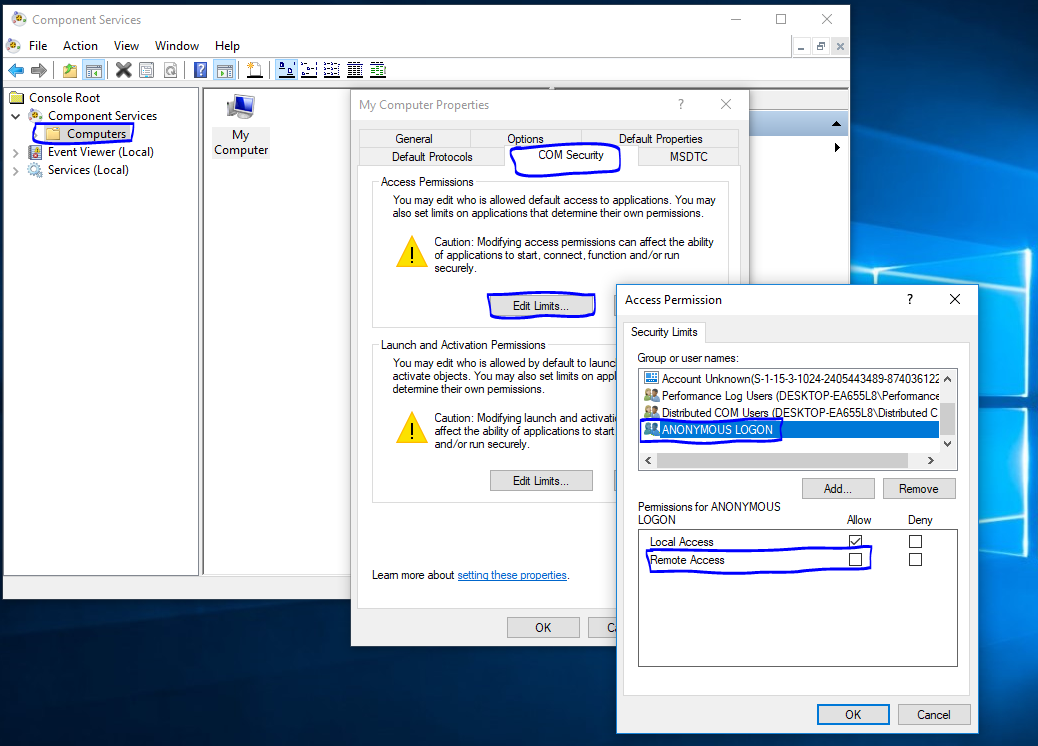
Thanks
All replies (4)
Friday, January 25, 2019 2:38 PM
I would strongly suggest you look at another way for this, whatever the reason for wanting this severally lowers the security of a system.
Items you need to check:
Windows firewall, remote access firewall rules, make sure they are enabled.
Local security policy -> user right assignment, make sure your settings are correct
Control panel -> system -> system properties, make sure the "Allow remote assistance connections to this computer" check box is checked.
Friday, January 25, 2019 2:43 PM
Thanks Jedi, But I would like to do this using command prompt and remotely on the remote machine. I just do this on test environment not production. Is there a way to do that?
Friday, January 25, 2019 2:52 PM
You still need to check the firewall settings and make sure you are allowed to access the computer from the network, Windows removed the ANONYMOUS USER from the Everyone group.
For powershell if you use the credential switch you can run as a different user (link below)
Monday, January 28, 2019 8:38 AM
Hi,
Thanks for posting in the forum.
However, such command prompt is out of the scope of our discussion.
You may refer to experts from the following link to get for more professional support.
https://social.technet.microsoft.com/Forums/ie/en-US/home?forum=winserverpowershell
Your understanding and cooperation is appreciated.
Regards,
Zoe
Please remember to mark the replies as answers if they help and unmark them if they provide no help.
If you have feedback for TechNet Subscriber Support, contact [email protected].