Note
Access to this page requires authorization. You can try signing in or changing directories.
Access to this page requires authorization. You can try changing directories.
Question
Wednesday, October 2, 2019 1:12 PM
Hi,
We're enrolling iOS devices via Apple Business Manager so they are supervised, etc...
Is it possible to limit the amount of detail shown in a notification on the lock screen (for all apps). The manual setting for this would be Settings > Notifications > Show Previews > While Unlocked or Never. The default for iOS seems to be Always.
This doesn't seem possible to control from Intune atm.
I'm aware of the following similar setting but it prevents access to the notification centre, not notifications themselves: Device configuration - Device restrictions - Locked Screen Experience - Notification Center access while device locked
TIA,
Piers
All replies (2)
Friday, October 4, 2019 2:49 AM ✅Answered
Hello Piers,
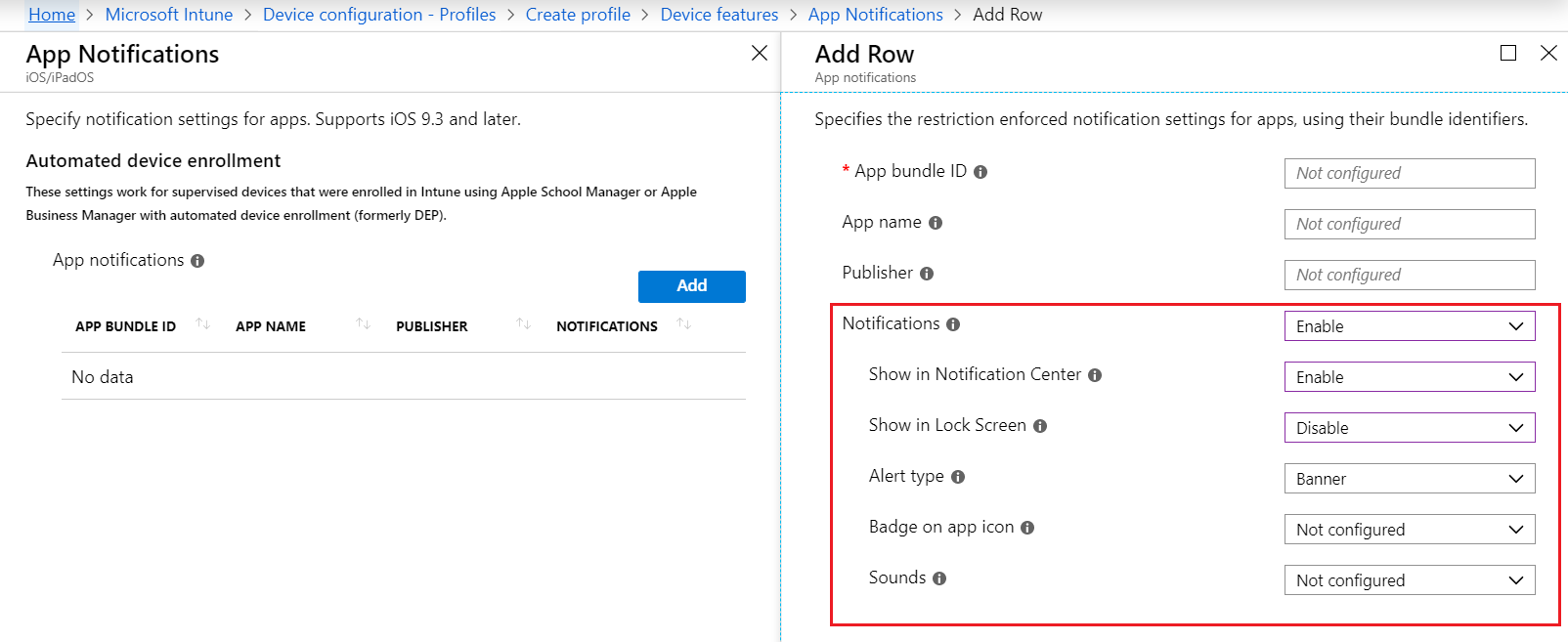
Intune does support for the settings of iOS app notification. But it doesn't support for the control of preview. Please see the screenshot as below.
The same feature request has already been submit on the Intune Uservoice site, and you can vote it.
Best regards,
Andy Liu
Please remember to mark the replies as answers if they help.
If you have feedback for TechNet Subscriber Support, contact [email protected].
Friday, October 4, 2019 9:42 AM
Hi Andy,
Yes I'd seen that and configured it for some of the more critical apps, but wondered if there was a generic setting. Will have to wait.
I've just voted on UserVoice - not going to know we need it unless we tell them.
Thanks,
Piers