Note
Access to this page requires authorization. You can try signing in or changing directories.
Access to this page requires authorization. You can try changing directories.
Question
Monday, September 10, 2012 7:46 AM
Hi,
Does anyone know How set-aduser to modify the AD attribute "Telephone Number" ?
All replies (13)
Monday, September 10, 2012 7:58 AM ✅Answered
Set-ADUser Sam -Add @{telephonenumber="123123"}
Monday, September 10, 2012 8:53 AM ✅Answered | 2 votes
Import-Csv 'd:\postcode.csv' | % { Set-ADUser -Identity $_.name -OfficePhone $_.OfficePhone -WhatIf}
Grant Ward, a.k.a. Bigteddy
Monday, September 10, 2012 7:54 AM | 1 vote
Set-ADUser samw -OfficePhone '0211232222'
Grant Ward, a.k.a. Bigteddy
Monday, September 10, 2012 8:04 AM
Sorry, the error is:
PS C:\Windows\system32> Import-Csv 'd:\postcode.csv' | % { Set-ADUser -Identity
$_.name $_.OfficePhone -WhatIf}
Set-ADUser : A positional parameter cannot be found that accepts argument '123456'.
At line:1 char:46
Monday, September 10, 2012 8:23 AM
You have to use a named parameter:
-OfficePhone <string>
        Specifies the user's office telephone number. This parameter sets the OfficePhone property of a user object. The LDAP display name (ldapDisplayName) of this
        property is "telephoneNumber".

        The following example shows how to set this parameter.
          -OfficePhone  "+1 (999) 555 1212"

        Required?                    false
        Position?                    named
        Default value
        Accept pipeline input?       false
        Accept wildcard characters?  false
Grant Ward, a.k.a. Bigteddy
Monday, September 10, 2012 8:49 AM
Sorry, it's not easy for me.
Could point me more detial about how I can change the script to meet the request?
Thanks.
Monday, September 10, 2012 9:25 AM
Thanks so much.
Friday, November 29, 2013 10:14 PM
Hi Bigteddy,
I am trying to modifying the below information for existing users using CSV file. Could you help me to do it through Power Shell.
Scenario:
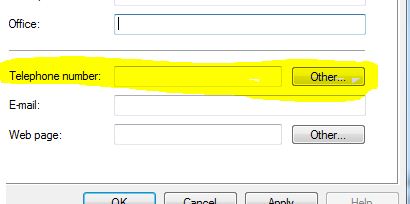
I have 50 Users where I want to modify "Othertelephone" & "info" for those object. These are AD attributes and you can see under respectively: General >> Telephone Number >>Other and Telephone >> Notes.
I want to look users from .csv file and modify above attributes for mentioned users in csv file.
Thanks
Shambhu Sharma
Saturday, November 30, 2013 2:33 PM | 1 vote
Hi Bigteddy,
I am trying to modifying the below information for existing users using CSV file. Could you help me to do it through Power Shell.
Scenario:
I have 50 Users where I want to modify "Othertelephone" & "info" for those object. These are AD attributes and you can see under respectively: General >> Telephone Number >>Other and Telephone >> Notes.
I want to look users from .csv file and modify above attributes for mentioned users in csv file.
Thanks
Shambhu Sharma
Well, all you need to do is to modify the attributes (add otherTelephone and info) from the answer earlier in this thread.
Something like:
Import-CSV "C:\Users.csv" | % {
$User = $_.UserName
$Info = $_.Info
Set-ADUser $User -info $info
}
Monday, December 2, 2013 5:51 PM
Hi,
It did´t work. Below are error:
Set-ADUser : A parameter cannot be found that matches parameter name 'info'.
At C:\altools\Info.ps1:1 char:115
- Import-CSV "C:\altools\testaccount55.csv" | % { $User = $_.SamAccountName; $Info = $_.Info; Set-adUser $User -info <<
<< $info }
+ CategoryInfo : InvalidArgument: (:) [Set-ADUser], ParameterBindingException
+ FullyQualifiedErrorId : NamedParameterNotFound,Microsoft.ActiveDirectory.Management.Commands.SetADUser
Otherway:
Set-ADUser : A parameter cannot be found that matches parameter name 'othertelephone'.
At C:\altools\Info.ps1:1 char:107
- Import-CSV "C:\altools\testaccount55.csv" | % {$User = $_.SamAccountName; Set-adUser $User -othertelephone <<<< $_.o
thertelephone -info $_.info}
+ CategoryInfo : InvalidArgument: (:) [Set-ADUser], ParameterBindingException
+ FullyQualifiedErrorId : NamedParameterNotFound,Microsoft.ActiveDirectory.Management.Commands.SetADUser
My Script:
Import-CSV "C:\altools\testaccount55.csv" | % {$User = $_.SamAccountName; Set-adUser $User -othertelephone $_.othertelephone -info $_.info}
From my understanding these two attributed are not acceptable from New-ADUser and Set-ADUser Powershell command.
I am not sure whether we have any other option to put these do attributes data using the other command but importing the same csv file.
Thanks Shambhu
Monday, December 2, 2013 6:02 PM
Hi,
I recommend starting your own thread.
Don't retire TechNet! - (Maybe there's still a chance for hope, over 12,420+ strong and growing)
Friday, January 20, 2017 7:30 PM
Import-Csv 'd:\postcode.csv' | % { Set-ADUser -Identity $_.name -OfficePhone $_.OfficePhone -WhatIf}Grant Ward, a.k.a. Bigteddy
Set-AdUser: Cannot validate argument on parameter 'Identity'...
Friday, January 20, 2017 7:45 PM
Please open your own topic. This one was closed 4 years ago.
\(ツ)_/