Note
Access to this page requires authorization. You can try signing in or changing directories.
Access to this page requires authorization. You can try changing directories.
Question
Friday, April 19, 2013 8:46 AM | 1 vote
Hi,
I have an item with many attachments like a word, pdf, excel and an image file. So when i make my report i can see all my attachments for my item with the help of the mini navigation bar. Now i navigate and stop when i see my image file on the list. After this i try to export the report as pdf and save it, but i see only the excel file. I cannot delete the attachments from the report but from the table, but i do not want to delete them.
Please help me as how can i select the image file from the list of attachments and display it when i export the report into a pdf file.
Thanks,
Santhiya
All replies (40)
Thursday, April 25, 2013 5:14 PM ✅Answered | 1 vote
Finally, TeamViewer saves the day again.
The new feature of Office365: big attachments (~3 Mb) make Access stuck and not respond while accessing .FileData property. Small pictures are being shown immediately. So all the ways of making a report from this thread work fine, it's just a matter of either O365 feature (bug) or the lack of bandwith.
Andrey V Artemyev | Saint-Petersburg, Russia
Russian blog artemyev.biztoolbox.ru
Friday, April 19, 2013 9:19 AM | 1 vote
Hi Santhiya,
firstly, you may want to create a query which selects only images from Attachment field.
Assuming we have a table like this:
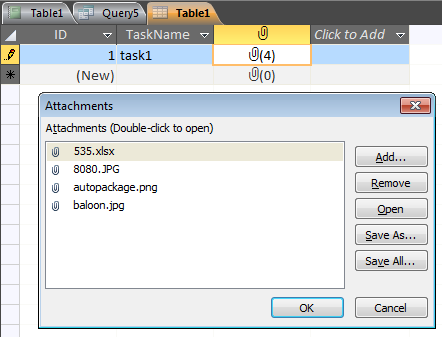
Let's consider only jpg images. And this query would be like this:
SELECT Table1.ID, Table1.TaskName, Table1.Photos.FileData, Table1.Photos.FileTypeFROM Table1WHERE (((Table1.Photos.FileType)="JPG"));
Then you just create a report based on this query and get smth like this:
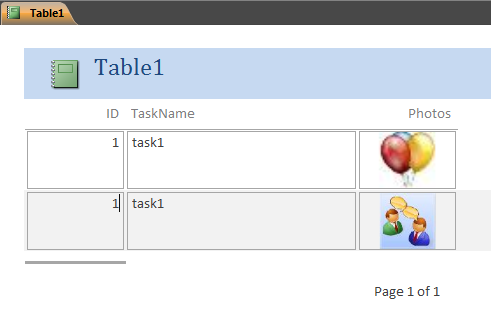
Andrey V Artemyev | Saint-Petersburg, Russia
Russian blog artemyev.biztoolbox.ru
Friday, April 19, 2013 9:24 AM
If you don't want the data itself be repeated, you may move it out to the header creating a group for ID fieldm for example.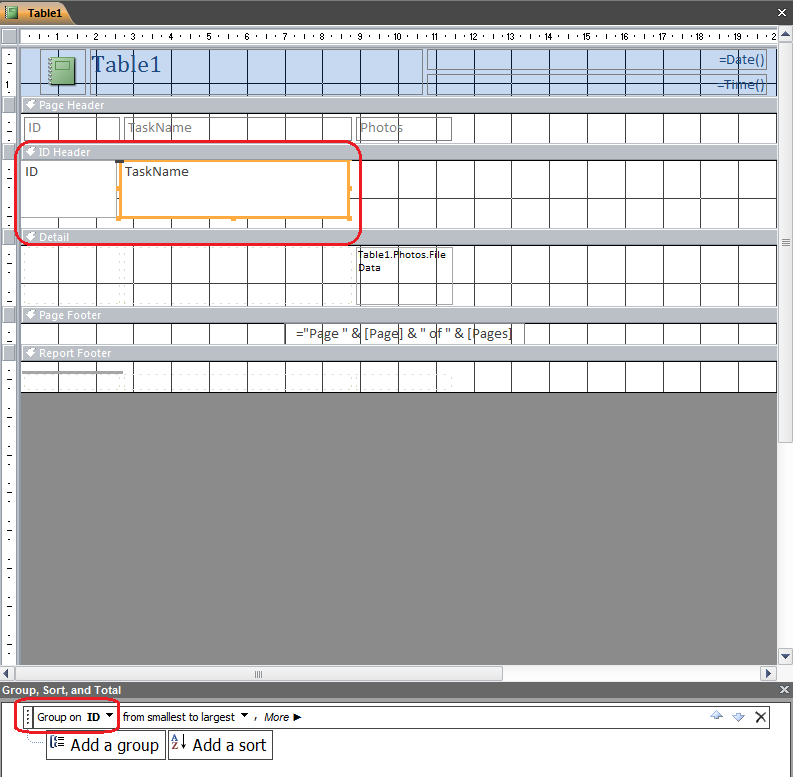
And the final look:
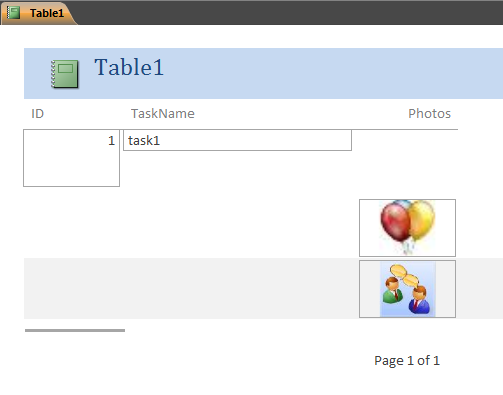
Of course, play with the layout and make it beautiful, it's just a quick sketch.
Andrey V Artemyev | Saint-Petersburg, Russia
Russian blog artemyev.biztoolbox.ru
Friday, April 19, 2013 9:33 AM
Hello Andrey,
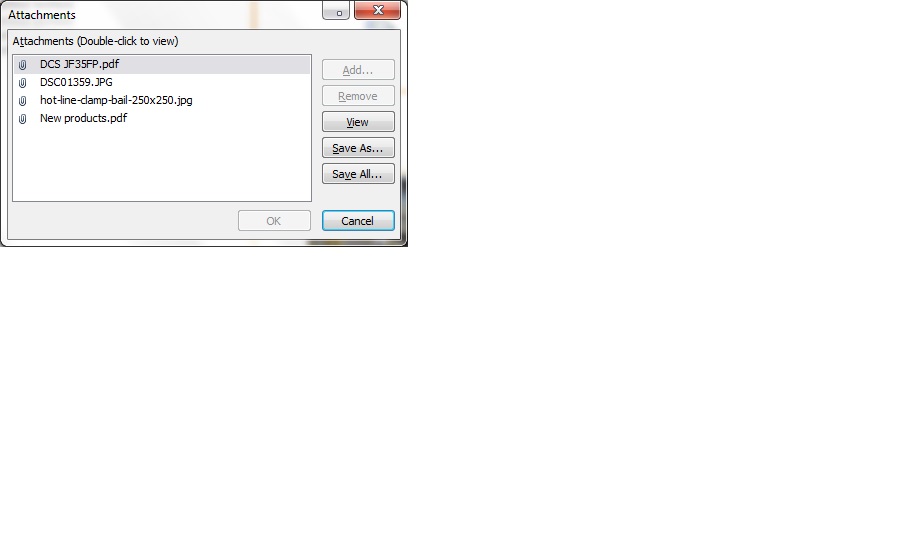
For example i have the 4 fields, i want to select only one image out of the two. How can i do that?
Santhiya
Friday, April 19, 2013 9:35 AM
 i want not the images to be displayed in the above report
the item with PDF icon displayed already has 2 jpg files
So how do i choose from the two?
Santhiya
Friday, April 19, 2013 9:40 AM
Have you made the query?
If you have 2 images in 1 record, which image do you want to show? Both? First? With a special name?
Andrey V Artemyev | Saint-Petersburg, Russia
Russian blog artemyev.biztoolbox.ru
Friday, April 19, 2013 9:49 AM
The query is not working for me, may be i made some mistake somewhere.
I want to show any one image from the list of attachments.
Let say i have the image of a product in 2 D drawing and 3D drawing, product original photo. then in such case i would like to select only the product original photo and display in the PDF when i export it.
Santhiya
Friday, April 19, 2013 10:05 AM
Show the query you have made.
And how do you know which image is the original? In you first example, which one do you need? DSC... or hot-line...?
Andrey V Artemyev | Saint-Petersburg, Russia
Russian blog artemyev.biztoolbox.ru
Friday, April 19, 2013 10:09 AM
SELECT [PDPL-Polska].Name, [PDPL-Polska].Attachments, [PDPL-Polska].Attachments.FileType
FROM [PDPL-Polska]
WHERE ((([PDPL-Polska].Attachments.FileType)="JPG"));
when i put this query i do not get any data as output.
For this example i would say the DSC image, i would like to display.
Santhiya
Friday, April 19, 2013 11:54 AM
[PDPL-Polska].Attachments - will return the whole attachment field again. you need .FileData for displaying a picture.
try this query:
SELECT [PDPL-Polska].Name, [PDPL-Polska].Attachments.FileData, [PDPL-Polska].Attachments.FileTypeFROM [PDPL-Polska]WHERE [PDPL-Polska].Attachments.FileType="JPG"AND Left([PDPL-Polska].Attachments.FileName,3) = "DSC"
Be sure that Attachments is the name of your Attachment field. There is another one I can see on your screenshot - Productimage. If there is at least one file with .jpg extension, it will be shown.
Andrey V Artemyev | Saint-Petersburg, Russia
Russian blog artemyev.biztoolbox.ru
Saturday, April 20, 2013 1:02 PM
Dear Andrey,
Thank you for your reply, let me check and come to you back.
Happy Weekend!!
Regards,
SAN
Santhiya
Monday, April 22, 2013 5:55 AM
Hello Andrey,
Greetings of the day!!
I have duplicated your query but i get zero records :(
What can be done?
Please advice.
Thanks,
SAN
Santhiya
Monday, April 22, 2013 6:12 AM
Hi Santhiya,
no records means there is smth wrong in WHERE clause, i.e. in the criteria. In this case it definitely means that there are no attachments with ".jpg" extension and beginnnig with "DSC". But this is strange according to your screenshot. Could you try to remove the "DSC" part and leave "JPG" criteria only?
SELECT [PDPL-Polska].Name, [PDPL-Polska].Attachments.FileData, [PDPL-Polska].Attachments.FileTypeFROM [PDPL-Polska]WHERE [PDPL-Polska].Attachments.FileType="JPG"
Andrey V Artemyev | Saint-Petersburg, Russia
Russian blog artemyev.biztoolbox.ru
Monday, April 22, 2013 6:15 AM
No result on the query after removing the where clause, but in 3 items i have the "JPG" as well as "jpg" files.
Santhiya
As you said, i have removed the Attachments and have added Attachments.FileData and Attachments.FileType
Monday, April 22, 2013 7:21 AM
Hm, I'm sure the problem could be resolved in a minute, if we look at the same screen. :) Ok, let's try the query without WHERE clause at all. Could you post the result? If there is a lot of records, just post a couple, for example, where .FileType is really jpg.
Andrey V Artemyev | Saint-Petersburg, Russia
Russian blog artemyev.biztoolbox.ru
Monday, April 22, 2013 7:52 AM
SELECT [PDPL-Polska].Name, [PDPL-Polska].Attachments.FileData, [PDPL-Polska].Attachments.FileType
FROM [PDPL- Polska]
WHERE ([PDPL-Polska].Attachments.FileType="JPG");
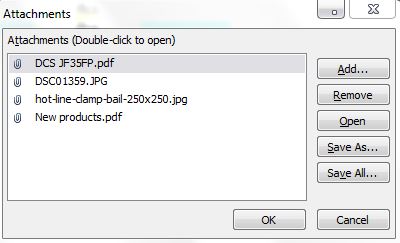
i want only one jpg image to be shown in the above list of attachments, for ex: i want to display DSC image.
While other item it has 2 files one jpg and pdf, here i want to display only jpg file. So what can be done? 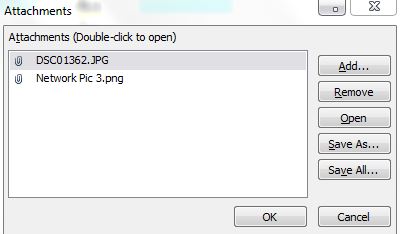
Santhiya
Monday, April 22, 2013 8:06 AM
Yes, I understand the requirements. I just want to see what the result of the query looks like:
SELECT [PDPL-Polska].Name, [PDPL-Polska].Attachments.FileData, [PDPL-Polska].Attachments.FileTypeFROM [PDPL- Polska]
Could you, please, run the above query and make a screenshot of Datasheet view?
For example, if I have this query:
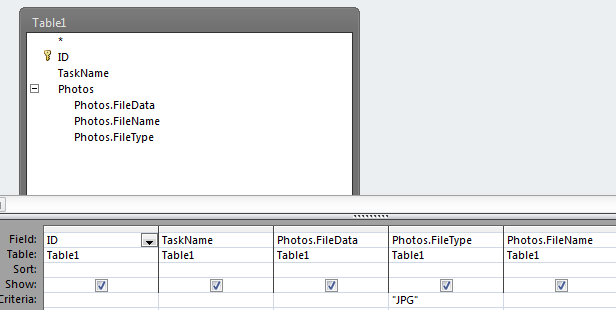
the result is:
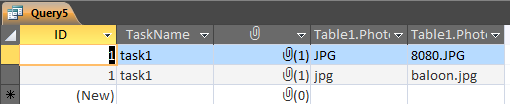
Andrey V Artemyev | Saint-Petersburg, Russia
Russian blog artemyev.biztoolbox.ru
Monday, April 22, 2013 9:05 AM
It is taking more than the usual time. When i run the query, access goes into not responding mode. :(
Santhiya
Monday, April 22, 2013 9:21 AM
Andrey,
Seriously i am not able to view the output, the query runs and makes access in not responding mode, i have tried restarting the application and even my laptop. But when ever i run the query it just goes to not responding mode.
I am running this query without the where clause:
SELECT [PDPL-Polska].Name, [PDPL-Polska].Attachments.FileData, [PDPL-Polska].Attachments.FileType
FROM [PDPL- Polska]
Santhiya
Monday, April 22, 2013 9:21 AM
If there are a lot records and getting them takes a much time, restrict the result via [PDPL-Polska].Name field. For example,
WHERE [PDPL-Polska].Name = 'bla-bla-bla'
And choose the name which has these 4 attachments you provide above:
Andrey V Artemyev | Saint-Petersburg, Russia
Russian blog artemyev.biztoolbox.ru
Monday, April 22, 2013 9:45 AM
Thanks Andrey it worked, i mean access did not go in not responding mode.
Please find below screenshot with Attachments.FileName, Code, Attachments.FileType. please ignore the last column its Attachments.FileType (sorry by mistake it got repeated). I again added Attachments.FileData in the design view but when i run the query it get stuck, not responding mode.
So this means, if i put Attachments.FileData, its not working for me. The query does not work.

Santhiya
Monday, April 22, 2013 10:51 AM
Dear Andrey,
Did you try working running a query with Attachment.FileData? Did it worked for you?
Santhiya
Monday, April 22, 2013 11:58 AM
2 strange things:
1. Your .FileType property value begins with "." (dot), mine doesn't.
2. Yes, I tried .FileData and it worked perfectly as I have shown in my first couple of posts.
As for returning 0 records, now I see that you have to add dot:
SELECT [PDPL-Polska].Name, [PDPL-Polska].Attachments.FileData, [PDPL-Polska].Attachments.FileTypeFROM [PDPL-Polska]WHERE [PDPL-Polska].Attachments.FileType=".JPG"AND Left([PDPL-Polska].Attachments.FileName,3) = "DSC"
Andrey V Artemyev | Saint-Petersburg, Russia
Russian blog artemyev.biztoolbox.ru
Tuesday, April 23, 2013 3:44 AM
Dear Andrey,
Good Morning.
I appended the Query as advised by you, but the Attachments.FileData makes the access not responding, when i run the query. But if i make a query without Attachments.FileData it shows me the fields, like the below. I don't understand why the first entry is repeated twice.

So without Attachments.FileData, can i proceed?
Also i tried the below query to display only the "Hot-Line........jpg" file.
SELECT [PDPL-Sicame Polska].Code, [PDPL-Sicame Polska].Attachments.FileName, [PDPL-Sicame Polska].Attachments.FileType, [PDPL-Sicame Polska].Attachments
FROM [PDPL-Sicame Polska]
WHERE ((([PDPL-Sicame Polska].Code)="Test 19April13") AND (([PDPL-Sicame Polska].Attachments.FileName)="hot-line-clamp-bail-250x250") AND (([PDPL-Sicame Polska].Attachments.FileType)=".JPG"));
It displayed me zero record when the above query was run.
Santhiya
Tuesday, April 23, 2013 6:51 AM
Hi Santhiya,
as for .FileData, I cannot see the way to go. Try to compact & repair your database and then use the query with .FileData field again.
As for your "hotline...", you didn't include an extension to your criteria, that's why you have 0 records as a result.
[PDPL-Sicame Polska].Attachments.FileName)="hot-line-clamp-bail-250x250.jpg"
Andrey V Artemyev | Saint-Petersburg, Russia
Russian blog artemyev.biztoolbox.ru
Tuesday, April 23, 2013 8:58 AM
Dear Andrey,
I tried working on a new database in access. But again there also access gets stuck when query has Attachments.FileData. Is it because the table is in online sync with SharePoint??
And yes i gave the full name in Attachments.FileName including the extension. When i run the query i get 2 rows of same records.
Regards,
SAN
Santhiya
Tuesday, April 23, 2013 9:16 AM
Ah, I missed this point about SharePoint. If so, I'm not surprised that Access gets stuck. It's a common scenarion for SharePoint. :) How long have you tried to wait? I have a database which is based on SP lists and sometimes I have to wait for a couple of minutes before it opens.
Also, do you have cache enabled?
It is File - Options - Current Database, here the last group of options for Access 2010. If it is disabled, try to enable it. It should run well after the first loading.
As for the same 2 records, try to add another one field from this table. E.g., ID field, maybe you have 2 similar attachments in different records.
Andrey V Artemyev | Saint-Petersburg, Russia
Russian blog artemyev.biztoolbox.ru
Wednesday, April 24, 2013 4:09 AM
Dear Andrey,
Very good Morning!
How are you today?
I never saw the output of that query because access goes to not responding mode and i have to close the application to restart it. So its not minutes it's like hours but still i have never seen the output of the query with Attachments.FileData.
And i checked File - Options - Current Database: "Use the Cache format that is compatible with Microsoft Access 2010 and later" is already enabled, but "Clear Cache and close" and "Never Cache" is not checked.
Please tell me if i have to enable them too?
Santhiya
Wednesday, April 24, 2013 5:12 AM
Andrey,
I need to ask you if Attachments.FileData is the field that will help me in displaying the image i need?
How is it helpful to me, because i cannot do anything if i put it in my query.
Any other way to display only one image from list of attachments?
Santhiya
Wednesday, April 24, 2013 7:32 AM
Hi Santhiya,
not very good morning, but thanks. :)
Unfortunately, yes, you need this .FileData. The last try is to create a temporary table with the records you need to show in your report. I hope there are not many of them. Then use the above query but based on this temporary table. Because I tested it with a local Access table and it worked perfectly.
Andrey V Artemyev | Saint-Petersburg, Russia
Russian blog artemyev.biztoolbox.ru
Wednesday, April 24, 2013 7:43 AM
I have like 56 lists in SharePoint, each for one subsidiary of our company. Is it possible to do this for all? And each lists have like 30 to 50 items in it.
Santhiya
Wednesday, April 24, 2013 8:31 AM
Do you open a report with a button and some VBA code? I need some details about the process itself.
Andrey V Artemyev | Saint-Petersburg, Russia
Russian blog artemyev.biztoolbox.ru
Wednesday, April 24, 2013 8:33 AM
Dear Andrey,
can i have your email ID, where i can send you some information in detail please?
Thanks
Santhiya
Wednesday, April 24, 2013 10:04 AM
I do not use a VBA code anywhere. I just sync SharePoint with access, make query and then make reports out of that query.
Recently i have been asked to display the product image and when users enter information in the list, they also upload/attach all files relating to the project/product.
So now the criteria is to display only the image in the attachment column of report.
Santhiya
Wednesday, April 24, 2013 10:26 AM
Santhiya,
try to contact me via this form http://artemyev.biztoolbox.ru/contact.aspx
There are 5 fields, they are:
Name
Subject
Message (body)
Attach a file
Andrey V Artemyev | Saint-Petersburg, Russia
Russian blog artemyev.biztoolbox.ru
Wednesday, April 24, 2013 2:03 PM
Santhiya,
I reply you here because I temporary can't reply via a good email with files etc. from my workplace.
The basic concept now is to create a local table and bind your report to it.
First of all, create a local table. Name - tmpAttachments. In my sample there are 3 fields, you may create more, these fields are all you need in the report, and the last should be Attachment field. My sample:
1. ID - Number
2. CompanyName - Text
3. MyAttachment - Attachment
Then you create a query:
SELECT MySharePointTable.ID, MySharePointTable.[CompanyName], MySharePointTable.AttachmentsFROM MySharePointTableWHERE MySharePointTable.Attachments.FileType=".JPG" ANDLeft(MySharePointTable.Attachments.FileName, 3) = "DSC"
Or smth like this. The main idea is that this query should return only 1 file for every record returned.
Not, assuming you have a form with a button which opens a report. The code behind this button is:
Private Sub Command0_Click()Dim db As DAO.Database, strSQL$, rsSP As DAO.Recordset, rsLocal As DAO.Recordset, rsSPAttachment As DAO.Recordset, _rsLocalAttachment As DAO.RecordsetOn Error GoTo err_lbl Set db = CurrentDb strSQL = "DELETE FROM tmpAttachments" db.Execute strSQL, dbFailOnError strSQL = "SELECT * FROM qAttachments" 'it's the name of the query we have created at the previous step Set rsSP = db.OpenRecordset(strSQL, dbOpenSnapshot) strSQL = "SELECT * FROM tmpAttachments" Set rsLocal = db.OpenRecordset(strSQL, dbOpenDynaset) With rsSP While Not .EOF rsLocal.AddNew rsLocal![ID] = ![ID] rsLocal![CompanyName] = ![CompanyName] Set rsLocalAttachment = rsLocal.Fields("MyAttachment").Value Set rsSPAttachment = .Fields("Attachments").Value While Not rsSPAttachment.EOF rsLocalAttachment.AddNew rsLocalAttachment!FileName = rsSPAttachment!FileName CopyLargeField rsSPAttachment!FileData, rsLocalAttachment!FileData rsLocalAttachment.Update rsSPAttachment.MoveNext Wend rsLocal.Update .MoveNext Wend End With DoCmd.OpenReport "rAttachments", acViewReport, , , acDialogexit_lbl:On Error Resume Next rsSP.Close rsLocal.Close Exit Suberr_lbl: MsgBox Err.Number & ": " & Err.Description Resume exit_lblEnd SubPrivate Function CopyLargeField(fldSource As Field, _ fldDestination As Field) ' Set size of chunk in bytes. Const conChunkSize = 32768 Dim lngOffset As Long Dim lngTotalSize As Long Dim strChunk As String ' Copy the photo from one Recordset to the other in 32K ' chunks until the entire field is copied. lngTotalSize = fldSource.FieldSize Do While lngOffset < lngTotalSize strChunk = fldSource.GetChunk(lngOffset, conChunkSize) fldDestination.AppendChunk strChunk lngOffset = lngOffset + conChunkSize Loop End Function
Firstly, we clean up the tmpAttachments table. Then we open a recordset for the SharePoint linked table and for our empty local tmpAttachments table. Looping through the records of the first table we fill the second one. There are also a couple of tricky moments about working with Attachment fields, I don't want to explain this on my own, you'd better to read about it here:
http://msdn.microsoft.com/en-us/library/ff822448.aspx that's where CopyLargeFile function came from.
http://msdn.microsoft.com/en-us/library/ff837014.aspx
In fact, we choose the 1 file of all files in Attachement field of SharePoint linked table and then create a record with an Attachment field which now holds only 1 file in it. Finally, you should have a report based on tmpAttachments table. See the beginning of this thread for a quick reference. And you haven't to have gouping by ID field now, because you query will guarantee the presence of the single file only.
If this does not help, I don't know what else we can do. This strange bug with stucking Access working directly with SP linked table spoils all the process.
P.S. I now understand the difference between file types. The value of .FileType field depends on the table:
for local tables it has no leading dot and looks like "JPG";
for SharePoint linked tables it has a leading dot and looks like ".jpg"
Andrey V Artemyev | Saint-Petersburg, Russia
Russian blog artemyev.biztoolbox.ru
Thursday, April 25, 2013 6:01 AM
Hello Andrey,
Thanks for replying.
I have read through your mail, understood few things and few did not.
As i informed you i am not making any Form in access, so wont be using any VBA code too.
I was just thinking based on the enormous lists of SharePoint and the items inside the lists to try making a local table for attachments and following what you asked me to do, i think its time consuming.
I was just wondering is there are any option in SharePoint itself to have two columns for attachment? Like we already have an attach field when we enter information in a list, but apart from that can we have another one?
The idea for the above is to attach image in one attachment field and other files related to the product in another attachment field?
I searched online but couldn't find any solution.
What are your views?
Santhiya
Thursday, April 25, 2013 6:41 AM
Ok, so we are in the dead end now. There 2 ways: via a query with .ItemData or via creating a temp table with Attachment field which has only 1 file inside using VBA. Both of these ways do not meet your requirements.
As for Attachments in SharePoint. No, there is no such type of field (column). Possibility to attach files to a list item can be set at the whole list level.
Andrey V Artemyev | Saint-Petersburg, Russia
Russian blog artemyev.biztoolbox.ru
Thursday, April 25, 2013 6:44 AM
So do i need to make a form too?
I mean the .FileData is not working when List is synced with Access. So other option can be tried but i am worried for the long lists and the number of items in each. Well let me try then to make one.
Santhiya
Thursday, April 25, 2013 6:59 AM
If you want to try this VBA approach, then yes, you need a very simple form with a button.
BTW, I tested the above provided code with a SharePoint 2007 List of nearly 20000 items. Works not bad, a couple of minutes to generate a local table with 150 files and open a report based on it.
Andrey V Artemyev | Saint-Petersburg, Russia
Russian blog artemyev.biztoolbox.ru