Note
Access to this page requires authorization. You can try signing in or changing directories.
Access to this page requires authorization. You can try changing directories.
Question
Monday, May 30, 2016 4:43 AM
Hi All,
I am having an issue with the dot net 4.5 on windows server 2012 R2 and as we all know the dot net 4.5 is a part windows Operating system if i removed the dot net 4.5 means i will lose my graphical interface. i tried to repair it by using Dot net repair tool from Microsoft but no use. I also tried to download patches from the Windows update but i have not received yet.
A reply will be appreciated!
Thanks
Arvind Chormalle
All replies (7)
Monday, May 30, 2016 5:57 AM ✅Answered | 1 vote
Hi Arvind,
You can't manage .NET 4.5 on Server 2012 R2 with things like the repair tool, as that's only intended for use on older systems where .NET 4.5 wasn't shipped as part of the operating system.
You also can't really compare the notion of removing the Windows feature (even if you elect to remove the binaries to reduce image size) with the traditional concept of uninstalling an application as Windows still knows about the feature at a manifest level. All that remains is to either re-enable the feature, or if you also chose to remove the binaries, enable the feature while specifying a source for the binaries.
You can achieve this through either Server Manager (which you can still run remotely if you've lost the GUI on your affected server) or PowerShell. I tend to find the latter faster, however, to each their own.
If you run the following command on a Server Core build, then by default the following .Net features are set to "installed":
Get-WindowsFeature *net*
- NET-Framework-45-Features
- NET-Framework-45-Core
- NET-WCF-Services45
- NET-WCF-TCP-PortSharing45
If one or more have a status of "available", that means you've removed the feature but not the binaries, which is easy to recover from with the following command:
Add-WindowsFeature -Name NET-Framework-45-Features,NET-Framework-45-Core,NET-WCF-Services45,NET-WCF-TCP-PortSharing45
If one or more have the status of "removed" then things can be a bit more difficult as you need to locate another server that not only has these features, but has them at the same hotfix levels as the affected server. Once you find such a server, you can use the following process to recover:
- Share out the %windir%\winsxs directory. Use "authenticated users" with "read" only access on the share permissions. There's no sensitive information within the side-by-side store and this allows you to use this server from any computer which might be missing binaries (again, with the caveat that they match the hotfix level of the affected server).
- Run the following command on the affected server. Note, it's the same command but with the additional "-Source" parameter:
Add-WindowsFeature -Name NET-Framework-45-Features,NET-Framework-45-Core,NET-WCF-Services45,NET-WCF-TCP-PortSharing45 -Source \\sourceServer.yourdomain.com\winsxs
Technically, if your server is Internet-connected then you don't need this second variation, however, that's not been overly common in my experience, hence the "-Source" example.
Once you get this sorted out, you can apply the same principles to the GUI features. You can use the following command to check the status of the binaries and the same format of Add-WindowsFeature from above to re-add the GUI (which requires these two features: Server-Gui-Mgmt-Infra and Server-Gui-Shell):
Get-WindowsFeature | where { $_.Parent -eq "User-Interfaces-Infra" }
Cheers,
Lain
Monday, May 30, 2016 7:38 AM
Thank you for your Reply Lain,
Actually we are having an application which needs dot net 4.0 to run the higher version of dot is installed already on the server. how would i install the 4.0?
Monday, May 30, 2016 7:50 AM
Hi Arvind,
.NET 4.0 is part of .NET 4.5, so it's already there.
You might want to use the "Get-WindowsFeatures *net* to double-check the correct features are installed that the application requires, but as I say, version 4.0 of the framework itself is already there.
Cheers,
Lain
Monday, May 30, 2016 7:55 AM
Yes Lain, I am aware of it but i am getting below attached error.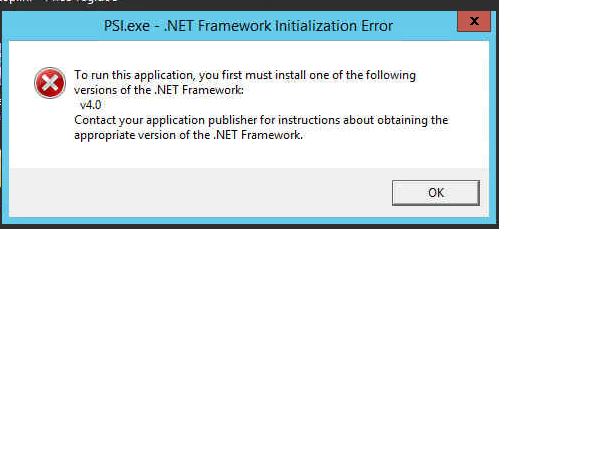
Monday, May 30, 2016 8:02 AM
What results do you get from running:
Get-WindowsFeature *net*
Cheers,
Lain
Monday, May 30, 2016 8:36 AM
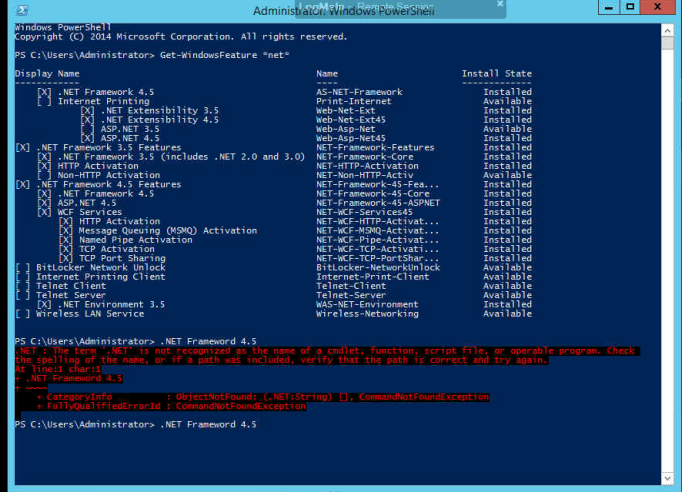
Monday, May 30, 2016 8:40 AM
Hi Arvind,
You may well need to go back to your application vendor and ask them as to how they're checking for the presence of .Net 4.0. It may end up in a response that the application is simply not compatible.
That said, you should have a read of the following official guidance from Microsoft as to how to check, as it might just be that something hasn't registered correctly.
Cheers,
Lain