Note
Access to this page requires authorization. You can try signing in or changing directories.
Access to this page requires authorization. You can try changing directories.
Question
Wednesday, April 10, 2019 11:44 PM
Hello all,
I need to compile a report containing information the server roles and features (ISS,DNS, etc) for all the servers in our environment. Is there a report built into SCCM to do this? Is there a better way to obtain this information other than trying to use SCCM? Thank you in advance.
Miguel V.
All replies (6)
Wednesday, April 10, 2019 11:58 PM ✅Answered | 1 vote
there is no builtin report for this. what version of cm do you have?
Garth Jones
Blog: https://www.enhansoft.com/blog Old Blog: https://sccmug.ca/
Twitter: @GarthMJ Book: System Center Configuration Manager Reporting Unleashed
Thursday, April 11, 2019 8:04 AM ✅Answered | 1 vote
Hi Miguel,
I think we can also use PowerShell to list all installed Roles and Features of the servers.
For more detailed information, please refer to the gallery articles:
Get List of Windows Servers from AD, Get Roles & Features, Export to CSV
Export Installed Roles And Features On Windows Server 2016 And 2012
Windows Server: List all installed Roles and Features using PowerShell
Hope it helps. Thanks for your time.
Best regards,
Simon Ren
Please remember to mark the replies as answers if they help.
If you have feedback for TechNet Subscriber Support, contact [email protected].
Thursday, April 11, 2019 4:14 PM ✅Answered
Hi Garth,
Running 2012 right now
if I remember right that is inventoried by default in CMCB. In CM12 you will need to find Sherry's blog on how to inventory this.
Garth Jones
Blog: https://www.enhansoft.com/blog Old Blog: https://sccmug.ca/
Twitter: @GarthMJ Book: System Center Configuration Manager Reporting Unleashed
Thursday, April 11, 2019 3:58 PM
Hi Garth,
Running 2012 right now
Thursday, April 11, 2019 4:00 PM
Thank you Simon, I will give these a look. Do these scripts have to be run on each server or is this a script to run through SCCM?
- Miguel
Friday, April 12, 2019 5:52 AM
Hi Miguel,
May we know if you have permissions on the domain controller?
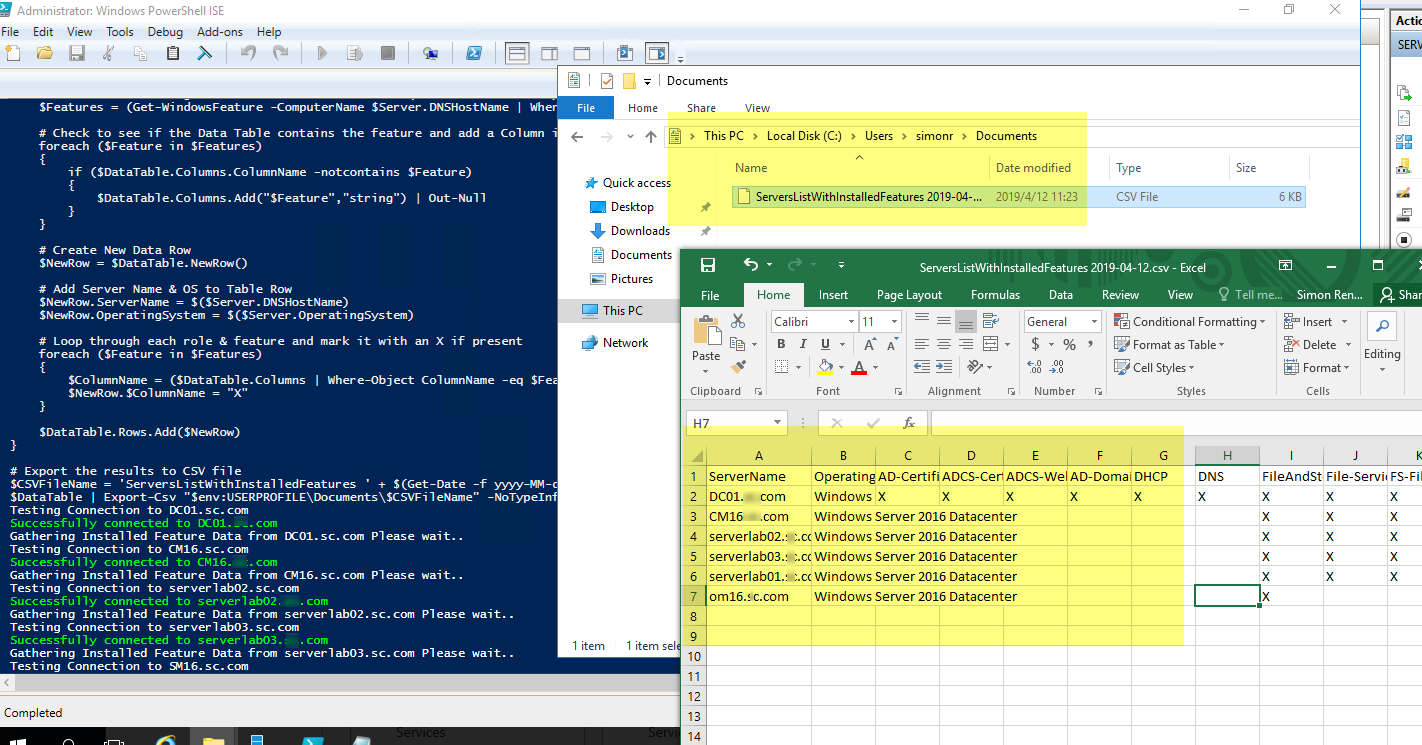
If yes, you can run the first gallery command once on the domain controller to get the installed roles and features information of all the servers in the domain into one csv file (the commend needs to import Active Directory Module, so it should run on the domain control). As shown below in my lab(Each installed role or feature is marked with an X).
If not, you may need to run the script on each server or on one server that can remotely connect to other servers to get the installed roles and features information.
Thanks and regards,
Simon
Please remember to mark the replies as answers if they help.
If you have feedback for TechNet Subscriber Support, contact [email protected].