Note
Access to this page requires authorization. You can try signing in or changing directories.
Access to this page requires authorization. You can try changing directories.
Question
Wednesday, November 28, 2018 4:14 PM
I have done the obvious of adding a group the user is a member of to the certificate template security permissions (read, write and enroll). However, when I try to use certmgr to request certificates, it doesn't show as available.
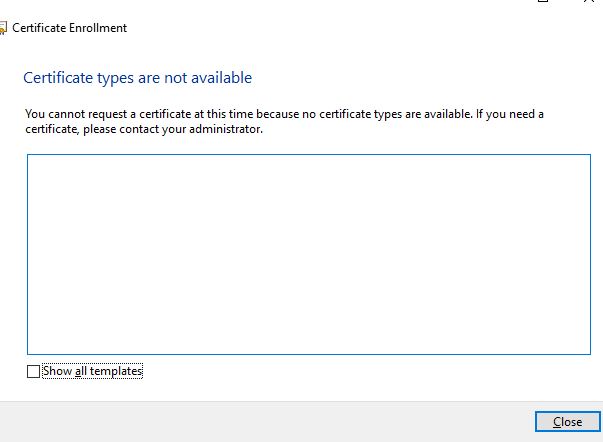
When I select the option to show all certificates, it says:
"The template is missing a required signature policy attribute" I searched that error on the web and found nothing helpful.
It also says "You do not have permissions to view this type of certificate."

Again, I have verified that a user is a member of a group with read and enroll permissions on the template and it still doesn't work.
This is a template this user will enroll on behalf of another user. The user is in the enrollment agents group and has has the enrollment agent certificate installed and I removed enrollment agent restrictions as a troubleshooting step.
What else would cause this issue?
All replies (8)
Friday, November 30, 2018 10:01 AM ✅Answered
Hi,
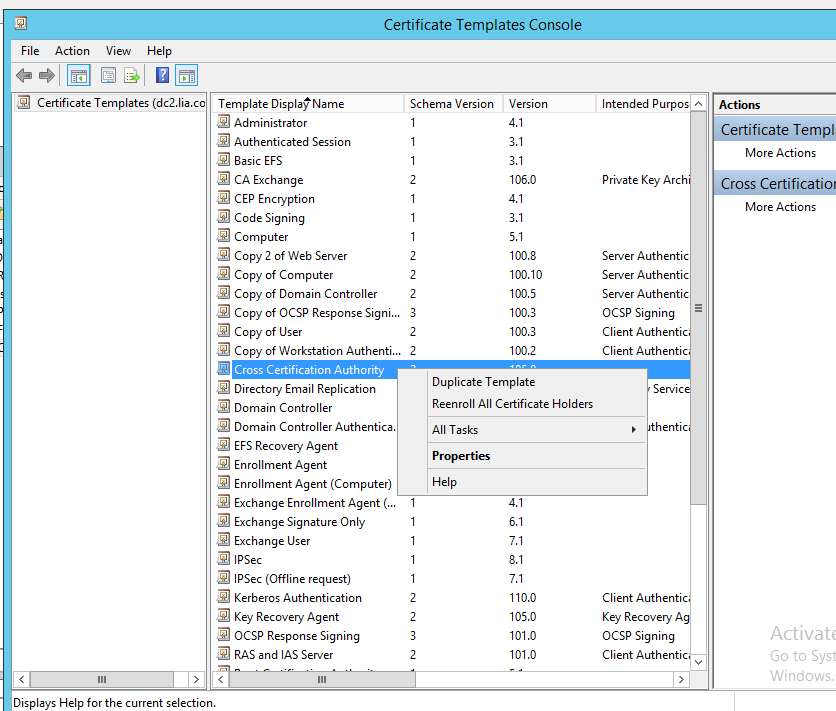
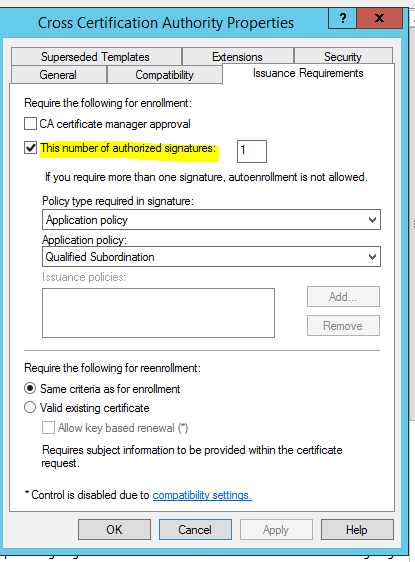
Please open certificate templates console, find the issue certificate template, right click on it and choose Properties, on the Issuance Requirement tab, please check whether the option This number of authorized signatures is checked, if yes, please uncheck this option to see if we can request certificate:
If anything is unclear, please feel free to let me know.
Best regards,
Kallen
Please remember to mark the replies as answers if they help.
If you have feedback for TechNet Subscriber Support, contact [email protected].
Monday, December 10, 2018 9:19 AM ✅Answered
Hi,
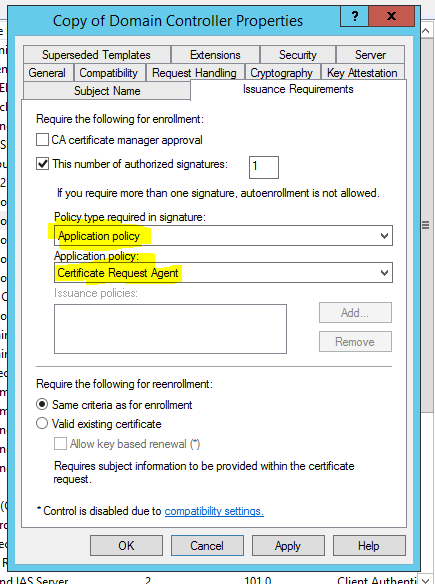
Please try to check the option “This number of authorized signatures” again, then choose Application policy then choose Certificate Request Agent, then request this template to see if it can work.
Best regards,
Kallen
Please remember to mark the replies as answers if they help.
If you have feedback for TechNet Subscriber Support, contact [email protected].
Thursday, November 29, 2018 9:47 AM
Hello,
This is a quick note to let you know that I am currently performing research on this issue and will get back to you as soon as possible. I appreciate your patience.
If you have any updates during this process, please feel free to let me know.
Thank you for your understanding and support.
Best Regards,
Kallen
Please remember to mark the replies as answers if they help.
If you have feedback for TechNet Subscriber Support, contact [email protected].
Saturday, December 1, 2018 6:13 AM
Now I'm seeing a different error about requiring too many RA signatures as shown in the screen shot below and I have unchecked that box.

Wednesday, December 12, 2018 9:58 AM
Hi,
Just checking in to see if the information provided was helpful. Please let us know if you would like further assistance.
Best Regards,
Kallen
Please remember to mark the replies as answers if they help.
If you have feedback for TechNet Subscriber Support, contact [email protected].
Friday, December 14, 2018 2:17 AM
Hi,
Was your issue resolved?
If you resolved it using our solution, please "mark it as answer" to help other community members find the helpful reply quickly.
If you resolve it using your own solution, please share your experience and solution here. It will be very beneficial for other community members who have similar questions.
If no, please reply and tell us the current situation in order to provide further help.
Best Regards,
Kallen
Please remember to mark the replies as answers if they help.
If you have feedback for TechNet Subscriber Support, contact [email protected].
Friday, December 14, 2018 3:07 AM
Cannot get it to work.
We have given up on this, so I will just mark your answers.
Friday, December 14, 2018 3:19 AM
Hi,
I'm sorry to hear that.
And thanks for your support and patience.
Wish you good luck.
Best regards,
Kallen
Please remember to mark the replies as answers if they help.
If you have feedback for TechNet Subscriber Support, contact [email protected].