Note
Access to this page requires authorization. You can try signing in or changing directories.
Access to this page requires authorization. You can try changing directories.
Question
Tuesday, September 11, 2018 9:00 PM
Hi,
I've configure almost all the Event Id's for monitoring the Reboot and unexpected shutdown/reboot of the servers in my environment but the issue is when the Hardware Host is getting disconnecting or Host failure we haven't receive any reboot alert for the servers which are under the host which was failure or disconnected
Please help me on this...
The Event ID's that we've configured for reboot and shutdown monitoring below
6006,6005,6008,6009,1074,1071,1076,1001,6013,7036
Thanks,
Shiva Ravichandran.
All replies (4)
Tuesday, September 11, 2018 9:20 PM ✅Answered
Hi,
Sometimes if a hardware failure occurs it might not log something in the Event Log, which makes it quite hard to identify.
By looking at the Event IDs you've got, it looks like you've covered most if not all.
Here's also good table for the different reboot/shutdown Event IDs:
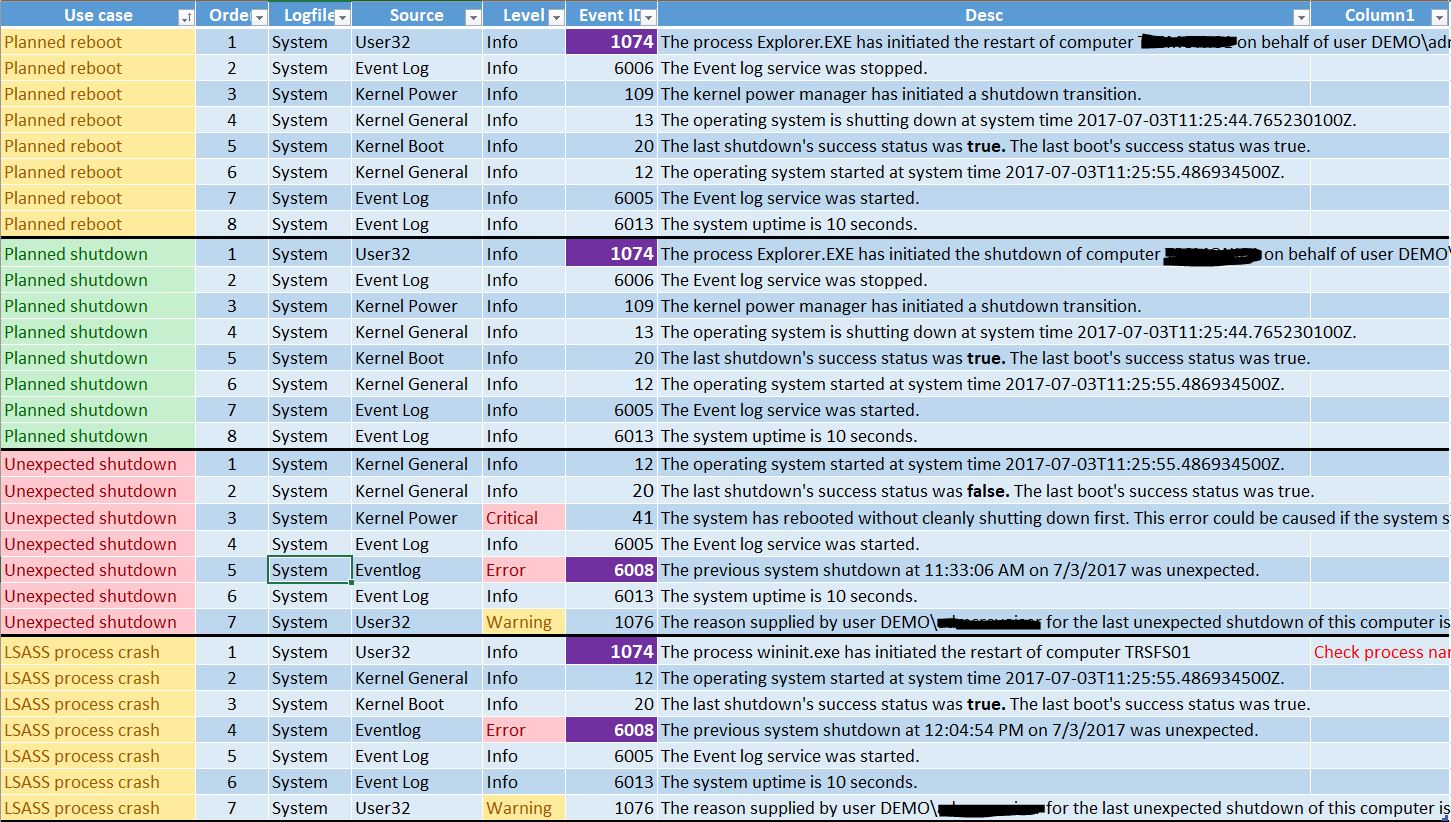
For the rest you could just use SCOM's default monitors?
Depending on what hardware you're using, most hardware vendors also have softwares/tools that provide alerting/monitoring that can be used.
Best regards,
Leon
Blog: https://thesystemcenterblog.com LinkedIn:
Wednesday, September 12, 2018 6:38 AM ✅Answered | 1 vote
Hi Shiva,
I agree with both,
What i am suggesting,
- Hope you have configured event rule for generating alert after detecting event id. If you have configured monitor then it might be best possible that it is already in critical state since no one refreshed this hence you are not getting alert.
- Hope you have set right samples ( if applied) what is happeing VM servers ups with in 1~2 min so if we have long sample values then we are also quite close to miss the alert situation.
- Now please check either MMA service running on servers, again it might be a case when server is going to unexpected reboot (event id 6008) due to high CPU, Memory etc. First it will stop/crash the health service so we are not getting alert.
- Hope you have target this rule/monitor to all servers, you might also missed to enable/target this to some machines.
- last silly suggestion, check agent is not greyed out.
As a conclusion:-
Check your monitor/rule property like its samples and target classes. And do work on heartbeat failure and computer not reachable alert in a proactive manner.
Hope this helps :)
Cheers, Gourav Please remember to mark the replies as answers if it helped.
Wednesday, September 12, 2018 2:42 AM
>>Hardware Host is getting disconnecting or Host failure we haven't receive any reboot alert for the servers
When host is disconnected, it does not send any detection of reboot event id to management server. As a result, no alert is generated. however, you may receive heartbeat failure alert which may be indicator
Roger
Wednesday, September 12, 2018 7:54 AM
Hi,
Yes, agree with the above. Since the shutdown/reboot is unscheduled, we are limited to monitor the event by event id. The the communication is lost, the heartbeat alert is received.
Have a nice day!
Regards,
Alex Zhu
Please remember to mark the replies as answers if they help.
If you have feedback for TechNet Subscriber Support, contact [email protected].