Note
Access to this page requires authorization. You can try signing in or changing directories.
Access to this page requires authorization. You can try changing directories.
Question
Tuesday, August 7, 2018 4:20 AM
We have had Exchange 2016 on prem and Skype for Business 2015 on prem working for two years, then the internal certs (OAuth etc) expired and we set up new ones. Now when I run the Test-CsExStorageConnectivity test it fails.
Test-CsExStorageConnectivity : ExCreateItem exchange operation failed, code=50043, reason=#CTX#{ctx:{traceId:1182912700
But every test we do to check shows no problems. (good guide here http://blog.chiffers.com/2018/02/14/test-csexstorageconnectivity-returning-error-code50043/)
But what we see in our error message is this...
Could not get the required ExchangeServiceBinding client
Uri=https://autodiscover.domain.com/Autodiscover/Autodiscover.svc, Web Proxy=http://192.133.31.65:8080/ (proxy! What proxy? Why are you trying to use the proxy!)
HTTP/1.1 407 Proxy Access Denied (why? Why would you deny that?)
Proxy-Authenticate: Negotiate,NTLM,Basic realm="WebMarshal Proxy Server"
Server: WebMarshal Proxy (*sigh*)
I have tried changing the proxy settings in IE, and then tried setting the winhttp proxy with netsh winhttp proxy source-ie but nothing works. No proxy set it IE, and no winhttp proxy set, yet Skype for Business still seems to insist on using a proxy!
How do I fix this? Is the proxy a red herring? I've tried everything, rebuilt the partnership etc over and over, nothing works.
Thanks, Neal
All replies (18)
Tuesday, November 13, 2018 7:11 PM ✅Answered
Fixed! Finally. It WAS the proxy settings.
1) Stop the WinHTTP Web Proxy Auto-Discovery Service and set to Disabled.
2) At an admin command prompt, type in netsh winhttp reset proxy. This will then show as DIRECT.
3) Reboot! The above steps have no impact until you reboot.
So thanks to everyone that helped with this, it's a frustrating set of steps to go through, why in the world they don't have a wizard to do this I have no idea, but there you go.
Regards, Neal Blackie
Wednesday, August 8, 2018 6:05 AM
Hi Neal,
According to your description, you have configured Exchange and Skype for Business integration before, now, as you changed the Exchange certificate, the integration has some problems.
Based on my experience, you could try to check the Exchange certificate whether the SAN field include the desired FQDN of Autodiscover.domain.com. You could run the cmdlet: Get-ExchangeCertificate | Select-Object Subject,Services,CertificateDomains | fl
In addition, I suggest you could refer to the following blog to check the Exchange and Skype for Business Integration step by step:
http://blog.schertz.name/2015/09/exchange-and-skype-for-business-integration/
Best Regard,
Evan
Thursday, August 9, 2018 1:54 AM
Thanks Evan. I have already been through the Schertz blog, and all setup steps worked just fine.
I wish Microsoft would produce a wizard/program to set this up, it's crazy that it's so hard to do.
I am following your suggestion and looking at the certificates. I have a question. WHICH certificate is supposed to have the Autodiscover FQDN.
Get-ExchangeCertificate | Select-Object Subject,Services,CertificateDomains | fl
Subject : CN=ourdomain.co.nz, OU=IT, O=Domain, L=Chritchurch, S=Canterbury, C=NZ
Services : None
CertificateDomains : {ourdomain.co.nz, sip.ourdomain.co.nz, chchlync.ourdomain.local,
chchexch46.ourdomain.local, dialin.ourdomain.co.nz, lyncservice.ourdomain.local, meet.ourdomain.co.nz, LyncdiscoverInternal.ourdomain.co.nz,... }
Subject : CN=Microsoft Exchange Server Auth Certificate
Services : SMTP
CertificateDomains : {}
Subject : CN=CHCHEXCH16
Services : IIS, SMTP
CertificateDomains : {CHCHEXCH16, CHCHEXCH16.ourdomain.local}
Subject : CN=WMSvc-SHA2-CHCHEXCH16
Services : None
CertificateDomains : {WMSvc-SHA2-CHCHEXCH16}
Subject : CN=ice.ourdomain.co.nz, OU=Domain Control Validated
Services : IMAP, POP, IIS, SMTP
CertificateDomains : {ice.ourdomain.co.nz, www.ice.ourdomain.co.nz, autodiscover.ourdomain.co.nz, oa.ourdomain.co.nz,
autodiscover.nzaht.org, webmail.ourdomain.co.nz, autodiscover.nzari.aq, service.ourdomain.co.nz}
Thanks, Neal
Thursday, August 9, 2018 2:39 AM
Hi Neal,
According to the information you provided, the certificate which used for the integration should be the last one in your information. However, I do not know which certificate is the one you renew, as the first certificate shows no services has been assigned to.
I suggest you could check which Exchange certificate you renew and make sure assign the Exchange services to the new certificate, and make sure the new certificate has the Autodiscover.domain.com as SAN. You could check in the Exchange Admin Center, in the Servers->certificates, make sure the new certificate’s status is “Valid”:

Best Regard,
Evan
Friday, August 10, 2018 1:31 AM
Hi Neal,
Is there any update for this issue, if the reply is helpful to you, please try to mark it as an answer, it will help others who has the similar issue.
Best Regard,
Evan
Tuesday, August 14, 2018 1:48 AM
Hi Neal,
Is there any update for this issue, if the reply is helpful to you, please try to mark it as an answer, it will help others who has the similar issue.
Best Regard,
Evan
Tuesday, August 14, 2018 11:57 PM
I have just set it up again, this time with the public certificate, and it still fails with the same error.
I would like to strip this all out and start again. I have not found a tutorial that says how to do that, so I'll just have to try.
I still think the answer is in the first post, it looks like it is being denied by the proxy server but I don't know how to resolve that.
Thanks for your help.
Wednesday, August 15, 2018 7:45 AM
Hi Neal,
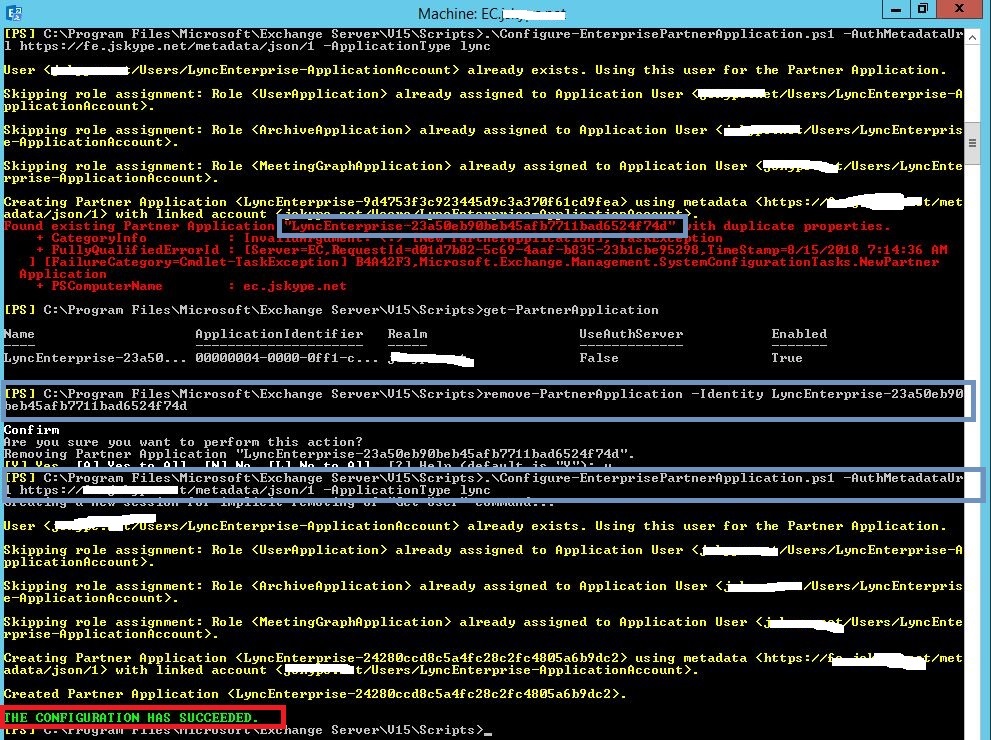
According to your description, you want to try to rebuild the integration between SFB Server and Exchange Server. As you have built the integration, when you run the following cmdlet: .\Configure-EnterprisePartnerApplication.ps1 -AuthMetaDataUrl ‘https://feFQDN/metadata/json/1′ -ApplicationType Lync", it will show errors like found existing partner application.
I tested in my test environment, you could follow the steps I did, then try to check whether this issue was resolved:
- In the Exchange Server, run cmdlet: get-PartnerApplication |fl, you could get the Partner Application’s identity:XXX
- Run cmdlet: remove-PartnerApplication -Identity XXX
- Restart the IIS in Exchange Server
- Run cmdlet: .\Configure-EnterprisePartnerApplication.ps1 -AuthMetaDataUrl ‘https://feFQDN/metadata/json/1′ -ApplicationType Lync"
You could find the process in the following picture:
Best Regard,
Evan
Wednesday, August 15, 2018 9:23 PM
Thanks again Evan for your continued support. I really appreciate it.
The problem is, I have already removed and recrated the partner application multiple times and I can re-create it without errors.
I always get the same as you, THE CONFIGURATION HAS SUCEEDED.
But I still get the error...
Thursday, August 16, 2018 7:20 AM
Hi Neal,
As you only renewed the certificates and all the steps of the integration you have checked. I suggest you could try to check the certificates you renewed this time, compare the expired certificate and the new certificate, check the SAN whether as same.
In addition, when you assign the new certificate to SFB server and Exchange server, I suggest you need to delete the expired one, then check whether this issue occur again.
Best Regard,
Evan
Monday, August 20, 2018 2:20 AM
Hi Neal,
Is there any update for this issue, if the reply is helpful to you, please try to mark it as an answer, it will help others who have the similar issue.
Best Regard,
Evan
Monday, August 27, 2018 9:26 AM
Hi Neal,
Is there any update for this issue, if the reply is helpful to you, please try to mark it as an answer, it will help others who have the similar issue.
Best Regard,
Evan
Tuesday, August 28, 2018 2:09 AM
I have all but given up. I have tried so many times and it just doesn't work.
I can make the partner application, no errors. The test just does not work and all I can see in the errors mention our proxy server and HTTP/1.1 407 Proxy Access Denied
That's the only error I see.
I just wish Microsoft would make a wizard to set this up. I'd even love a script that would strip it all away so I could start again.
Thanks for your help Evan but I can't mark as answered, there does not seem to be an answer.
Tuesday, August 28, 2018 3:11 AM
Hi,
on your Exchange Server, you can use the Get-SettingsOverride cmdlet, to check possible certificate issues.
Tuesday, August 28, 2018 8:19 PM
Here's the output...
[PS] C:\Windows\system32>Get-SettingOverride
RunspaceId : 20eb7586-897b-4ddc-8f1d-acc3d3c2fd86
ComponentName : OwaServer
SectionName : IMSettings
FlightName :
ModifiedBy : antnz.local/Christchurch/IT/CHCH Administrator
Reason : ConfigureIM
MinVersion :
MaxVersion :
FixVersion :
Server : {chchexch46}
IsFlight : False
Parameters : {IMServerName=chchlync.antnz.local, IMCertificateThumbprint=554EAD092D11DF9B7FAA12B36386A6F32BE092A4}
XmlRaw : <S CN="OwaServer" SN="IMSettings" MB="antnz.local/Christchurch/IT/CHCH Administrator" R="ConfigureIM"><Ss><S>chchexch46</S></Ss><
Ps><P>IMServerName=chchlync.antnz.local</P><P>IMCertificateThumbprint=554EAD092D11DF9B7FAA12B36386A6F32BE092A4</P></Ps></S>
AdminDisplayName :
ExchangeVersion : 0.1 (8.0.535.0)
Name : SfB-Exchange
DistinguishedName : CN=SfB-Exchange,CN=Setting Overrides,CN=Global Settings,CN=OurDomain NZ,CN=Microsoft
Exchange,CN=Services,CN=Configuration,DC=antnz,DC=local
Identity : SfB-Exchange
Guid : b95cdcbd-a492-4871-83df-6555b8ed73fd
ObjectCategory : antnz.local/Configuration/Schema/ms-Exch-Config-Settings
ObjectClass : {top, msExchConfigSettings}
WhenChanged : 23/08/2018 8:22:50 AM
WhenCreated : 23/08/2018 8:22:50 AM
WhenChangedUTC : 22/08/2018 8:22:50 PM
WhenCreatedUTC : 22/08/2018 8:22:50 PM
OrganizationId :
Id : SfB-Exchange
OriginatingServer : chchad2.antnz.local
IsValid : True
ObjectState : Unchanged
Thanks, Neal
Tuesday, August 28, 2018 11:33 PM
I've just started again, following the first part of this guide. http://lyncdude.com/2015/10/06/the-complete-skype-for-business-exchange-2016-integration-guide-part-i/index.html
Checked the cert on the Exchange server, checked the cert on the Skype server. Set up the partnership and it seems fine. But every time I get first test, Test-CsExStorageConnectivity -SipUri "[email protected]" -Verbose it fails.
ExCreateItem exchange operation failed, code=50043
#CTX#Could not get the required ExchangeServiceBinding client
2018/08/28 23:07:55.049 Autodiscover.EWSMA trace, type=AutodiscoverResponseHttpHeaders, message=<Trace Tag="AutodiscoverResponseHttpHeaders" Tid="48" Time="2018-08-28 23:07:55Z">
HTTP/1.1 407 Proxy Access Denied
Thanks, Neal
Thursday, August 30, 2018 7:42 AM
Hi Neal,
You could try to do the settings as the official document provided:
https://technet.microsoft.com/en-us/library/jj688055%28v=ocs.15%29.aspx
In addition, you could refer to the case do some reference:
https://social.technet.microsoft.com/Forums/lync/en-US/70e22e72-ef20-43c8-95fa-0cbabfc6ae4b/configuring-interoperability-with-exchange-access-denied?forum=lyncinterop
Best Regard,
Evan
Tuesday, November 13, 2018 2:00 AM
Well months have gone by and I had given up. But then a different problem came along with different servers. These three severs would not talk to each other (pushing out a vendor hotfix) and the vendor investigated. They found that the servers were trying to use our proxy when they shouldn't be.
I suddenly realized that this is what is happening here.
When I run the command **Test-CsExStorageConnectivity -SipUri "sip:[email protected]" -Verbose ** it comes back with this...
Test-CsExStorageConnectivity : ExCreateItem exchange operation failed, code=50043, reason=#CTX#{ctx:{...activityId:"..."}}#CTX#Could not get the required ExchangeServiceBinding client
2018/11/13 01:39:29.928 Autodiscover, send GetUserSettings request, [email protected], Autodiscover
Uri=https://autodiscover.antarcticanz.govt.nz/Autodiscover/Autodiscover.svc, Web Proxy=http://192.133.31.65:8080/
Proxy-Authenticate: Negotiate,NTLM,Basic realm="WebMarshal Proxy Server"
Server: WebMarshal Proxy
Via: 1.1 CHCHPROXY
HTTP/1.1 407 Proxy Access Denied
So why do our servers now use a proxy? Someone has implemented a WPAD file and published it. Now if only I can figure it out and turn it off, I'll get this fixed. I believe that the Skype\Exchange config is correct, but that it's the proxy...