Note
Access to this page requires authorization. You can try signing in or changing directories.
Access to this page requires authorization. You can try changing directories.
Question
Thursday, June 18, 2015 11:55 AM
Hello,
I want to set the Network Policy Server (RADIUS) in Windows Server 2012 to authorize the MAC for Unifi.
The problem is that the server prompts you for a user name and password when trying to connect.
The name should be the MAC address of the device, and the password is not. I changed a value in the registry.
What am I doing wrong?
Sorry for my bad language. I used Google Translator
All replies (6)
Thursday, June 18, 2015 12:07 PM ✅Answered
Hi
Could you check these articles about;
Enchange your 802.1x deployment security with MAC filtering
http://blogs.technet.com/b/nap/archive/2006/09/08/454705.aspx
MAC address Authorization
https://technet.microsoft.com/en-us/library/dd197535(v=ws.10)..aspx
Thursday, June 18, 2015 6:20 PM
Thanks for your answer.
1. In steps writes "Join the machine to the domain." Is it necessary? I do not have that option. Users (MAC addresses) will be charged to the group in AD, but the machines are not connected to the AD.
2. What type of authentication you choose?
4. Do I have to change back the value in the registry and instead use the account names mentioned values?
I am a novice administrator, so please bear with us.
Thursday, June 18, 2015 7:24 PM
Hi
1-it is for machine authentication,not must to join to domain.
2-Try to with EAP
3-you should edit "Calling-Station-ID" on users properties,dial-in tab,if you need to also edit registry can able to revert this settings.
Friday, June 19, 2015 8:04 AM
Hi Unnamed123,
Agree with Burak. He gave the right steps to follow.
Here are some references:
MAC Address Authorization:
https://technet.microsoft.com/en-us/library/dd197535%28WS.10%29.aspx?f=255&MSPPError=-2147217396
Network Policy and Access Services:
https://technet.microsoft.com/en-us/network/bb545879.aspx
Best Regards,
Leo
Please remember to mark the replies as answers if they help and unmark them if they provide no help. If you have feedback for TechNet Support, contact [email protected].
Saturday, June 20, 2015 7:36 PM
Hello and thank you again for your answers,
Leo,
In your first link in the first step writes to enable MAC authentication on the AP. My configuration is as follows:
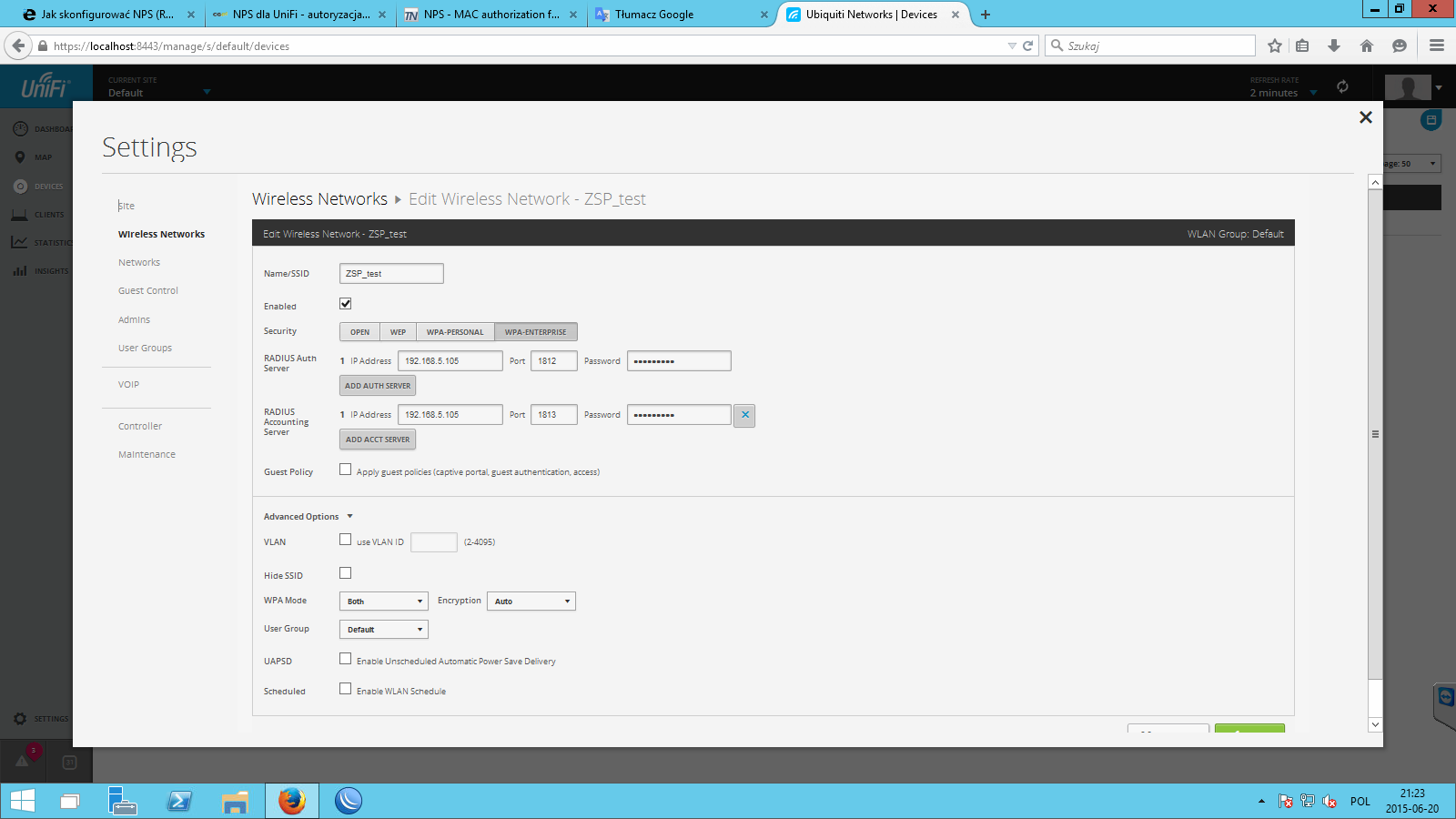
I suspect that the problem prompted for a user name and password is WPA2 for Unifi. I think that the message generates Unifi system before connecting to the NPS. What do you think?
Best Regards
Tuesday, June 23, 2015 1:15 AM
Hi Unnamed123,
About the AP, we could refer to the user guide or ask the technical support team for help.
The manufacturer is familiar with the product. They may know how to configure the AP to work with NPS.
Best Regards,
Leo
Please remember to mark the replies as answers if they help and unmark them if they provide no help. If you have feedback for TechNet Support, contact [email protected].