Note
Access to this page requires authorization. You can try signing in or changing directories.
Access to this page requires authorization. You can try changing directories.
Question
Tuesday, February 23, 2016 4:40 PM | 1 vote
Hello,
We develop a solution to generate a Hotspot from a laptop on windows. So we use hosted network technology to generate the wifi. Then we use our own DNS Server and Web Server to redirect users on the wifi to our web application.
On windows 7 and 8, we used a custom DNS Server listening on port 53 on the laptop generating the wifi and everything worked very well. Computers on our network used automatically our DNS (except the one which emits the wifi and that is cool).
On windows 10, computers on the network don't use any DNS Server. How to change this behavior to come back to a windows 7 or 8 behavior ?
Thanks
All replies (11)
Wednesday, February 24, 2016 3:20 PM ✅Answered | 1 vote
Ok, sorry might not be clear myself. On the clients that connect, set 192.168.173.1 as the DNS server.
Tuesday, February 23, 2016 5:28 PM | 1 vote
Windows 10 clients use DNS in the same way and use DNS servers. These can be changed on the properties of the network adapter and the IPv4 settings (the same as Windows 7 & Windows 8).
Do you mean Windows 10 does not have a DNS server? I am not aware of any DNS server built in to Windows 7 or 8 (there are 3rd party ones available).
So not sure I understand the exact issue, perhaps you can clarify.
Tuesday, February 23, 2016 7:08 PM | 1 vote
Thanks for the reply.
We use our own DNS server listening on port 53. It is not a microsoft-made DNS server.
On windows 7 or 8, we do not need to configure a special DNS. On the properties, even if we setup to dynamic DNS Server, virtual adapter uses our custom DNS server.
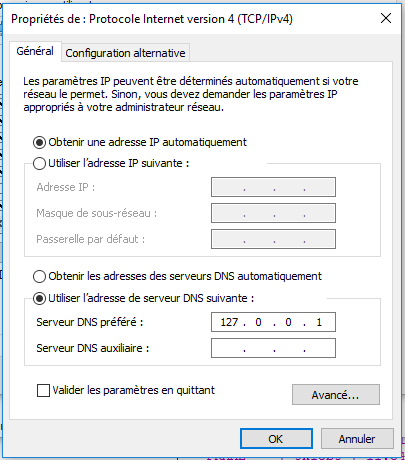
On windows 10, even when we setup a DNS in the virtual adapter properties, peers connected to the wifi doesn't detect the DNS Server (see the screenshot). We tried everything, force ip address and dns server, force different dns server address like 127.0.0.1 (DNS Server is started on the laptop which generates the wifi), the fixed ip address... Nothing works.
The behavior is really different between windows 8 and windows 10 and we would like to reproduce the same behavior as windows 8 or 7. Do you have an idea ?
Tuesday, February 23, 2016 7:53 PM | 1 vote
This would appear to me to be down to whatever produces the wifi network giving out the DNS server addresses with DHCP I would think.
What are you using \ how is the wifi on hotspot on Windows 10 created? What DNS server address does that give out to clients that connect?
Wednesday, February 24, 2016 10:32 AM | 1 vote
I use the technology hosted network of microsoft to generate the wifi : https://msdn.microsoft.com/en-us/library/windows/desktop/dd815243(v=vs.85).aspx
Wednesday, February 24, 2016 1:58 PM | 1 vote
Ok, sorry I do not a wifi adapter do any testing with so cannot help with at. Hopefully someone else can advise on Wireless Hosted Network and what DNS settings that gives to clients.
Check on a client connected to the Wireless Hosted Network, what DNS server is it listing?
Wednesday, February 24, 2016 2:35 PM | 1 vote
These are the dns server detected :
When windows 7 or 8 hosts the wifi, on a client connected to the Wireless Hosted Network:
- 127.0.0.1
- 127.0.0.2
- fec0:0:0:ffff::1
- 192.168.173.1 <- the ip address of the laptop generating the wifi and having the dns server
When windows 10 hosts the wifi, on a client connected to the Wireless Hosted Network:
- 127.0.0.1
- 127.0.0.2
- fec0:0:0:ffff::1
The computer generating the wifi and his dns server are not visible.
Wednesday, February 24, 2016 2:54 PM | 1 vote
Well not sure why the Windows 10 client is different, or why the Windows 7 \ 8 show 192.168.173.1.
As a work-around on Windows 10 if you set statically 192.168.173.1 as the DNS server does that work? (it does not need 127. addresses as they are loopback so the local machine)
Wednesday, February 24, 2016 3:16 PM | 1 vote
Ok I maybe not very clear. I have updated my previous post. The difference is when Windows 10 hosts the wifi not connect to the wifi.
And I tried to set statically the dns server address on the laptop hosting wifi but it doesn't change anything.
Wednesday, February 24, 2016 3:55 PM | 1 vote
Yes it works. Unfortunately I can't ask to everyone who connect its device to my hotspot to configure manually their interfaces.
Wednesday, July 27, 2016 7:59 PM
I have the same problem and no one can seem to figure this out. Microsoft really needs to make this consistent.