Note
Access to this page requires authorization. You can try signing in or changing directories.
Access to this page requires authorization. You can try changing directories.
Question
Sunday, July 5, 2020 8:38 PM
Hi all,
I have two Windows Server 2016 physical server.
On these servers there is installed Hyper-V with different virtual machines.
The problem is that sometimes, physical servers and virtual machines reboot automatically, and without control, for Windows Update.
I would like to point out that there is a virtual machine that manages the WSUS,
perhaps it can help solve the problem.
How can I solve this issue?
Best regards
Federico
All replies (12)
Monday, July 6, 2020 2:02 AM
Hi Federico,
Thanks for posting on this forum.
My understanding of this case is that the automatic restart time after the client installs the update is out of control, and you want to manage the client automatically restart time. Is it right?
As for the restart automatically after the installation of the updates, please refer to the following Group policy:
[Always automatically restart at the scheduled time]
(Location: Group Policy Management Editor\Policies\Administrative Templates\Windows Components\Windows Update)
If you have any updates about this issue, please keep us in touch.
Regards,
Rita
Please remember to mark as answers if they help.
If you have feedback for TechNet Subscriber Support, contact [email protected].
Monday, July 6, 2020 9:29 PM
Dear Rita,
thanks for your reply.
>> My understanding of this case is that the automatic restart time after the client installs the update is out >> of control, and you want to manage the client automatically restart time. Is it right?
I would install update on differents Windows Sever machines (physical and virtual), but I want avoid that them reboot automatically and without control.
I want decide that they reboot just when I press "Reboot" option from "Start Menu".
You suggestion is interesting too!
I hope to be clear.
Federico
Tuesday, July 7, 2020 8:49 AM
Hi Federico,
Thanks for your response.
In my opinion, there is no such policy to achieve this feature. Due to the Windows 10 system setup, the client can only choose to restart immediately and schedule a delayed restart. Client delayed restarts could refer to the following Group Policy. We may choose one of the both:
Turn off auto-restart for updates during active hours
(Location: Group Policy Management Editor\Policies\Administrative Templates\Windows Components\Windows Update)
No auto-restart with logged on users for scheduled automatic updates installations
(Location: Group Policy Management Editor\Policies\Administrative Templates\Windows Components\Windows Update)
Thanks for your time.
Regards,
Rita
Please remember to mark as answers if they help.
If you have feedback for TechNet Subscriber Support, contact [email protected].
Tuesday, July 7, 2020 10:27 PM
Thanks for your reply.
I want specify that I need to avoid reboot on Windows Server 2016 machines and not about client with Windows 10, at the moment it is not important.
It is very important avoid that Hyper-V physical servers (these servers has got Win Server 2016 OS) don't reboot without control, otherwhise all users will be impacted.
>> If you set AlwaysAutoRebootAtScheduledTime to 0 that means disable automatic reboot after update
>> installation at scheduled time.
I will create group policy with these settings.
Best regards
Federico
Thursday, July 9, 2020 1:31 AM
Hi Federico,
In my opinion, setting policies as above did help. Looking forward to your feedback.
Regards,
Rita
Please remember to mark as answers if they help.
If you have feedback for TechNet Subscriber Support, contact [email protected].
Thursday, July 9, 2020 7:56 AM
Hi all,
@Akshay MThanks for your suggestion.
 In addition, using Group Policy settings may be more convenient.

1.Press Windows Key+R to open the run prompt.

2.Type "gpedit.msc" and press enter.

3.In the "Local Group Policy Editor", navigate to Computer Configuration > Administrative Templates > Windows Components > Windows Update.

4.Enable the "Configure Automatic Updates" policy and set it to "2".

5.Enable the "No auto-restart with logged on users for scheduled automatic updates installations" policy
At the moment I have a domain policy for Servers that use WSUS.
In this policy "Configure Automatic Updates" policy is setted to "3". I can set it to "2".
After that inside the same domain policy, "No auto-restart with logged on users for scheduled automatic updates installations" is already enabled.
At the moment with this configuration Hyper-V restarted sometimes without control.
I have attached photoes about my GPO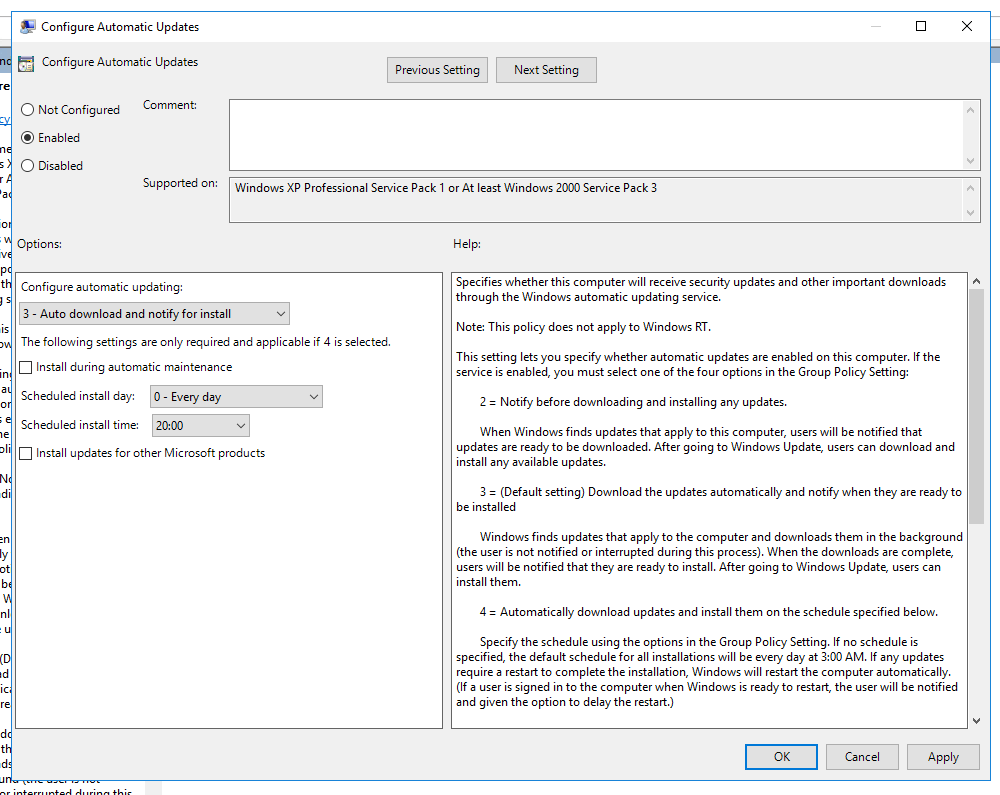
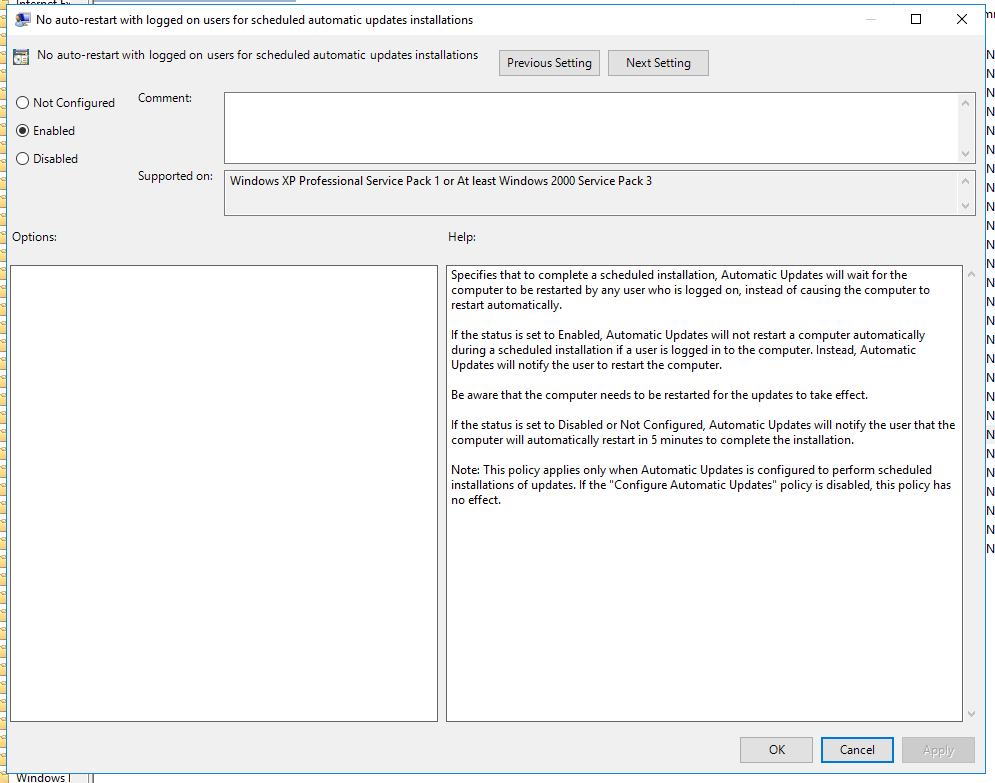
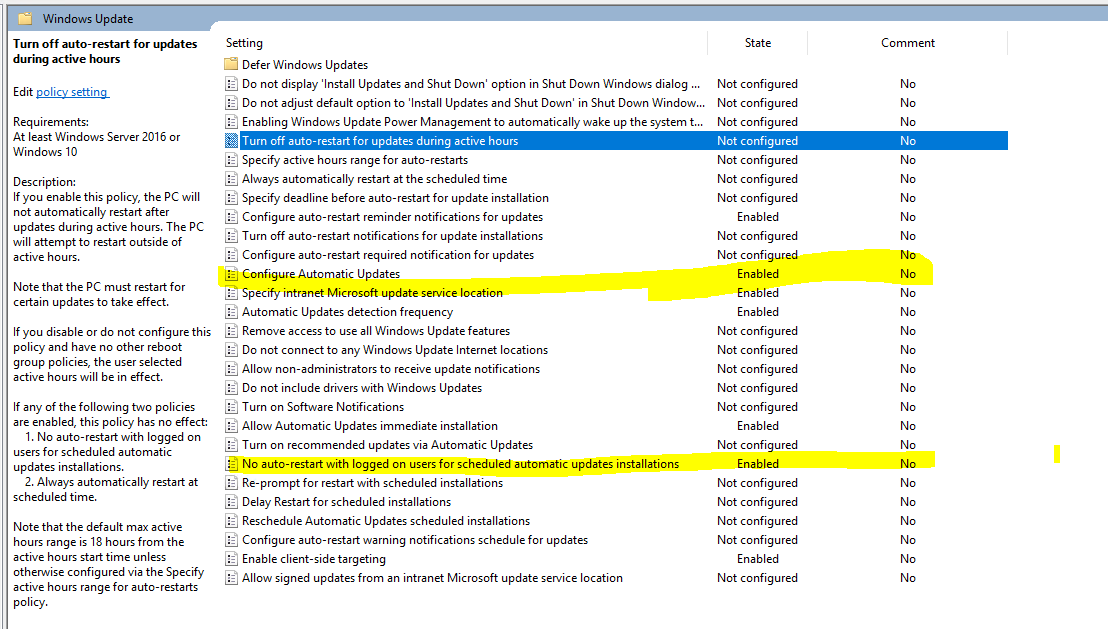
Do you suggesto to add AlwaysAutoRebootAtScheduledTime inside my policy?
Thanks for your help
Federico
Thursday, July 9, 2020 8:31 AM
Hi Federico,
Due to your needs, it is recommended to consider applying the following two Group Policies:
[Configure Automatic Updates]- 4 -Automatic download and schedule the install. We can install updates and restart the computer in a free time.
Location: Computer Configuration\Administrative Templates\Windows Components\Windows update
[Always automatically restart at the scheduled time]
Location: Computer Configuration\Administrative Templates\Windows Components\Windows update
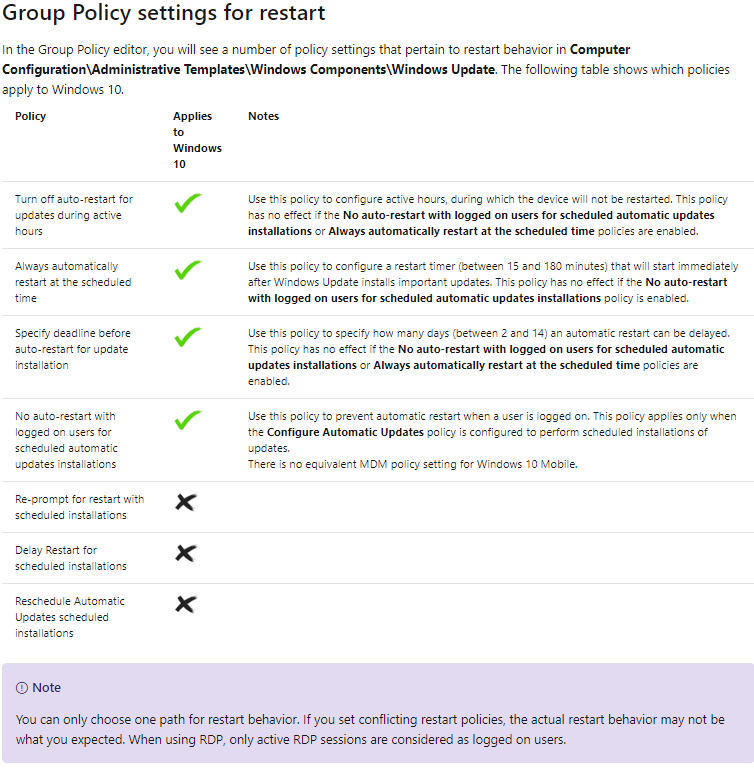
In addition, in Windows 10 only one Group Policy may be used for computer startup after client update installation.
Reference picture:
Regards,
Rita
Please remember to mark as answers if they help.
If you have feedback for TechNet Subscriber Support, contact [email protected].
Thursday, July 9, 2020 8:49 PM
Dear Rita,
thanks for your reply.
I need to apply this Windows Update rules to Windows Server 2016 machines, not to windows 10.
I have different GPO for them and it is fine at the moment.
I need to avoid reboot on Windows Server 2016, because two times reboot happened without control.
Do you suggest me to use these settings for Server too?
Thanks for your help!
Federico
Friday, July 10, 2020 6:27 AM
Hi Federico,
Thanks for your time.
Manual restarts are difficult to implement with Group Policy settings. Delayed restarts through Group Policy are some of the ways mentioned above. Windows server 2016 and Windows 10 clients don't seem to me to be fundamentally different.
In addition, the policy - [No auto-restart with logged on users for scheduled automatic updates installations] prevent automatic restart when a user is logged on. But if no one on the client is logged on, the restart triggers after updates installation.
Regards,
Rita
Please remember to mark as answers if they help.
If you have feedback for TechNet Subscriber Support, contact [email protected].
Sunday, July 19, 2020 6:54 PM
Hi Rita,
thanks for your reply
Thanks for all suggestions
Federico
Monday, July 20, 2020 6:30 AM
Hi Federico,
If there is anything else we can do for you, please feel free to post in the forum.
If the issue is resolved, share your solution or find the helpful response "Mark as Answer" to help other community members find the answer.
Thanks for your time. Have a nice day.
Best Regards,
Rita
"WSUS" forum will be migrating to a new home on Microsoft Q&A!
We invite you to post new questions in the "WSUS" forum's new home on Microsoft Q&A!
For more information, please refer to the sticky post.
Please remember to mark as answers if they help.
If you have feedback for TechNet Subscriber Support, contact [email protected].
Thursday, July 23, 2020 3:21 AM
Hi Federico,
I am honored to assist you in solving the problem!
If my answer is helpful to you, please consider marking the corresponding answer as ending the current thread.
If you still have questions, please keep in touch.
Regards,
Rita
"WSUS" forum will be migrating to a new home on Microsoft Q&A!
We invite you to post new questions in the "WSUS" forum's new home on Microsoft Q&A!
For more information, please refer to the sticky post.
Please remember to mark as answers if they help.
If you have feedback for TechNet Subscriber Support, contact [email protected].