Note
Access to this page requires authorization. You can try signing in or changing directories.
Access to this page requires authorization. You can try changing directories.
Question
Monday, June 24, 2019 8:07 AM
Hi all,
For test purpose, I need to put some data into System reserved partition for UEFI/GPT disk. Below is what I see in diskpart:
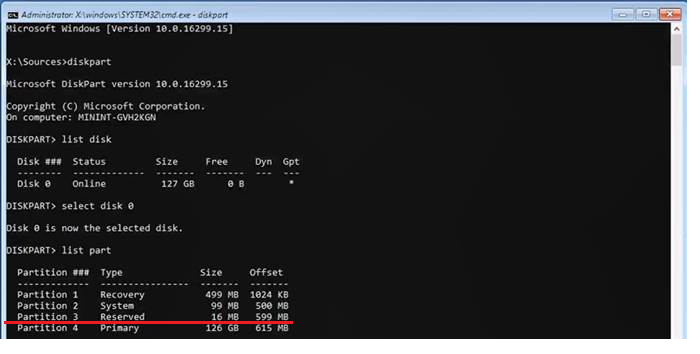
In above pic, the underlined partition 3 is the system reserved partition that I would like to handle.
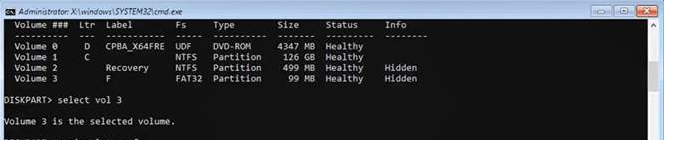
The above pic is the output of "list vol". Sorry the command "list vol" is truncated.
We see correspondences like partition 1 <> Volume 2, partition 2 <> Volume 3, partition 4 <> Volume 1.
And, we can assign a driver letter to the volume 3. But, the system reserved partition is not listed by "list vol" as listed in the 2nd pic.
So, my question is how I could assign a letter to System reserved partition.
Thanks,
Jie
All replies (11)
Monday, June 24, 2019 12:04 PM
Hello,
You can directly run list volume command after opening DISKPART. It should list System Reserved Partition and you can then assign the drive letter (see screenshot below).
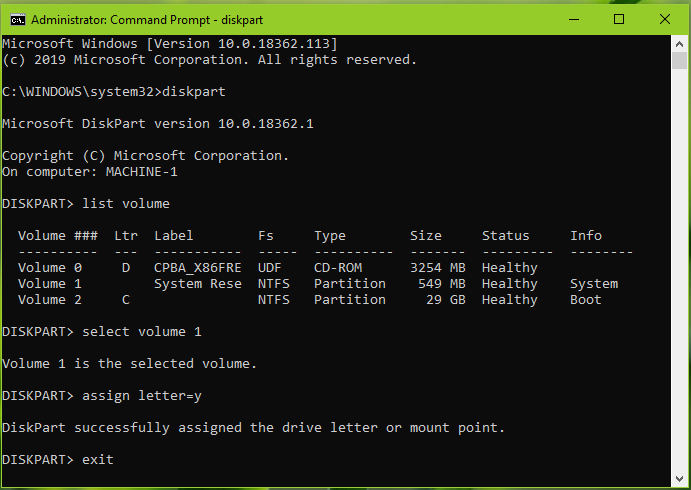
Hope this helps!
Microsoft MVP (Windows and Devices for IT)
Windows Insider MVP
Windows Help & Support [www.kapilarya.com]
Monday, June 24, 2019 6:32 PM
Hello,
I don't think you can store any data on the Reserved partition. What you have underlined in the MSR ( Microsoft Reserved Partition) which is reserved space for future use by disk utilities.
Could the data be stored on the System partition?
UEFI/GPT-based hard drive partitions
Microsoft reserved partition (MSR)
Beginning in Windows 10, the size of the MSR is 16 MB.
Add an MSR to each GPT drive to help with partition management. The MSR is a reserved partition that does not receive a partition ID. It cannot store user data.
What is a Microsoft Reserved Partition (MSR)?
The Microsoft Reserved Partition (MSR) reserves space on each disk drive for subsequent use by operating system software. GPT disks do not allow hidden sectors. Software components that formerly used hidden sectors now allocate portions of the MSR for component-specific partitions. For example, converting a basic disk to a dynamic disk causes the MSR on that disk to be reduced in size and a newly created partition holds the dynamic disk database.
Thanks, Darrell Gorter [MSFT] This posting is provided "AS IS" with no warranties, and confers no rights.
Wednesday, June 26, 2019 2:59 AM
Hi,
Thank you for posting in Microsoft TechNet Forum.
Based on your description, please refer to the following link which may help:
Best regards,
Hurry
Please remember to mark the reply as an answer if they help.
If you have feedback for TechNet Subscriber Support, contact [email protected]
Wednesday, June 26, 2019 6:27 AM
Hello Hurry,
That thread refers to a MBR disk rather than a GPT disk.
You can assign drive letters to the System partition on a GPT disk, but the picture shown has the underline of the Reserved disk which cannot have a drive letter assigned to it.
Thanks, Darrell Gorter [MSFT] This posting is provided "AS IS" with no warranties, and confers no rights.
Wednesday, June 26, 2019 4:36 PM
That partition appears to be the MSR. I would not attempt to do anything with this partition on an active system, only a test deployment.
Friday, June 28, 2019 9:15 AM
Hi Darrell,
Thanks for reply. Yes, I know. But this is for test purpose. I have a upgrade failure case from an older Win10 to higher Win10, and I suspect the root cause is some anti-virus process puts some data to reserved partition and make it full. Now I need to reproduce and expand to other scenarioes.
Friday, June 28, 2019 9:16 AM
Thank you. But it doesn't help.
Friday, June 28, 2019 9:17 AM
yes, it is only for test purpose. If you know how to put data into MSR and make it full. Kindly please advice.
Friday, June 28, 2019 8:46 PM
In a deployment scenario, you only create the MSR, nothing is done besides that. So from the beginning, it is a partition that has no file system on it. I never really looked to see if Windows does something with that partition after the fact. You can try formatting it to say... FAT or FAT32, then you can assign a drive letter and put files onto it. However, this may cause the OS to not be able to boot again, so make sure to do it in a VM or a cloned disk.
Friday, June 28, 2019 9:36 PM
yes, it is only for test purpose. If you know how to put data into MSR and make it full. Kindly please advice.
Hi superwizard,
have you heard about partition wizard, follow the link: https://www.partitionwizard.com/partitionmagic/windows10-couldn't-update-system-reserved-partition.html
Saturday, June 29, 2019 12:50 PM
Hi,
Thank you for your feedback.
Maybe you can't put data into MSR and make it full.
Best regards,
Hurry
Please remember to mark the reply as an answer if they help.
If you have feedback for TechNet Subscriber Support, contact [email protected]