Note
Access to this page requires authorization. You can try signing in or changing directories.
Access to this page requires authorization. You can try changing directories.
Question
Monday, April 27, 2020 4:37 PM
Hi everyone
I kindly ask for help about the following problem:
I have a virtual machine on the cloud, which has install windows server 2012, on this machine I have 5 users that connect via RDP. But only one account is able to connect right now.
Everytime another user tries to log on the machine the message "User profile cannot be loaded". Even if it's a new and fresh user
I've already tried the following fixes:
-deleting user on registry.
-modifying security policies on default folder
-applying the following option: “Replace all child permission entries with inheritable permission entries from this object.”
-run and automate the “User Profile Service” on the Services Manager
-Modifying registry entry for the user, changing to 0 state
-Deleting user key on registry
-Deleting user folder on C:/Users
but nothing work
also there are some limitations because of the need to have the server active:
-cannot shutdown/restart (if I have to I’m going to ask with 4-6 hours of anticipation)
-Is a virtual machine which can only be accessed via RDP
Thanks in advance
All replies (4)
Tuesday, April 28, 2020 8:16 AM
HI
1“But only one account is able to connect right now.”
did all 5 users logon rdsh server w2012 successfully before ?
2.did you install "remote desktop session host" role on this issue w2012 ?
3.is issue w2012 added in AD domain?
4.did you check if the dfault user profile located at c:\users\default is either missing or corrupt ?
5.did you configure roaming profile for issue w2012 ?
Computer Configuration\Administrative Templates\System\User profiles\
Do not log users on with temporary profiles
If the above policy is configured and the user profile service is unable to synchronous the roaming profile, then the user login will fail.
6.if the problem persist ,when the issue user remote logon the w2012 ,will there be any log about this issue ?
we can try to refer below document to collect the log and analyze the log.
https://www.thewindowsclub.com/user-profile-service-event-ids
Best Regards
Andy YOU
Please remember to mark the replies as answers if they help.
If you have feedback for TechNet Subscriber Support, contact [email protected].
Tuesday, April 28, 2020 4:03 PM
HI Andy
Thanks for th quick answer
Now doing the troubleshooting I can tell you the following information
1-Yes...all of them were able to connect, what cause this problem is unknown
2.-Yes Remote Session host is installed
3.- Yes this is added to AD 4.- I can tell that the default folder is there…and I can access without a problem
5.-it’s active the user roaming profile
6.- Windows event viewer shows an error with ID 1500 every time I try to access with the affected accounts According with the documentation that you sent we can tell is about temporary user profile So I kindly ask you to share me the best way to fix my problem Thanks again
Thursday, April 30, 2020 9:23 AM | 1 vote
HI
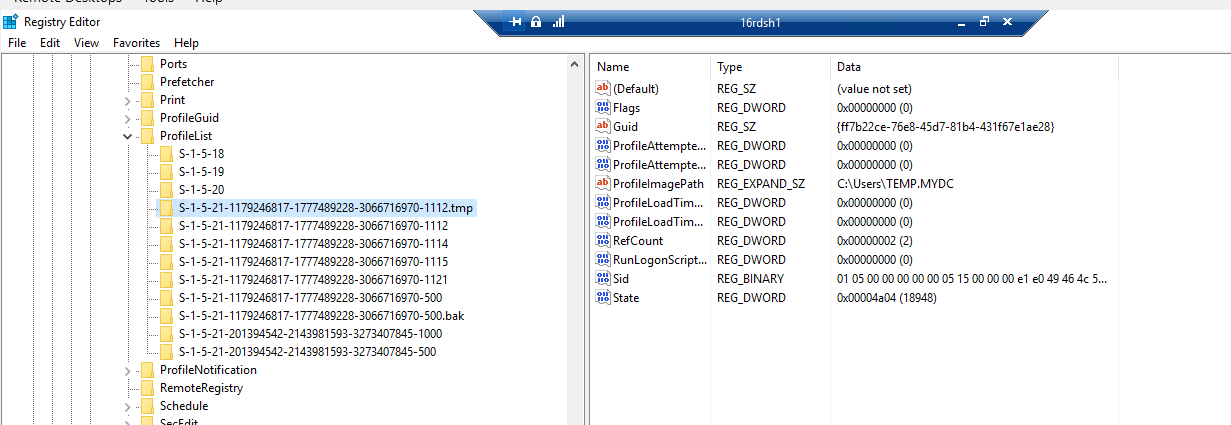
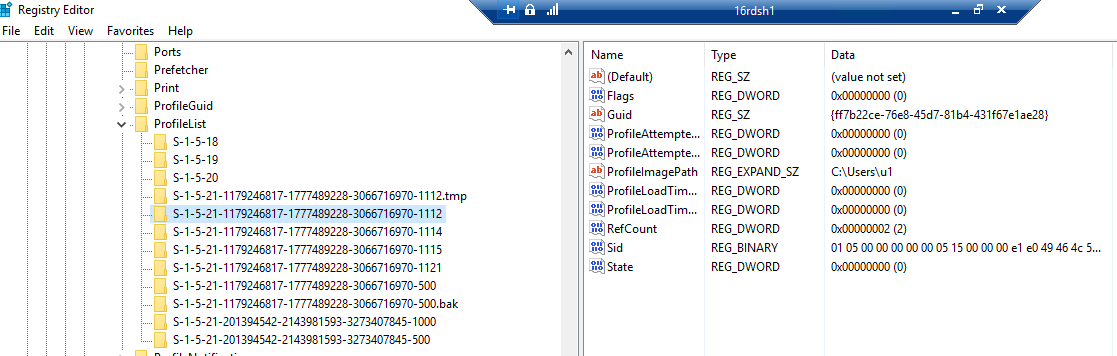
7.we need to log off the issue user session first and don't allow him to logon again . then refer below document to rename the sid of temp profile as .tmp in below registry location on RDSH server .Meanwhile rename the .bak profile without extension. reboot the RDSH server(for my test I haven' restart rdsh) and allow this issue user to logon again ,finally we can check if it solve this user issue.
if it can solve ,we can go head to fix other users' temp profile issue.
Computer \HKEY_LOCAL_MACHINE\ SOFTWARE\ Microsoft\ Windows NT\ CurrentVersion\ ProfileList
If there is a temporary profile condition ,we can refer below document to solve it.
https://blogs.technet.microsoft.com/deployment_field_notes/2011/11/03/a-corrupted-or-missing-profile-problem/
How to fix Temporary Profile in Microsoft Windows and Microsoft Server
https://www.itsmdaily.com/easy-how-to-fix-temporary-profile-in-microsoft-windows-and-microsoft-server/
Best Regards
Andy YOU
Please remember to mark the replies as answers if they help.
If you have feedback for TechNet Subscriber Support, contact [email protected].
Sunday, May 3, 2020 2:34 PM
HI
Is there any progress on your question?
Best Regards
Andy YOU
Please remember to mark the replies as answers if they help.
If you have feedback for TechNet Subscriber Support, contact [email protected].