Note
Access to this page requires authorization. You can try signing in or changing directories.
Access to this page requires authorization. You can try changing directories.
Question
Monday, August 29, 2016 8:04 PM
Hello,
I know we can download a file from a website using the script task. But the issue I'm facing is quite different. We have a cloud box from where we need to download a file. If i click on the URL, it will go to a page which has a 'Continue' button in it. If I click on the continue button it will take me to the folder where the file resides. This happen even if I give complete path to reach the file destination.
When I tried it from SSIS package by providing my authentication details, It goes to the home page (where the continue button is) and save the content of that page in my destination location. Is there any way to go through the home page and reach out my destination folder location?
Any clue for this will help me a lot.
Thanks.
All replies (9)
Tuesday, August 30, 2016 2:02 PM ✅Answered
Most likely the site is detecting you aren't authenticated and redirects you to the base page. You'll need to go to the base page and execute the authentication logic. This generally involves sending a request to a specific URL (F12 tools in the browser are useful here). Once authenticated you'll generally get back some sort of token or cookie that you'll then need to include in all subsequent requests. The server is most likely looking for the token/cookie to know you are authenticated. Unfortunately how it works is dependent upon the site implementation so you're going to need to monitor and understand how the site communicates with the browser and what data it is passing back and forth.
Michael Taylor
http://www.michaeltaylorp3.net
Monday, August 29, 2016 8:47 PM
Hi Kavin,
It looks like you need some automation added e.g. find the continue button and initiate the click if it exists, this task is better suited for JavaScript therefore not SSIS forum, or at lest C# programmers.
Please let me know if I shall move your post accordingly.
Arthur
MyBlog
Monday, August 29, 2016 9:09 PM
Thanks for the response Arthur.
I'm new to this forum, so if you move it to C# programmers it will help me.
Thanks.
Tuesday, August 30, 2016 1:00 AM
The first big problem might be the Terms of Service. If they do not allow automation of this kind, doing so would be illegal. It is a very common problem people that try to automate foreign Webpages face.
You can in theory do web-scraping with WebRequest and a HTML parser like the HTML Agility Pack. But that does not help you if that Button is not defined as a basic URL.
Ideally you should be looking if that service provides any WebAPI for these kinds of tasks. Using Service calls would be faster and be gauranteed to be allowed - preferable to WebScraping in 100% of the cases.
If they do not offer that, consdier just switching to a cloud service that does. While automated/unattended access might not have been a original requirement, it is one now.
Remember to mark helpfull answers as helpfull and close threads by marking answers.
Tuesday, August 30, 2016 7:25 AM
Hi Kavin Kannan,
Thank you for posting here.
>> Is there any way to go through the home page and reach out my destination folder location?
For your question, could you provided more details? what is your continue button? Is it defined by yourself or in SSIS home page?
If you want to download file from a website using SSIS, here are two options.
1.Script Task with WebClient
Create a SSIS string variable named DownloadURL and fill it with a correct value. Add a Script Task to your Control Flow and give it a suitable name. Connect it to your Data Flow Task. Add the DownloadURL variable as ReadOnly to the Script Task.
using System;
using System.Data;
using Microsoft.SqlServer.Dts.Runtime;
using System.Windows.Forms;
using System.Net;           // Added

namespace ST_929b5207bd37455a882c35e500ab2950.csproj
{
    [System.AddIn.AddIn("ScriptMain", Version = "1.0", Publisher = "", Description = "")]
    public partial class ScriptMain : Microsoft.SqlServer.Dts.Tasks.ScriptTask.VSTARTScriptObjectModelBase
    {

        #region VSTA generated code
        enum ScriptResults
        {
            Success = Microsoft.SqlServer.Dts.Runtime.DTSExecResult.Success,
            Failure = Microsoft.SqlServer.Dts.Runtime.DTSExecResult.Failure
        };
        #endregion

        public void Main()
        {
            try
            {
                // Logging start of download
                bool fireAgain = true;
                Dts.Events.FireInformation(0, "Download File", "Start downloading " + Dts.Variables["DownloadURL"].Value.ToString(), string.Empty, 0, ref fireAgain);

                // Create a webclient to download a file
                WebClient mySSISWebClient = new WebClient();

                // Download file and use the Flat File Connectionstring (D:\SourceFiles\Products.csv)
                // to save the file (and replace the existing file)
                mySSISWebClient.DownloadFile(Dts.Variables["DownloadURL"].Value.ToString(), Dts.Connections["myProductFile"].ConnectionString);

                // Logging end of download
                Dts.Events.FireInformation(0, "Download File", "Finished downloading " + Dts.Connections["myProductFile"].ConnectionString, string.Empty, 0, ref fireAgain);

                // Quit Script Task succesful
                Dts.TaskResult = (int)ScriptResults.Success;
            }
            catch (Exception ex)
            {
                // Logging why download failed
                Dts.Events.FireError(0, "Download File", "Download failed: " + ex.Message, string.Empty, 0);

                // Quit Script Task unsuccesful
                Dts.TaskResult = (int)ScriptResults.Failure;
            }
        }
    }
}
2.Script Task with HTTP Connection Manager
You don't need the URL variable for this solution. Instead add a new connection of the type HTTP. Add the download URL in the Server URL box and optional set all Credentials and Proxy settings if you need them for your internet connection. I'm directly connected to the internet so I don't have to change any of the settings here. Add a Script Task to your Control Flow and give it a suitable name. Connect it to your Data Flow Task.
using System;
using System.Data;
using Microsoft.SqlServer.Dts.Runtime;
using System.Windows.Forms;

namespace ST_6799d08685cb4ad78633d035fab12178.csproj
{
    [System.AddIn.AddIn("ScriptMain", Version = "1.0", Publisher = "", Description = "")]
    public partial class ScriptMain : Microsoft.SqlServer.Dts.Tasks.ScriptTask.VSTARTScriptObjectModelBase
    {

        #region VSTA generated code
        enum ScriptResults
        {
            Success = Microsoft.SqlServer.Dts.Runtime.DTSExecResult.Success,
            Failure = Microsoft.SqlServer.Dts.Runtime.DTSExecResult.Failure
        };
        #endregion

        public void Main()
        {
            try
            {
                // Logging start of download
                bool fireAgain = true;
                Dts.Events.FireInformation(0, "Download File", "Start downloading " + Dts.Connections["HTTP Connection Manager"].ConnectionString, string.Empty, 0, ref fireAgain);

                // Get your newly added HTTP Connection Manager
                Object mySSISConnection = Dts.Connections["HTTP Connection Manager"].AcquireConnection(null);

                // Create a new connection
                HttpClientConnection myConnection = new HttpClientConnection(mySSISConnection);

                // Download file and use the Flat File Connectionstring (D:\SourceFiles\Products.csv)
                // to save the file (and replace the existing file)
                myConnection.DownloadFile(Dts.Connections["myProductFile"].ConnectionString, true);

                // Logging end of download
                Dts.Events.FireInformation(0, "Download File", "Finished downloading " + Dts.Connections["myProductFile"].ConnectionString, string.Empty, 0, ref fireAgain);

                // Quit Script Task succesful
                Dts.TaskResult = (int)ScriptResults.Success;
            }
            catch (Exception ex)
            {
                // Logging why download failed
                Dts.Events.FireError(0, "Download File", "Download failed: " + ex.Message, string.Empty, 0);

                // Quit Script Task unsuccesful
                Dts.TaskResult = (int)ScriptResults.Failure;
            }
        }
    }
}
For more details, please refer to the link.
I hope this would be helpful to you.
If you have something else, please feel free to contact us.
Best Regards,
Wendy
We are trying to better understand customer views on social support experience, so your participation in this interview project would be greatly appreciated if you have time. Thanks for helping make community forums a great place. Click HERE to participate the survey.
Tuesday, August 30, 2016 12:18 PM
The webpage which I'm referring is one of the cloud box own by my company. So it is not a foreign webpage, which made me thought it is do-able.
Tuesday, August 30, 2016 12:21 PM
Thanks for your reply. I have code something similar to this but my problem is the URL mentioned in 'HTTP COnnection manager' doesn't take me to the desired folder directly. It takes me to a base page where I need to click on a button to reach my destination location. This happens when I do manually as well as through my automation process.
I want to understand whether we have any automated method to handle any of these scenario.
Thursday, August 23, 2018 8:09 PM
Hi Wendy,
Below code is working for me for a url with no username and password required.
mySSISWebClient.DownloadFile(Dts.Variables["DownloadURL"].Value.ToString(), Dts.Connections["myProductFile"].ConnectionString);
Can you help me on how to pass the username and passoword also pls.
FYI..
My Full code:
public void Main()
{
// TODO: Add your code here
bool fireAgain = true;
Dts.Events.FireInformation(0, "Download File", "Start downloading " + Dts.Variables["DownloadURL"].Value.ToString(), string.Empty, 0,ref fireAgain);
// Create a webclient to download a file
WebClient mySSISWebClient = new WebClient();
//Download file and use the Flat File Connectionstring
// to save the file (and replace the existing file)
mySSISWebClient.DownloadFile(Dts.Variables["DownloadURL"].Value.ToString(), Dts.Connections["myProductFile"].ConnectionString);
// Logging end of download
Dts.Events.FireInformation(0, "Download File", "Finished downloading " + Dts.Connections["myProductFile"].ConnectionString, string.Empty, 0, ref fireAgain);
// Quit Script Task succesful
Dts.TaskResult = (int)ScriptResults.Success;
//Dts.TaskResult = (int)ScriptResults.Success;
mySSISWebClient.DownloadFile
}
Friday, September 20, 2019 12:11 AM
Thank you Wendy for the various options. I get error message after following your script as is. I am able to download if I access the https url and provide userId, password. Here is the error details:
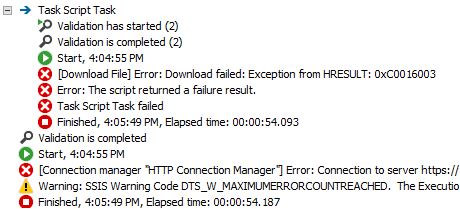
Any advise?